Pass Payment Processing Fees to the Client
As part of our latest ARI software update, we’ve introduced a highly requested option that gives shops more control over online payment costs: the ability to pass payment processing fees to the client. As more customers choose to pay invoices online, processing fees can quietly eat into margins. This new setting helps protect your revenue while keeping the checkout experience transparent and easy to understand. The feature is OFF by default, so nothing changes unless you decide to enable it.
How the feature works
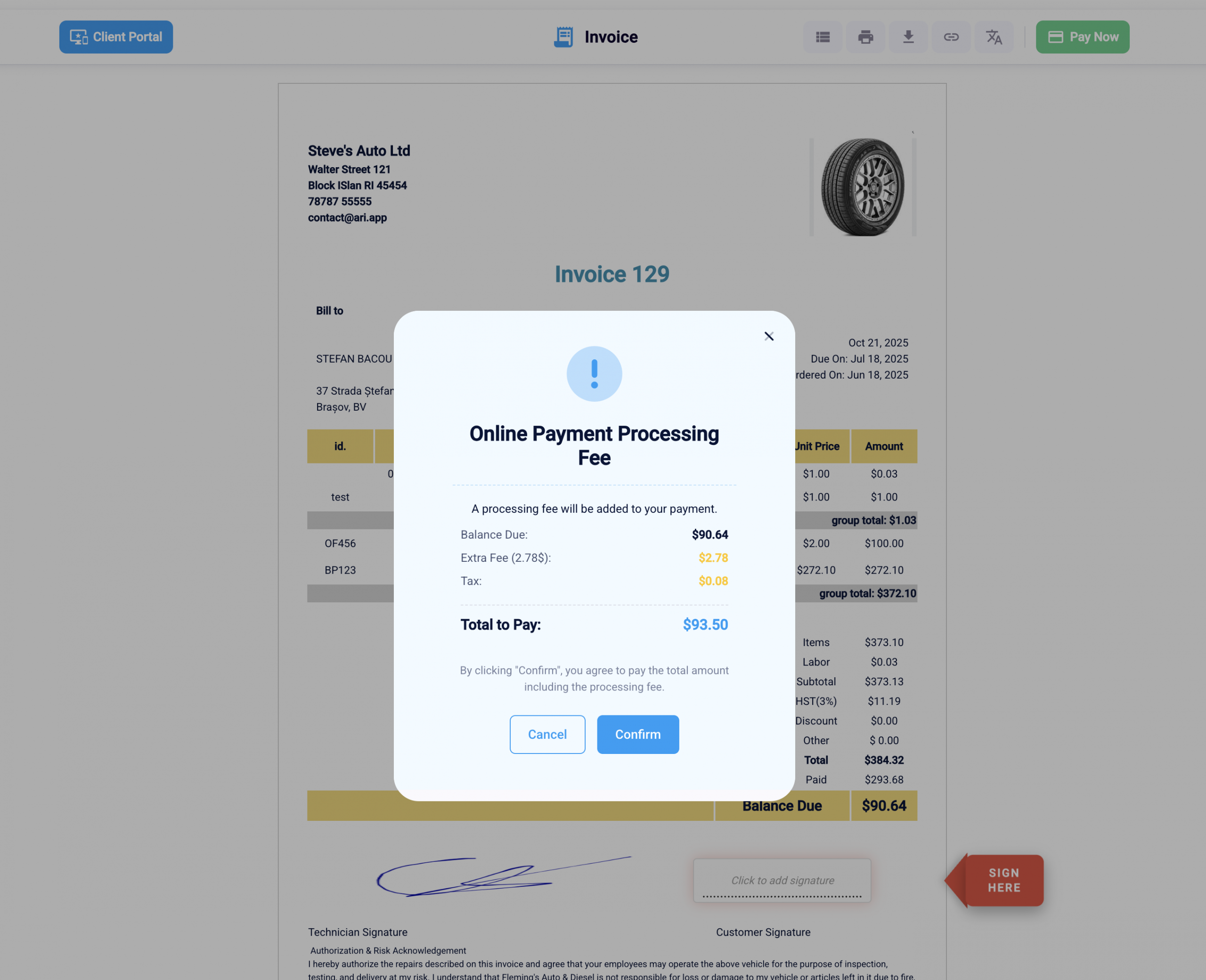
When the “Pass Fee to Client” option is turned on, ARI (Auto Repair Software) adds a clear disclosure step during online invoice payment. Customers see this disclosure before completing the payment, so they understand that a processing fee will be applied. This approach follows common best practices for payment transparency—showing relevant details at the right moment without overwhelming the user.
The fee is only presented when a client attempts to pay an invoice online. There are no changes to in-person payments or invoices that are not paid through the online payment flow.
How to enable the feature
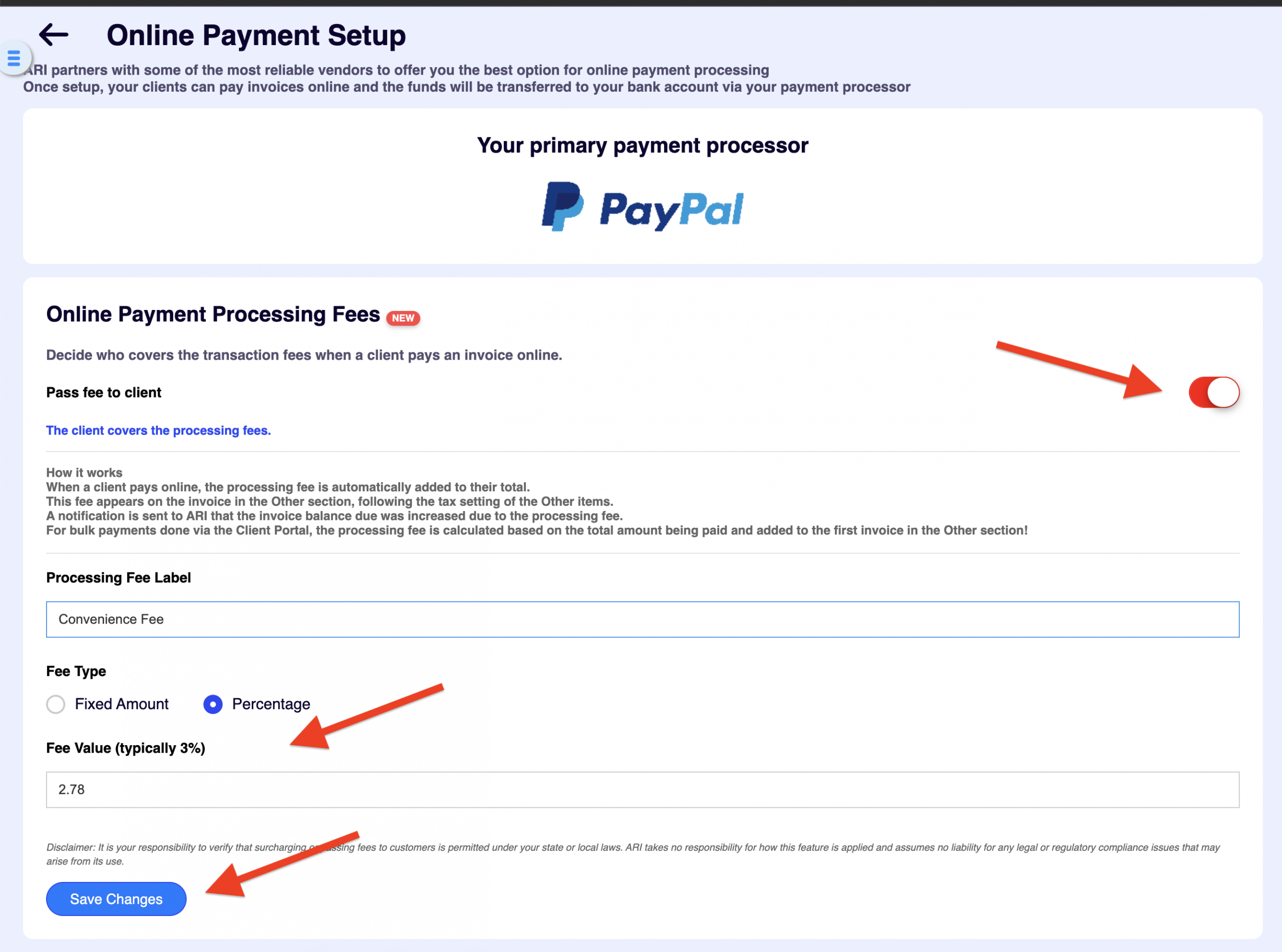
Because this setting directly affects your customers’ checkout experience, it’s intentionally disabled by default. To turn it on:
Go to Settings → Online Payments Setup
Make sure a payment processor is connected to ARI
Toggle “Pass Fee to Client” to ON
Once enabled, your clients will see a disclosure pop-up when paying invoices online, clearly explaining the added processing fee before payment is finalized. This keeps expectations clear and helps prevent confusion or disputes.
Track your savings
We made a table and an interactive calculator with an estimation of the savings you get after turning this setting on.
Estimated processing-fee savings (annual)
Assumptions used: $1,060,000 annual shop revenue, and a typical online payment processing fee range of 2%–3%.
Savings = Revenue × % of invoices paid online × fee rate.
| Online-paid share of invoices | Online-paid revenue | Savings @ 2% | Savings @ 3% |
|---|---|---|---|
| 5% | $53,000 | $1,060 | $1,590 |
| 10% | $106,000 | $2,120 | $3,180 |
| 20% | $212,000 | $4,240 | $6,360 |
| 35%+ | $371,000+ | $7,420+ | $11,130+ |
Processing fee savings calculator
Enter your numbers, then click Calculate savings.
Online-paid revenue (annual)
—
Savings at 2%
—
Savings at 3%
—
Savings at 2.5%
—
Savings at your custom rate
—
Monthly savings (custom rate)
—
Note: This models percentage fees only (many processors also add a small fixed fee per transaction).
Conclusion
This update gives your auto repair business more flexibility in how you handle online payment costs—without compromising transparency. If online payments are a regular part of your workflow, passing processing fees to the client can help keep margins consistent as transaction volume grows. Since this feature is part of the latest ARI (Auto Repair Software) update, it’s worth reviewing your payment settings to decide whether enabling it makes sense for your shop. As always, the choice stays fully in your hands.
Happy Holidays, and best of luck in the new year.
Team ARI