

Accurately estimating repair times and pricing can be a constant challenge for mechanics and auto repair shops. Here’s where our Free AI Labor Guides come in handy. ARI (Auto Repair Software) provides complete access to standardized and organized auto repair labor guides information. You can pull accurate labor data and get help from an AI assistant that answers your questions throughout the repair process.
With our AI Labor Guides, you can:
This means enhanced customer transparency, streamlined billing for your business, and a stronger reputation for your auto repair shop.
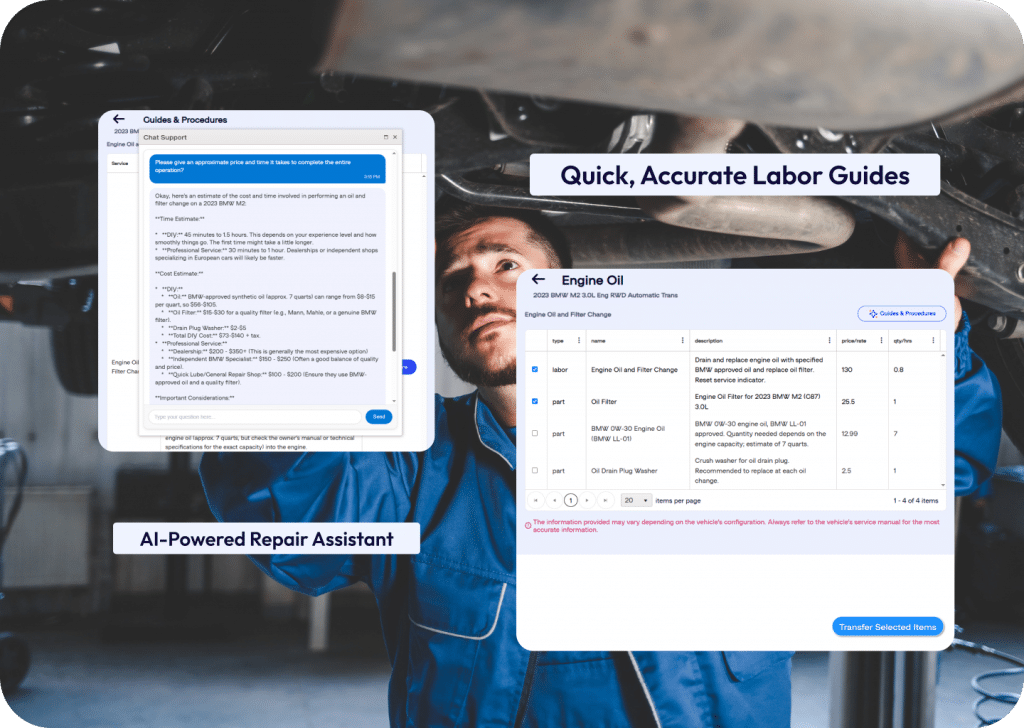
On this page, we will break down how to use ARI’s AI Labor guides and Repair Assistant.
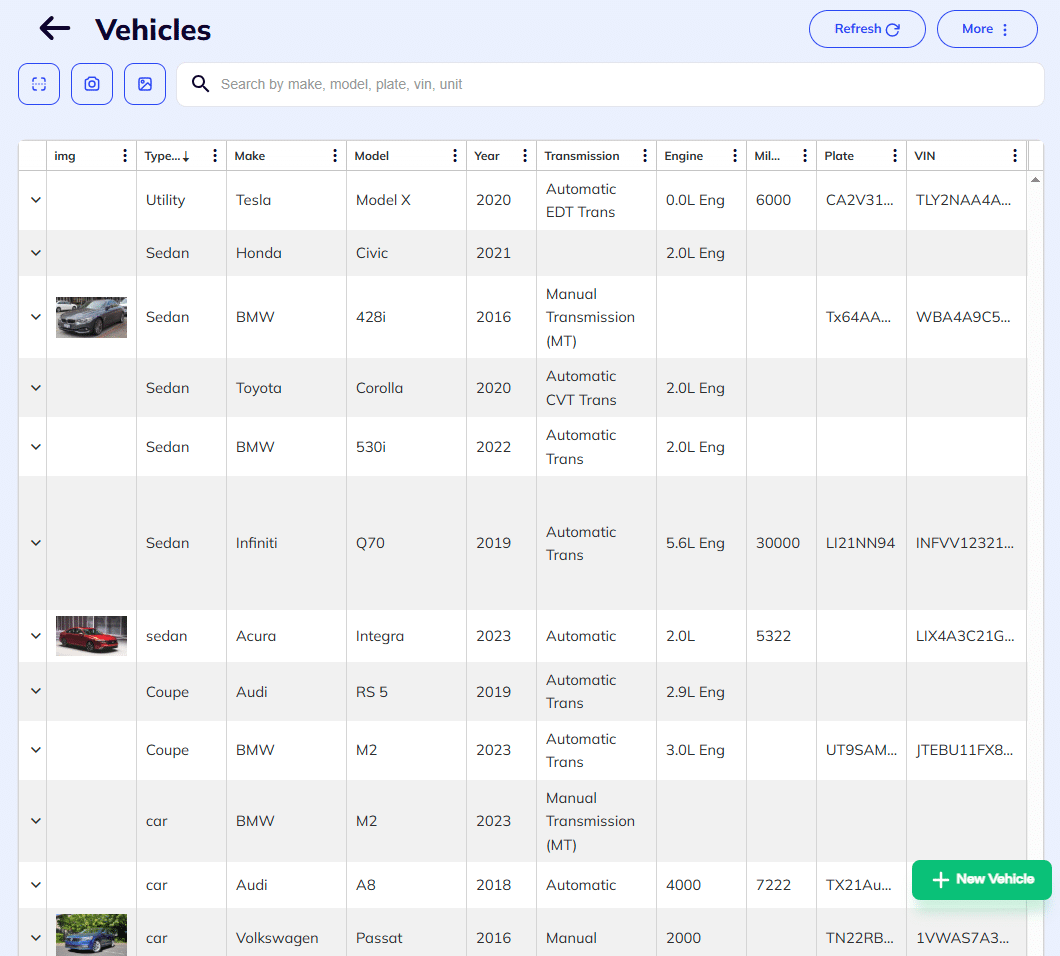
To use ARI’s AI labor guides, you first need to select the vehicle you are working on. You can do that by opening the labor guides tab on the main menu. Then open the AI Labor Guides section and choose ‘Select Vehicle‘. You will be prompted to choose a vehicle from the list or add a new one. Select the one you need or click the + button to add a new one. Once you are done with the selection, the system will bring up the labor details for it. You can always change the vehicle from the same panel.
Step-by-step navigation:
					Main Menu -> Labor guides ->
AI Labor Guides -> Select Vehicle/ Change Vehicle
This menu allows you to access crucial Labor Guides, Parts Information, Maintenance Procedures, and Fluids information when working on a vehicle. All of the information provided is free(included in the standard ARI package).
Quick access to accurate parts and labor information is often what makes or breaks the quality of your auto care service. Our advanced AI labor guides framework allows you to quickly find and use detailed labor guides, labor times, and parts specs. The main menu consists of Parts and Labor information, Maintenance procedures, and Fluid items. From this menu, you get unrestricted access to free labor guides and free labor times.
The Parts& Labor menu allows you to search for the parts and labor items you need and quickly transfer them to your quotes or invoices. Or you can dive deeper into any labor item and get detailed labor guides with step-by-step instructions.
You can do that with the Guides and Procedures action button visible after you open the main Parts and Labor page.
Here’s how you can access the parts and labor menu in ARI:
					Home Screen -> Labor Guides
Select Vehicle -> Parts& Labor Guides
Choose between the panels:
Parts | Maintenance | Fluides

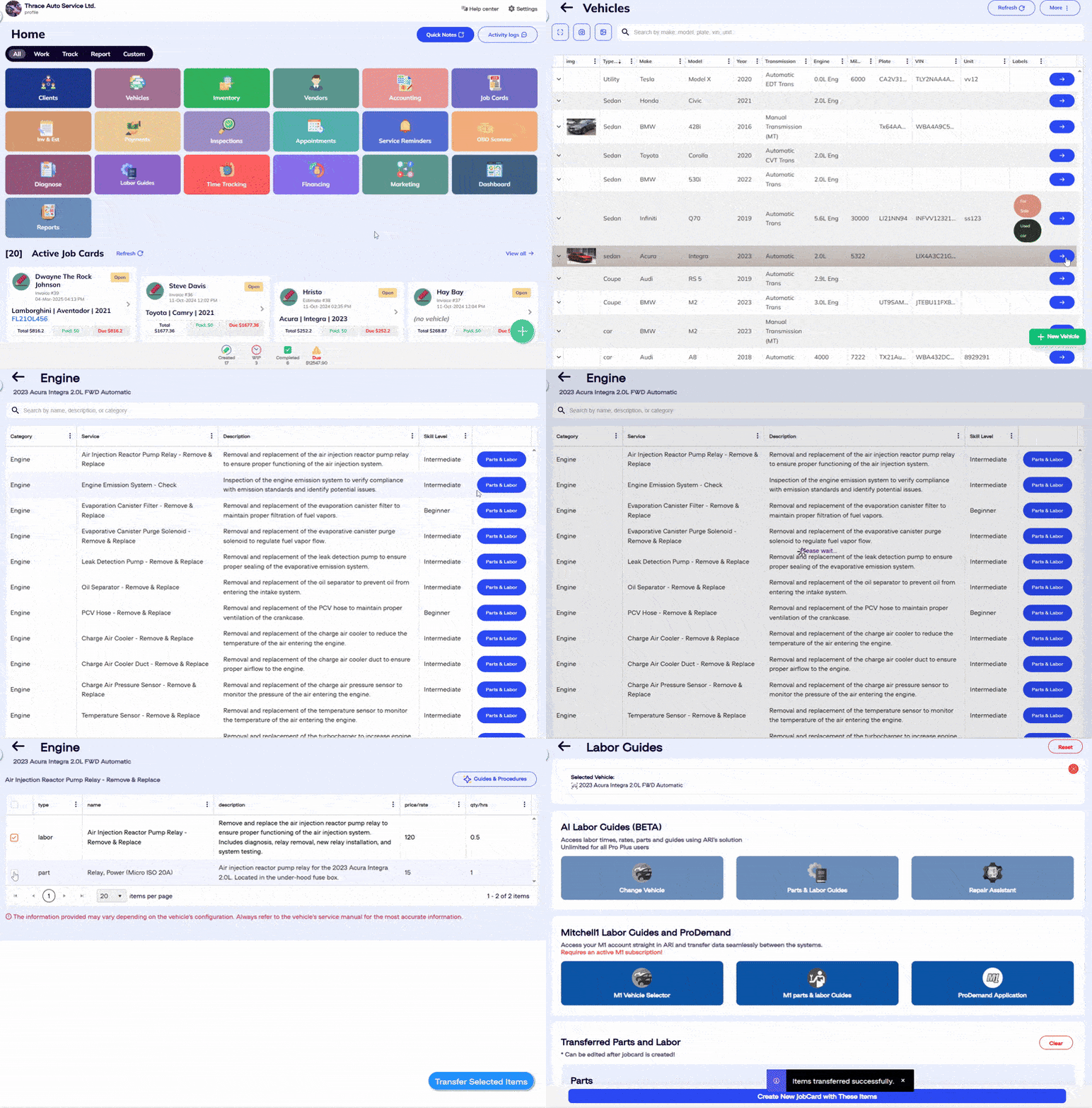
After selecting the vehicle you need to work on, you can access the parts& labor menu. There, you’ll see a breakdown of all repair procedures by category, such as Engine, Body and Frame, Steering, Electrical, HVAC, Accessories, and more. These are the standard categories for most vehicles, but you can find different labor items for each car. To add the parts and labor, do the following:
The last step will transfer the items to the main labor guides page. You can repeat the process and add more items. Once you are ready, hit Create new Job card with the following items. This will automatically create an Invoice/ Estimate with the items you’ve chosen.
Each service from the list has the following details:
Use the markers to navigate and quickly find the right information.
Accurate labor time information for routine vehicle maintenance is essential for all auto care providers. ARI’s AI Labor Guides offer a comprehensive overview of all services recommended based on a vehicle’s maintenance schedule (timeframe or mileage).
To use them, first select a vehicle and go to the Parts& Labor section. Then switch to the Maintenance tab and choose the necessary time interval or mileage. You will see a detailed breakdown of the associated parts and labor, and you can choose the ones you’d like to use.
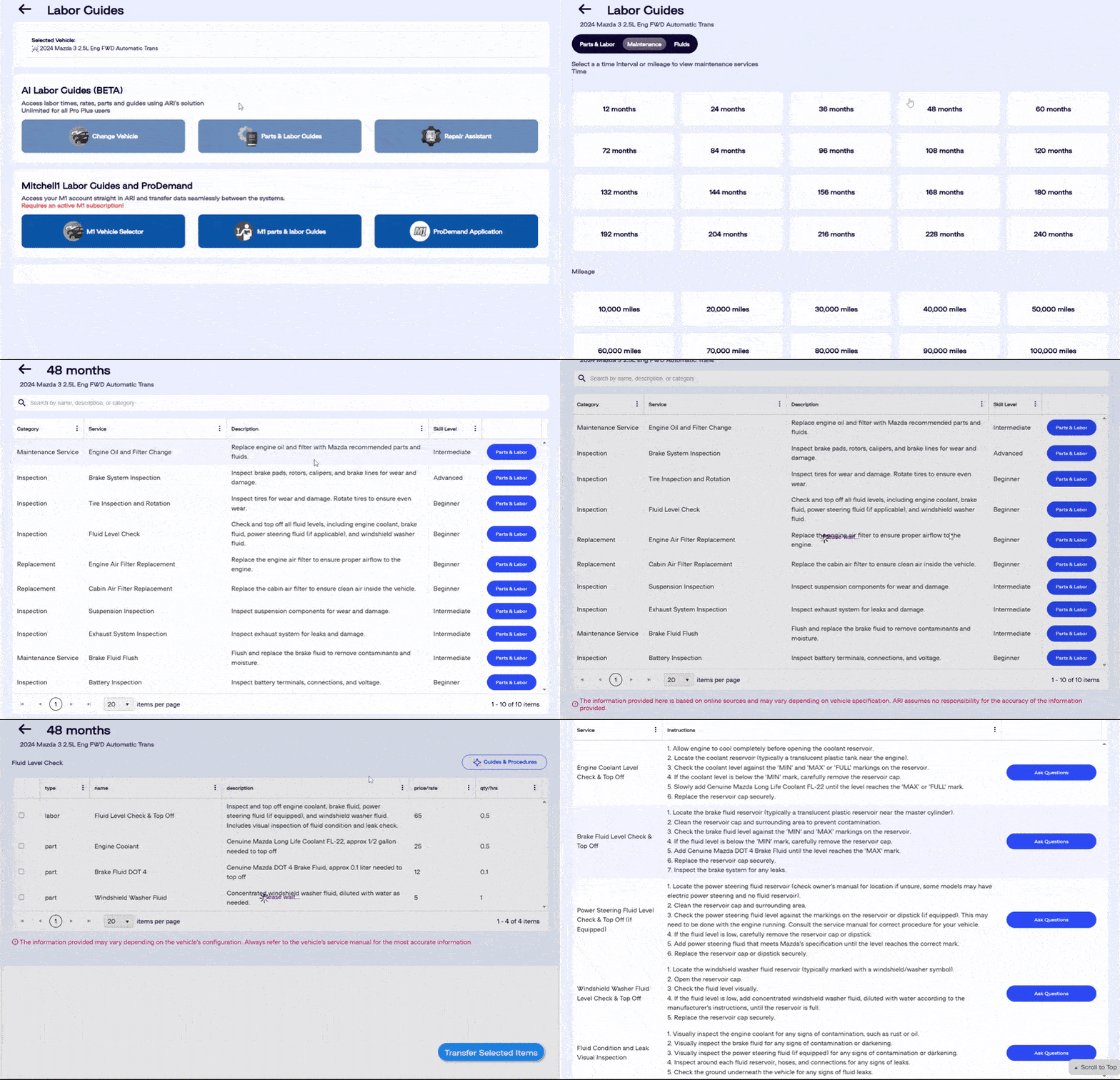
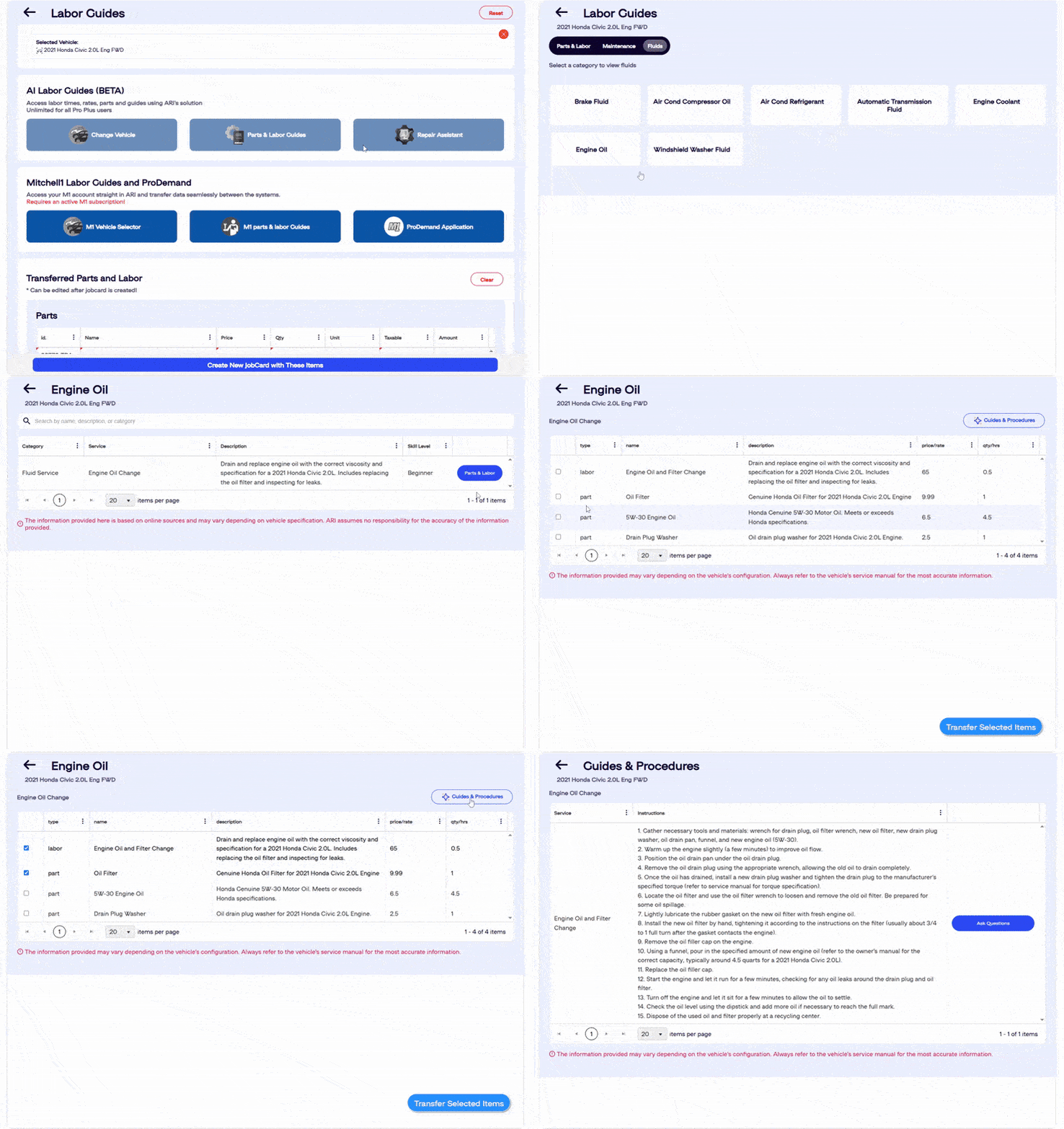
For any car, fluids are essential for optimal performance and a long lifespan. Each vehicle has specific requirements for fluid capacity, type, and volume, and these must be maintained for the vehicle’s long-term health.
Our labor guides give you access to information on all essential vehicle fluids. Use them from the Parts and Labor section under Fluids. Then choose the category you are interested in and select Parts and Labor to pull the needed data. Again, you can transfer the items to the main labor page and use them to create invoices or ask the repair assistant questions about the service.
Sometimes knowledge and informational gaps are inevitable. As an auto mechanic, you never want to be stuck when servicing a vehicle.
Our guides and procedures module will help you prevent just that. After you’ve selected the service you are performing, this tool will give you thorough information about every step of the process.
The steps are listed in a chronological order, and you can ask the AI chatbot for details about each one. You receive quick and systematic responses, in addition to the free labor guides.
*This is still an experimental feature; the AI might produce hallucinations.
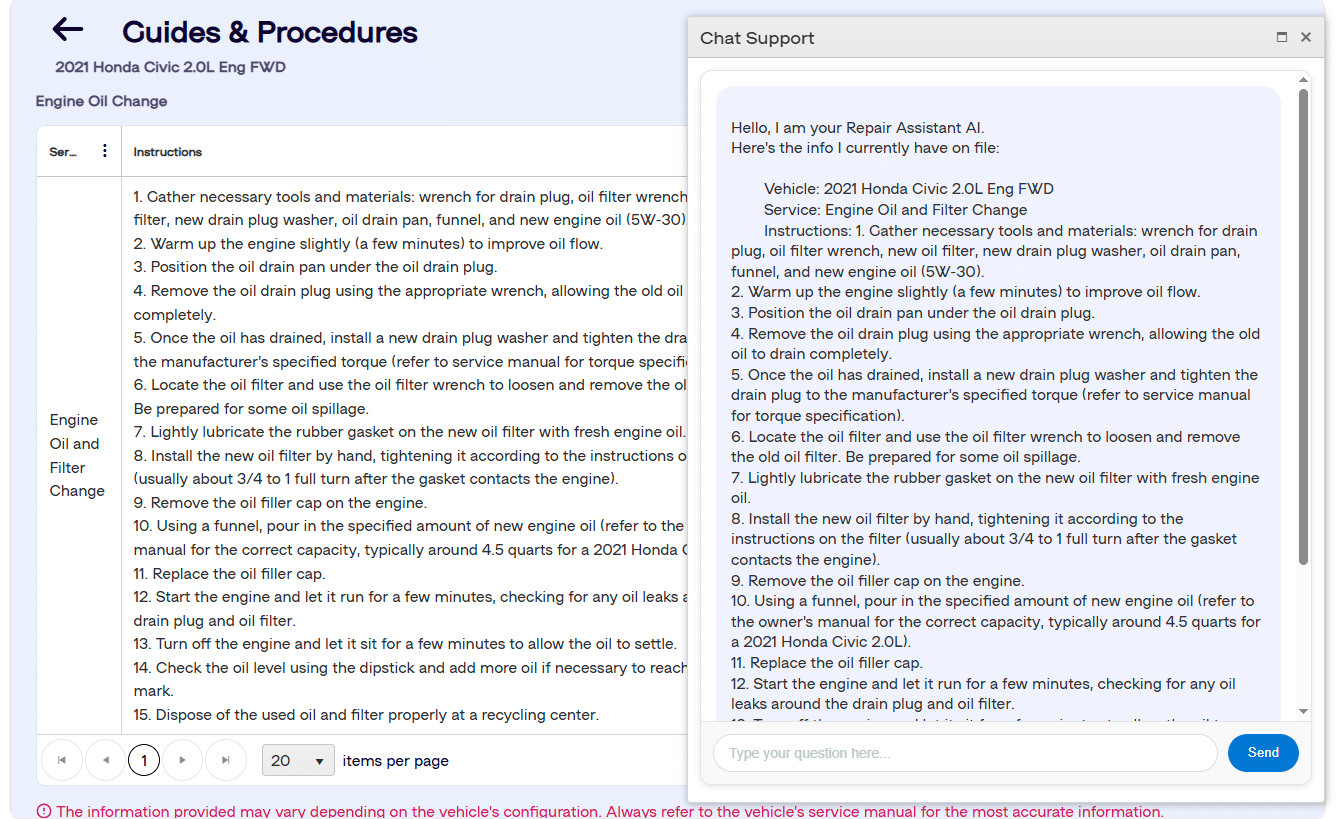
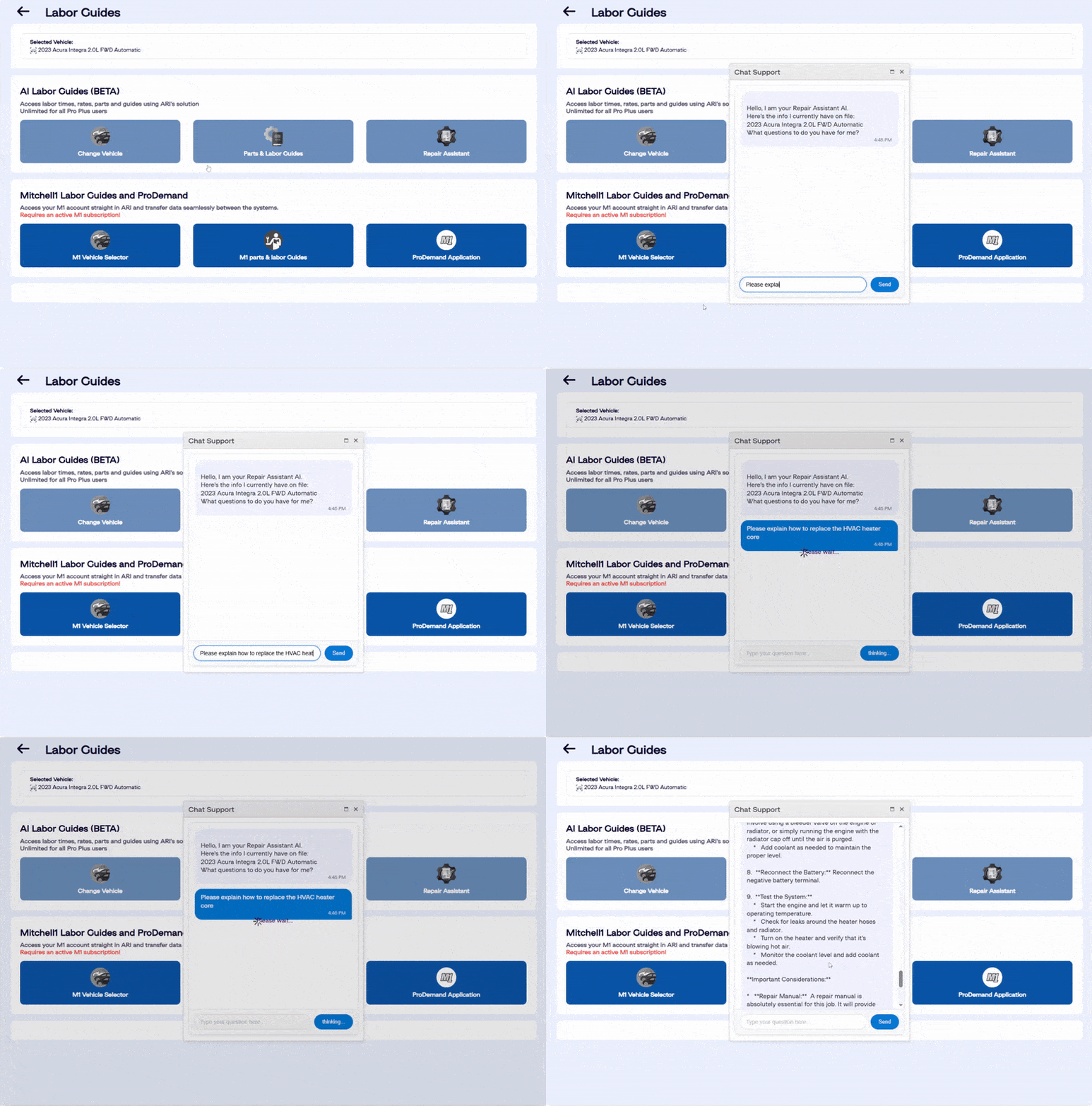
Our AI repair assistant is a free vehicle repair AI chatbot that provides support to you, the mechanic and auto technician, during vehicle maintenance. Its primary use is to answer labor-related questions that arise during the repair process.
This assistant delivers information concerning labor times for various tasks and assists with understanding complex repair methodologies. It offers insights into specific procedures and helps in resolving diagnostic inquiries. Repair Assistant aims to improve operational efficiency by providing readily available information, allowing technicians to focus on the repair work itself.
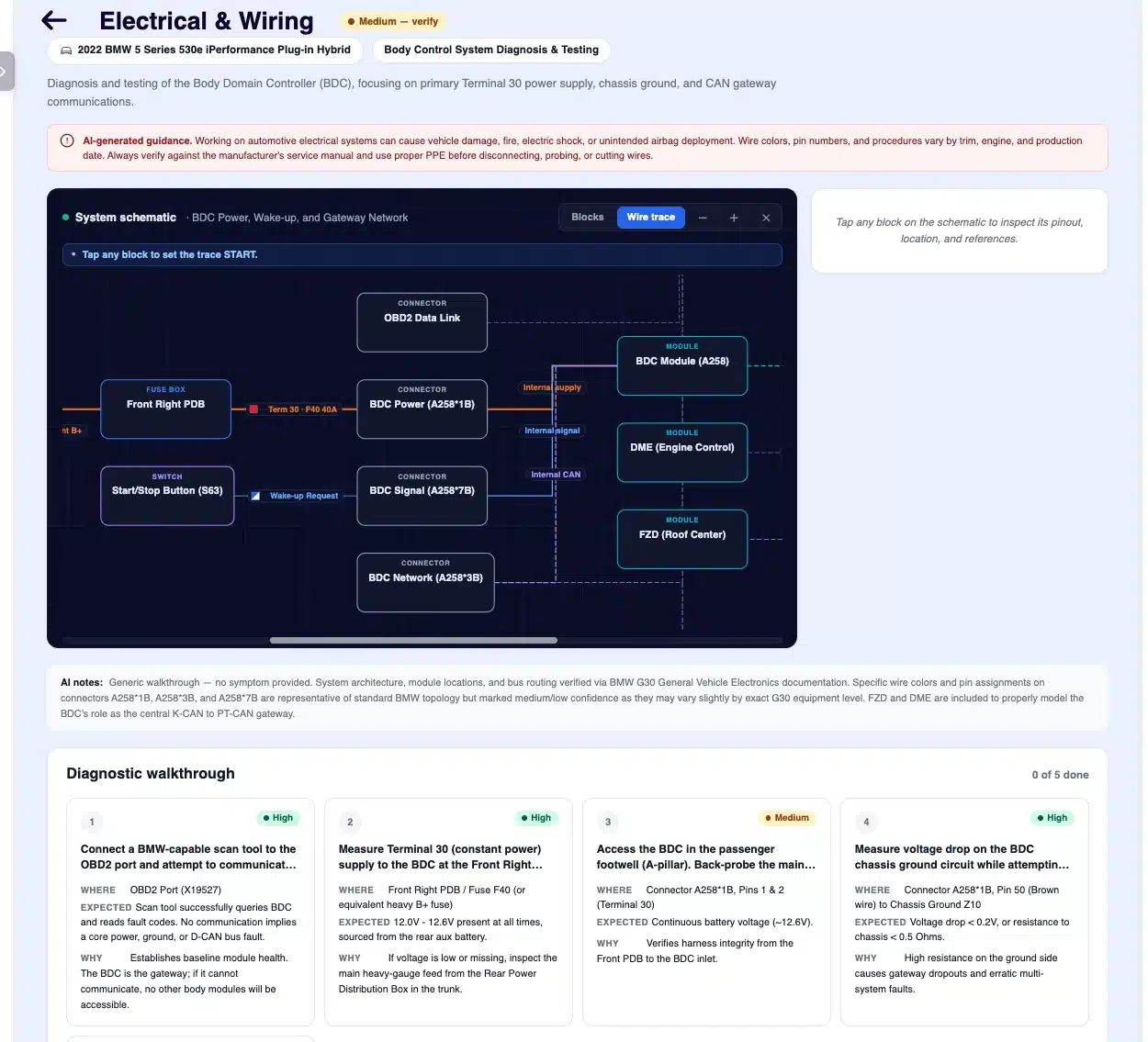
ARI’s AI Labor Guides include an Electrical & Wiring Assistant that generates schematic-grade wiring diagrams, connector pinouts, and step-by-step electrical diagnostics for the exact vehicle on your job card. Electrical diagnosis is the hardest category of work to estimate and the easiest to lose money on. Instead of paying for a separate service-information subscription, you get vehicle-specific electrical data built directly into your repair workflow.
For any electrical service — headlamps, ABS sensor, fuel pump, A/C clutch, power windows, BCM, or instrument cluster — ARI generates an interactive system schematic showing exactly how the circuit is wired, from battery to fuse box to relay to module to load to ground. A typical circuit renders 12 to 20 individual components across thirteen node types (power sources, fuse boxes, relays, control modules, connectors, splices, sensors, loads, grounds, diodes, and buses) using proper symbology. Every wire carries its color, gauge, ignition state (KOEO, KOER, ACC, OFF), and the fuse protecting it. Diagrams are generated for the specific year, make, model, engine, and trim — never a generic template. Zoom in to read a connector label, tap any component to open its detail view, and drag to pan around large circuits.
Each electrical service comes with an ordered diagnostic walkthrough that tells you what to test, where to probe, what reading to expect, and what each result means. Every step lists the action (e.g., “Backprobe BCM connector C501, pin 13”), the target location, the expected meter reading, and the interpretation for your next move. Mark steps done as you work — the progress counter keeps the whole team in sync, so a tech can hand off a long job and pick up exactly where it was left.
Tap any component to open its physical location in the vehicle, a full pinout table (PIN, wire color, function), fuse tables with amp ratings, and notes on common failure modes and OEM quirks. Mark each component Pass or Fail as you test it, and the schematic updates with a colored status badge so you can see at a glance which parts of the circuit are cleared and which still need attention.
Built to be honest about uncertainty:
How to open it: Open any Job Card, Invoice, or Estimate with a vehicle attached → Labor Guides → Parts & Labor → Electrical & Wiring. The first request takes a couple of minutes while sources are verified; results are then cached and reopened instantly.
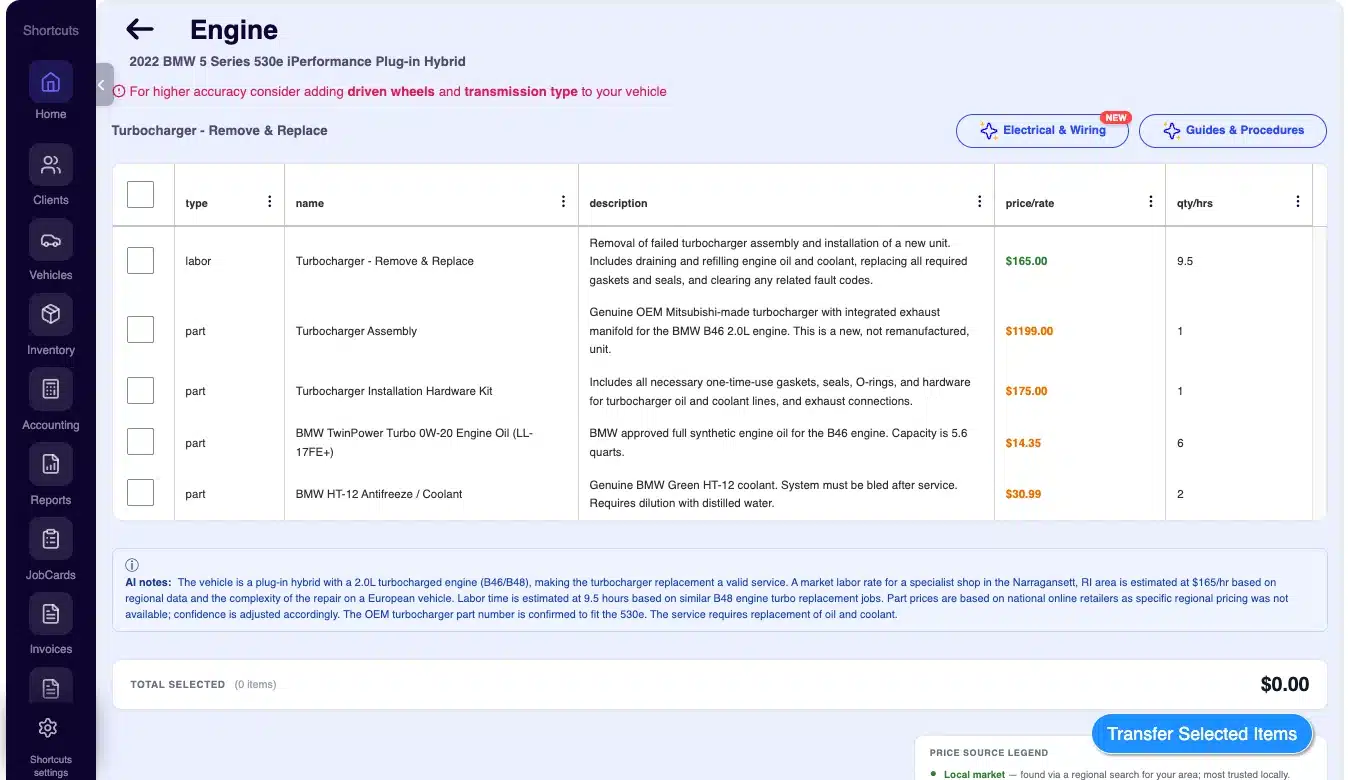
ARI’s AI Parts & Labor estimator localizes every price to your shop’s market. Using the city, state, and currency saved in your profile, it pulls parts pricing from retailers that actually serve your area and generates a regional labor rate based on what local shops charge. A shop in rural Montana no longer sees big-city pricing, and a shop outside the US gets estimates in its own currency instead of US dollars.
As long as your profile is current, tapping Get Parts & Labor in Labor Guides or Diagnose returns three things: regional sourcing from retailers that ship to or have stores in your region, currency matching that quotes every price in your local currency, and a regional market labor rate you can compare against your own primary rate.
If your primary rate is $65/hr and the local market is $120/hr, that gap appears on every estimate — a clear signal you may be leaving money on the table. If your rate is already above market, you have the data to back it up when a client pushes on price. A Total Selected card adds your checked parts and labor live before you transfer items into the invoice, and the AI surfaces its own reasoning (for example, “Shop location used for regional pricing; ADAS calibration required”) so you can see exactly what it checked.
Where to find it: Labor Guides → [Any Service] → Get Parts & Labor, or Diagnose → Get Parts & Labor. Make sure your city, state, and currency are set in your profile first.
Most shop-management tools are built around mechanical repair, so quoting a fender R&R with a three-stage pearl blend from a generic catalog never quite works. ARI includes a dedicated Body Repair tab in Labor Guides, built around how collision centers, paint booths, and body shops actually quote and invoice.
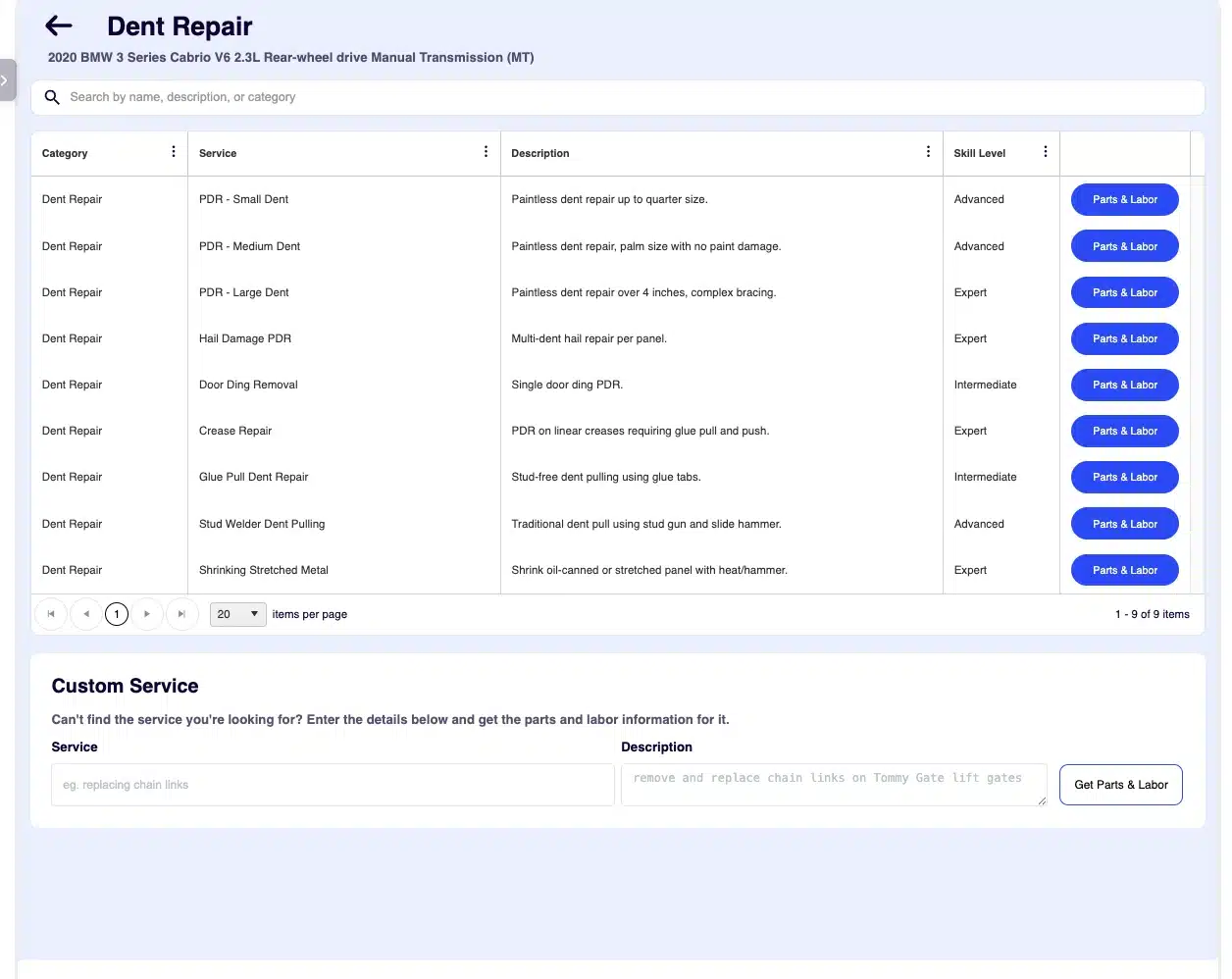
Select your vehicle and open the Body Repair tab to find 15 categories that mirror shop operations: Structural & Frame; Panel Repair & Replacement; Dent Repair (PDR, hail, creases); Paint Prep; Paint & Refinishing; Plastic & Bumper Repair; Glass (with ADAS calibration); Trim & Moldings; Interior & Upholstery; Rust & Corrosion; Welding & Metal Fab; Detailing & Reconditioning; Protective Film & Wraps (PPF, vinyl, tint); R&I / Access Operations; and Estimate & Admin (pre/post scans, teardown, ADAS, storage, tow). Each category holds billable services — from Tri-Coat application to Frame Straightening — so there are no vague “body work” line items.
Where to find it: Labor Guides → Select Vehicle → Body Repair tab. Review the AI-generated quote, tap Transfer, and the items drop directly into your invoice or job card.
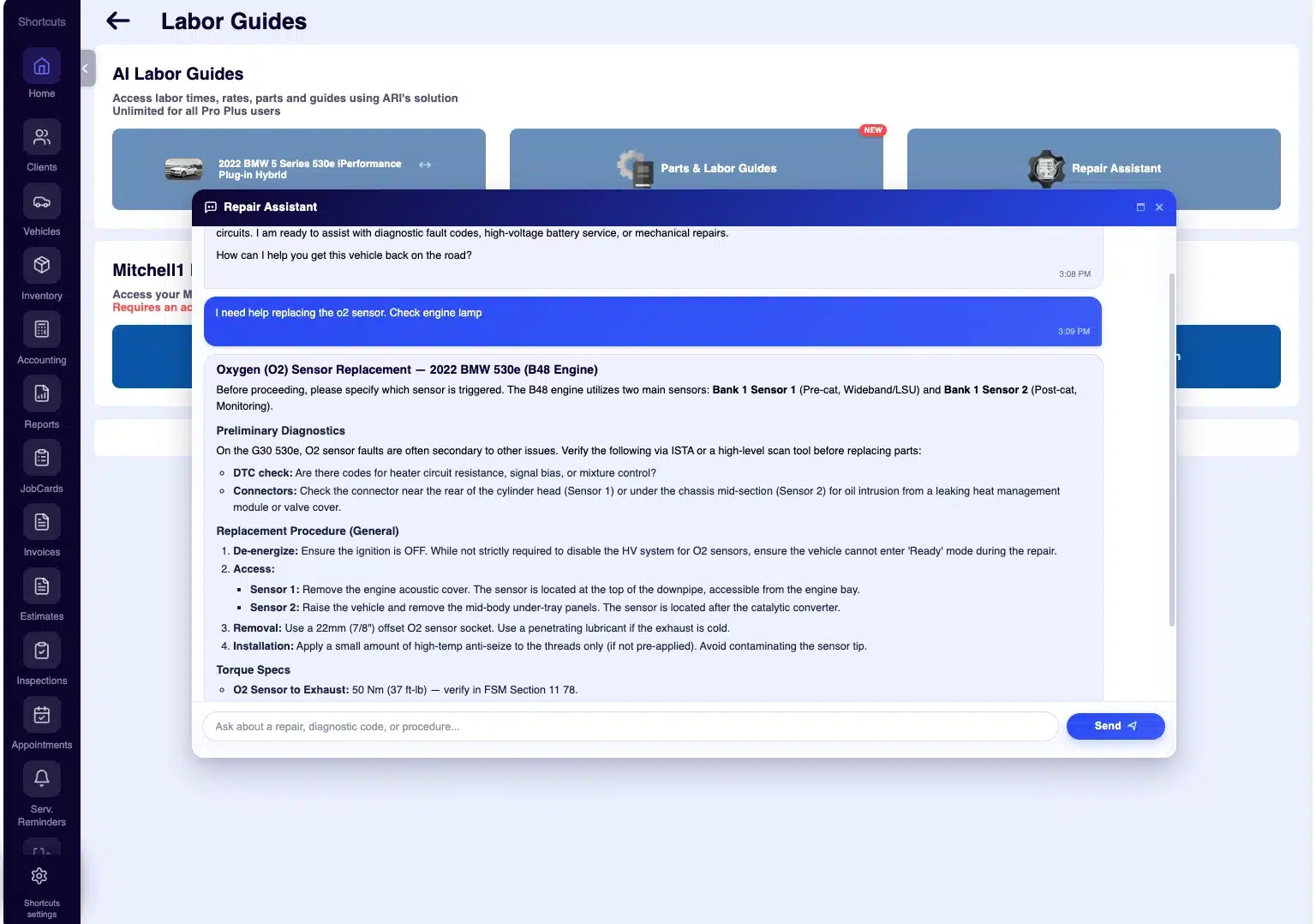
When you need a torque spec, a firing order, or a tip for reaching one hidden bolt, the Repair Assistant gives it to you without four tabs and three searches. Open it from a vehicle, a labor guide, or a diagnostic screen and it already has the context — the year, make, and model, the service you’re quoting, or the trouble code you’re chasing.
Instead of a blank chat box, the Assistant greets you, confirms the vehicle, and suggests specific questions for the job at hand. Tap one and the answer starts instantly — no typing, no rephrasing.
ARI's AI Labor Guides give auto repair shops standardized labor times, parts information, maintenance schedules, fluid specs, wiring diagrams, and a repair assistant in one place. You select a vehicle, pull accurate labor and parts data, and transfer it straight into an estimate, invoice, or job card.
Core labor guides, labor times, parts, maintenance, and fluids are included in the standard ARI package. Advanced AI features such as the Electrical & Wiring Assistant are part of ARI Pro at no extra add-on cost.
Most domestic, Asian, and European vehicles from roughly the last 25 years are supported across mechanical, electrical, and body repair work.
Open the Labor Guides tab, go to AI Labor Guides, and choose Select Vehicle. Pick a vehicle from your list or tap the + button to add a new one. You can change the vehicle anytime from the same panel.
Open Parts & Labor for your vehicle, choose a service category, select the labor items and parts you need, and tap Transfer selected items. When you're ready, create a new job card from those items and ARI builds the invoice or estimate automatically.
ARI grounds its data against OEM and reference sources and flags low-confidence items, but AI output can be incomplete or outdated. Always verify critical specifications — torque values, pin assignments, and high-voltage procedures — against official service manuals.
Yes. In Parts & Labor, switch to the Maintenance tab and choose a time interval or mileage to see the recommended services with their associated parts and labor, then select the ones you want to use.
Open Parts & Labor and select the Fluids section to view the required fluid type, capacity, and volume for the vehicle. You can transfer fluid items to the main labor page and use them on invoices.
The Repair Assistant is a built-in AI chatbot that answers labor-related questions during a repair — labor times, procedures, torque specs, and diagnostic guidance — so technicians can find information fast and stay focused on the work.
Yes. When opened from a vehicle, labor guide, or diagnostic screen, it already has the year, make, model, the service you're quoting, or the trouble code you're chasing, and suggests relevant starter questions so you don't start from a blank page.
Yes. The Electrical & Wiring Assistant generates schematic-grade wiring diagrams for the specific year, make, model, engine, and trim on your job card, with real wire colors, gauges, ignition states, connector pinouts, fuse data, and component locations.
For most routine wiring diagnostics, ARI's Electrical & Wiring Assistant covers the schematic, pinouts, and diagnostic steps you need without a separate subscription. For full TSBs and official OEM labor times you may still prefer a dedicated service, and critical pins should always be verified against OEM manuals.
Yes — it's part of ARI Pro at no extra cost, alongside the AI Labor Guides and AI Diagnosis.
The AI estimator localizes pricing using the city, state, and currency in your profile, sourcing parts from retailers that serve your area and generating a regional labor rate. This keeps quotes accurate to your market instead of defaulting to US-dollar or big-city pricing.
Make sure your city, state, and currency are set in your profile, then tap Get Parts & Labor in Labor Guides or Diagnose. No other setup is required.
Green means the price was found via regional search (most accurate for your area), orange means a national-average figure with no regional data (sanity-check before quoting), and blue means OEM list pricing pulled directly from the manufacturer.
Yes. The dedicated Body Repair tab provides 15 workflow-based categories with itemized materials, split body and refinish labor, and billable services from PDR to frame straightening — built for how collision and paint shops quote and invoice.
Yes. A windshield R&R on a camera-equipped vehicle automatically adds static and dynamic calibration labor, and panel work on EVs automatically includes an HV service disconnect line to support OEM safety compliance.
ARI (Auto Repair Software) brings the automotive aftermarket the world’s first free AI labor guides and free vehicle repair assistance, giving mechanics and shop owners instant access to accurate labor times, parts data, maintenance schedules, and fluid specs in one place. Beyond standard labor guides, ARI now covers the work shops actually lose time on: AI wiring diagrams with schematic-grade circuits, connector pinouts, and step-by-step electrical diagnostics; market-localized parts and labor estimates priced in your own city, currency, and regional labor rate; dedicated body repair labor guides built for collision and paint shops, with itemized materials, split body and refinish labor, ADAS calibration, and EV safety lines; and a context-aware Repair Assistant that already knows the vehicle and answers torque specs, procedures, and diagnostic questions formatted like a shop manual.
Together, these tools replace the cost and friction of separate service-information subscriptions and put cutting-edge, vehicle-specific data directly inside your estimating and invoicing workflow. Whether you run a one-bay independent shop, a mobile service, a high-volume operation, or a body and collision center, ARI’s AI labor guides are designed to help you quote faster, diagnose smarter, and bill with confidence. Explore everything the AI labor guides feature has to offer, and tell us how well it works for your shop.
Add clients, vehicles & all the details that are relevant to them
Create detailed inspections with checklists, damage reports
Manage your parts, tires, business assets, and all other important items.
Track labor progress, start & stop work clocks, approve & deny services.
Restore deleted invoices, clients & job cards within 7 days
Create professional quotes for your auto repair clients
Generate professional invoices for your auto shop’s clients
Generate damage reports & attach pictures to your auto inspections
Let your clients book your services online from the comfort of their home
Earn return customers by reminding them when service is due
Create purchase orders, track your expenses, and monitor your profits
Read Engine Error Codes with ARI monitor car’s parameters live
Reports for your business performance & export the data
Never miss a payment keep an eye on your invoice billing process
Reach your core customers & market business across different channels
Manage vendors, partners & orders for a streamlined repair experience
Monitor and label the activity of multiple employees
ARI’s client portal lets clients easily stay informed when they visit you
Get the most out of your client management with our online documents
Let clients view inspection photos and approve recommended repairs.
Share an interactive online booking page with your clients
Receive payments on your Online Invoices with the world’s most renowned payment networks
Order parts easily with PartsTech and ARI! Smooth and reliable parts procurement process.
Every mechanic benefits from quality Repair Guides and Car Repair Estimates.
Get Service History Instantly. Decode VINs and Plates with Accurate Data from a Leading Supplier.
Get Diagnostic & Maintenance Info. Access Diagnosis, Solutions, and Problem Predictions.
Sync ARI invoices to QuickBooks Online. Manage customers and inventory.
Get detailed labor guides, labor times, and estimates from the world's first AI labor guides system.
Process In-Person Payments On The Spot. Geared towards auto repair businesses.
ARI has partnered with Wisetack to offer your clients extra payment options for auto repair services.
Order auto parts through Nexpart without leaving ARI — a faster, more reliable way to source what your shop needs.
You can access ARI on all major digital platforms.
A complete guide to setting up and running your auto repair business
ARI offers features and settings tailored for auto repair services
You must ensure you keep your app updated all the time
Welcome to ARI's blog for updates, articles, and guides
Welcome To ARI's Official Video Library
Here are our most notable achievements over the years.
Test the features and see if it’s the right fit for you
How to add multiple users to your ARI Profile
Get 3000 ARI Credits by referring someone to ARI