

Helcim + ARI — Accept Payments the Smart Way

Helcim is now an official payments partner of ARI. Shops in the US and Canada can accept credit card and ACH payments directly from their ARI invoices and the Client Portal, with transparent interchange-plus pricing and no hidden fees.

Available in the US & Canada*

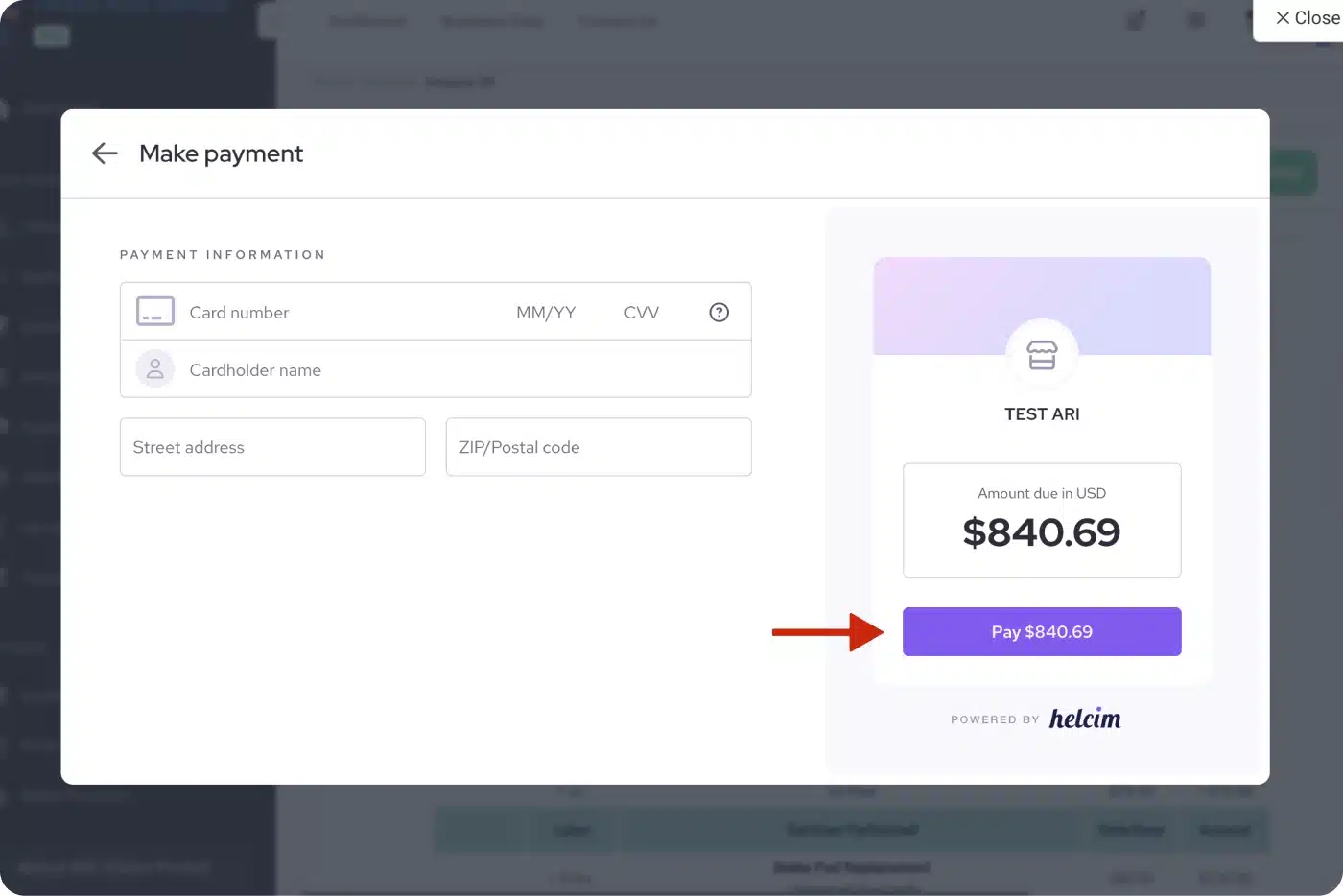
Helcim + ARI — payment integration in action

Why Helcim?

Transparent pricing, no contracts, and built for shops that want to keep more of every payment they take.
  • Interchange-plus pricing — you pay cost plus a small, published markup. No flat rates, no surprises.
  • Volume discounts built in — the more you process, the lower your rate automatically adjusts.
  • No monthly fees, no setup fees, no contract — pay only when you get paid.
  • No ARI platform fee — ARI does not charge anything on top of Helcim transactions.
  • Available in the US and Canada — supports both USD and CAD.
  • PCI-compliant by default — payments are collected through Helcim's secure iFrame; card data never touches your device.

What you can do with Helcim in ARI

  • Send a payment requests over email or text to customers for invoices — they click Pay Now and pay with a credit card or ACH.
  • Accept payments from the ARI Client Portal on any invoice or estimate.
  • See every Helcim transaction on the ARI payment record, with approval code, last 4, and cardholder name.
  • Issue refunds or voids straight from ARI — no need to log into Helcim's dashboard.
  • Optionally pass the processing fee to the customer using ARI's built-in fee settings.
Helcim payment screen and processing fee breakdown in ARI
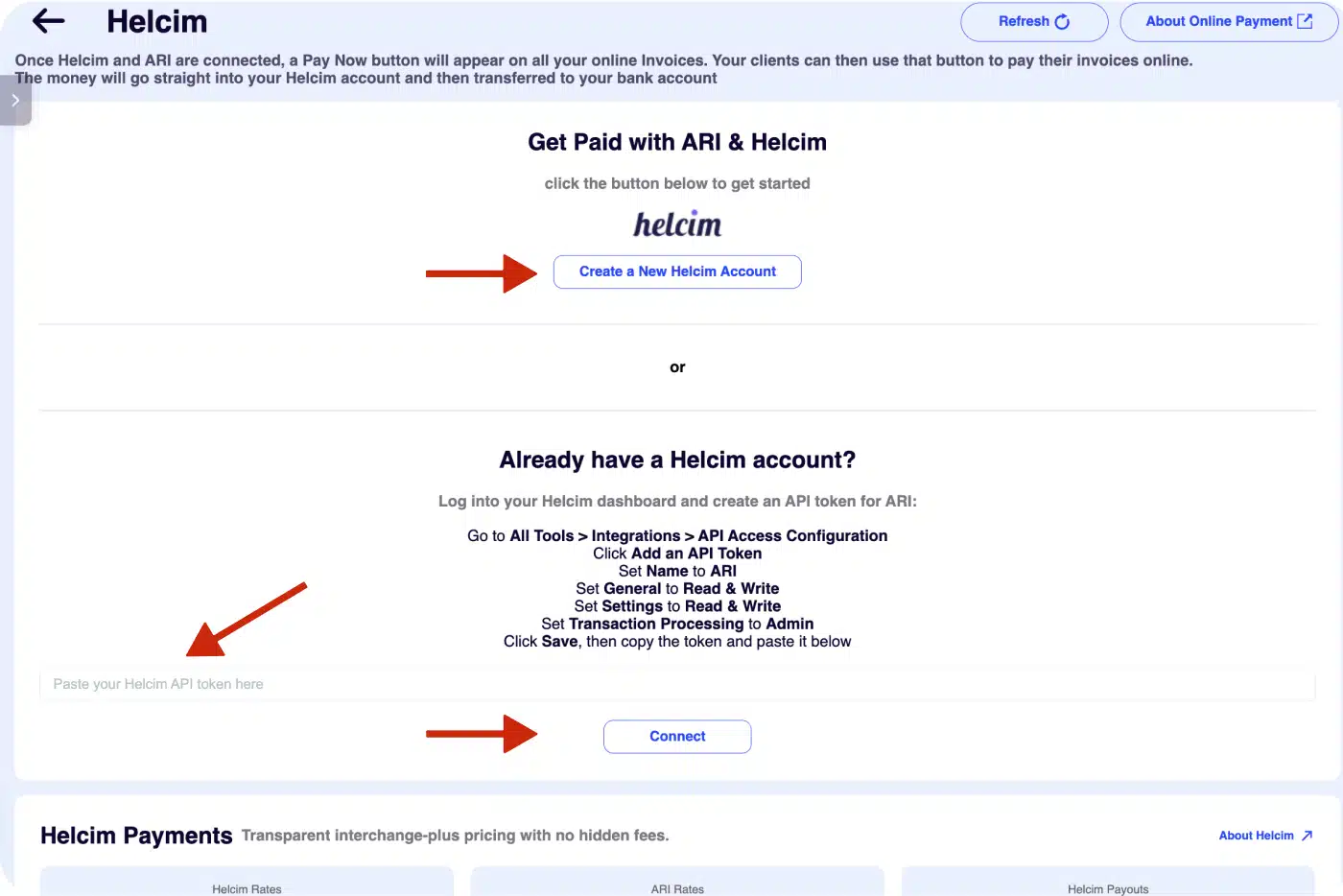
Helcim activation in ARI — Payments → Payment Processors → Helcim

How to get started

New to Helcim?

  1. Click Sign Up with Helcim below to create your account through our co-branded link.
  2. Helcim will review and approve your application (usually within 1 business day).
  3. Open ARI → Payments → Payment Processors → Helcim → Connect — your account links automatically.

Already have a Helcim account?

  1. Log into your Helcim dashboard → All Tools → Integrations → API Access Configuration and generate a new API token.
  2. Open ARI → Payments → Payment Processors → Helcim"Already have a Helcim account?" and paste your token.
  3. ARI validates the token and you're ready to accept payments.

Track Helcim payments in ARI

Once Helcim is set as your preferred payment method, every online transaction is logged automatically against the invoice it paid — no spreadsheets, no manual reconciliation. View the full history in your dashboard under Payments → individual payment record.

Each payment record shows the amount, status, transaction ID, approval code, cardholder name, and the last 4 of the card used. By default the record opens in a read-only view with a Print option for receipts. Click Edit Payment to reveal the action buttons — Process Payment, Void, and Refund — so you can manage the transaction without ever leaving ARI.

A built-in helper explains exactly when to use Void vs. Refund: void same-day payments before Helcim settles the batch, refund anything after that. The choice is clear, so you never have to second-guess the right action.
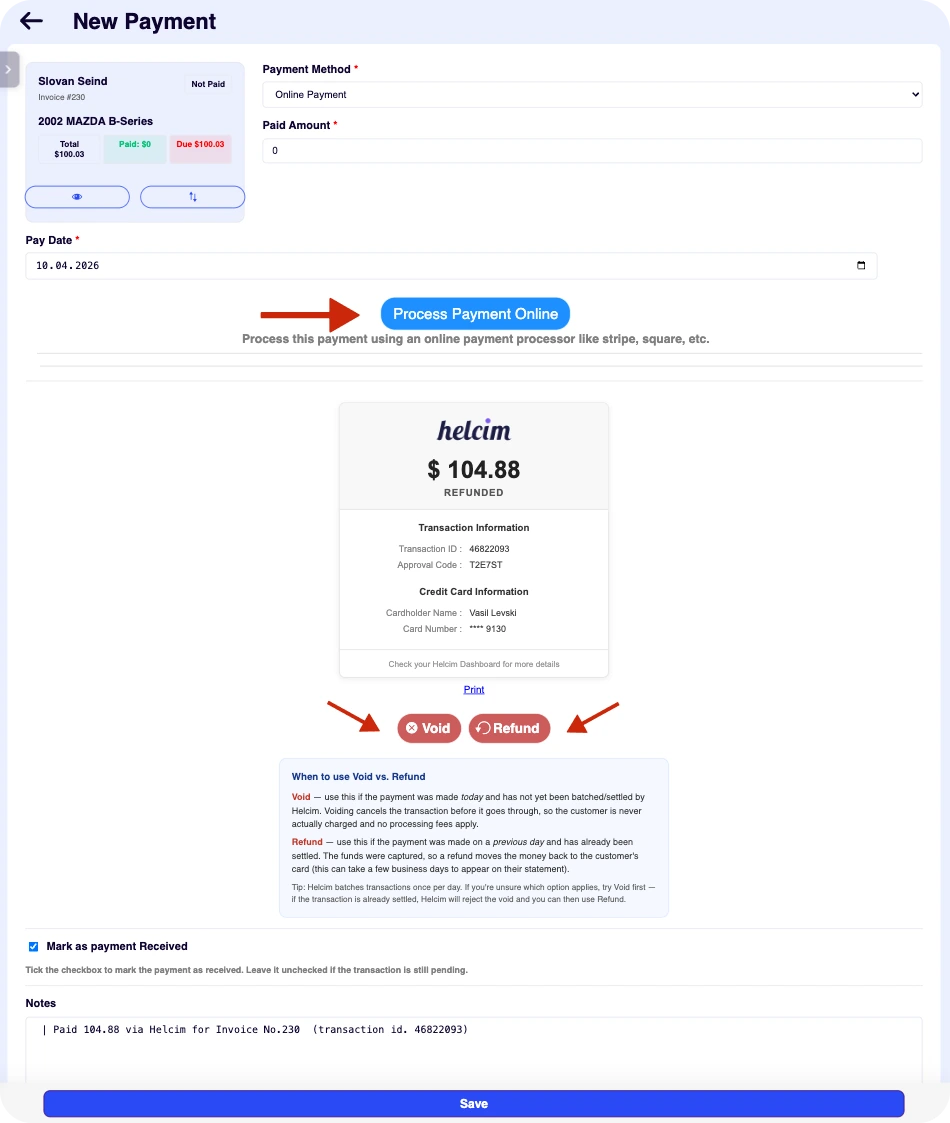
Helcim online payment record inside ARI — transaction details, void and refund actions

Ready to accept payments with Helcim?

Create your Helcim account through our co-branded link and connect it to ARI in minutes.

ARI is an official Helcim integration partner. For more information about Helcim, please see its Merchant Terms of Service at https://legal.helcim.com/us/terms-of-service/

Client Management

Add clients, vehicles & all the details that are relevant to them

Vehicle Management

Create detailed inspections with checklists, damage reports

Inventory Management

Manage your parts, tires, business assets, and all other important items.

Job Cards

Track labor progress, start & stop work clocks, approve & deny services.

Estimates

Create professional quotes for your auto repair clients

Invoices

Generate professional invoices for your auto shop’s clients

Inspections

Generate damage reports & attach pictures to your auto inspections

Appointments

Let your clients book your services online from the comfort of their home

Service Reminders

Earn return customers by reminding them when service is due

Accounting

Create purchase orders, track your expenses, and monitor your profits

OBD Scanner

Read Engine Error Codes with ARI monitor car’s parameters live

Reports & Stats

Reports for your business performance & export the data

Payments

Never miss a payment keep an eye on your invoice billing process

Marketing

Reach your core customers & market business across different channels

Vendors

Manage vendors, partners & orders for a streamlined repair experience

Time Tracking

Monitor and label the activity of multiple employees

Payment Processing

Receive payments on your Online Invoices with the world’s most renowned payment networks

Parts Ordering with
PartsTech

Order parts easily with PartsTech and ARI! Smooth and reliable parts procurement process.

M1 Labor Guides and
Estimates

Every mechanic benefits from quality Repair Guides and Car Repair Estimates.

Vehicle History with
CarFax

Get Service History Instantly. Decode VINs and Plates with Accurate Data from a Leading Supplier.

Car Diagnose with
CarMD

Get Diagnostic & Maintenance Info. Access Diagnosis, Solutions, and Problem Predictions.

Accounting with
QuickBooks

Sync ARI invoices to QuickBooks Online. Manage customers and inventory.

AI Labor
Guides

Get detailed labor guides, labor times, and estimates from the world's first AI labor guides system.

POS Terminal from 360Payments

Process In-Person Payments On The Spot. Geared towards auto repair businesses.

Customer Financing With Wisetack

ARI has partnered with Wisetack to offer your clients extra payment options for auto repair services.

Get Started

A complete guide to setting up and running your auto repair business

Client Portal

ARI’s client portal lets clients easily stay informed when they visit you

Multiple Users

How to add multiple users to your ARI Profile

Update ARI

You must ensure you keep your app updated all the time

Profile Setup

ARI offers features and settings tailored for auto repair services

Blog

Welcome to ARI's blog for updates, articles, and guides

ARI Awards

Here are our most notable achievements over the years.

Online Documents

Get the most out of your client management with our online documents

ARI Demo

Test the features and see if it’s the right fit for you

ARI Videos

Welcome To ARI's Official Video Library

ARI Affiliate Program

Earn rewards and ARI credits by referring our app to friends