A Game-Changing Update for Auto Repair Shop Accounting
We are thrilled to announce a comprehensive overhaul of the ARI QuickBooks integration. For shop owners, accounting is often the most tedious part of the day. And we changed that for your convenience.
We’ve updated the integration to an intelligent, synchronous financial system. We’ve introduced powerful new tax handling, automated vendor creation, and “smart” syncing that prevents errors before they happen.
Whether you are in the US, Canada, or Australia, syncing your auto repair business data to QuickBooks is now faster, more detailed, and audit-ready.
The Highlights: What’s New?
If you are in a rush, here is the big picture. The new integration brings you:
- Global Tax Compliance: Multi-level tax mapping for US, Canadian (HST), and Australian (GST) shops.
- Smart Automation: Automatic creation of Vendors, Payment Methods, and Inventory Items in QuickBooks.
- Full Financial Fidelity: Expenses and Purchase Orders now sync with full line-item details.
- Dual Document Tracking: No more confusion when converting Estimates to Invoices.
- Safety Nets: Auto-recreation of deleted clients and improved error recovery.
Let’s dive into the features that will save you hours of bookkeeping time.
Comprehensive Tax Configuration
The Problem: Previously, ARI sent taxes to QuickBooks as a single total. This caused headaches for shops in regions with compound taxes or specific reporting requirements (like Canada or Australia).
The Solution: We have built a sophisticated Multi-Level Tax Mapping System.
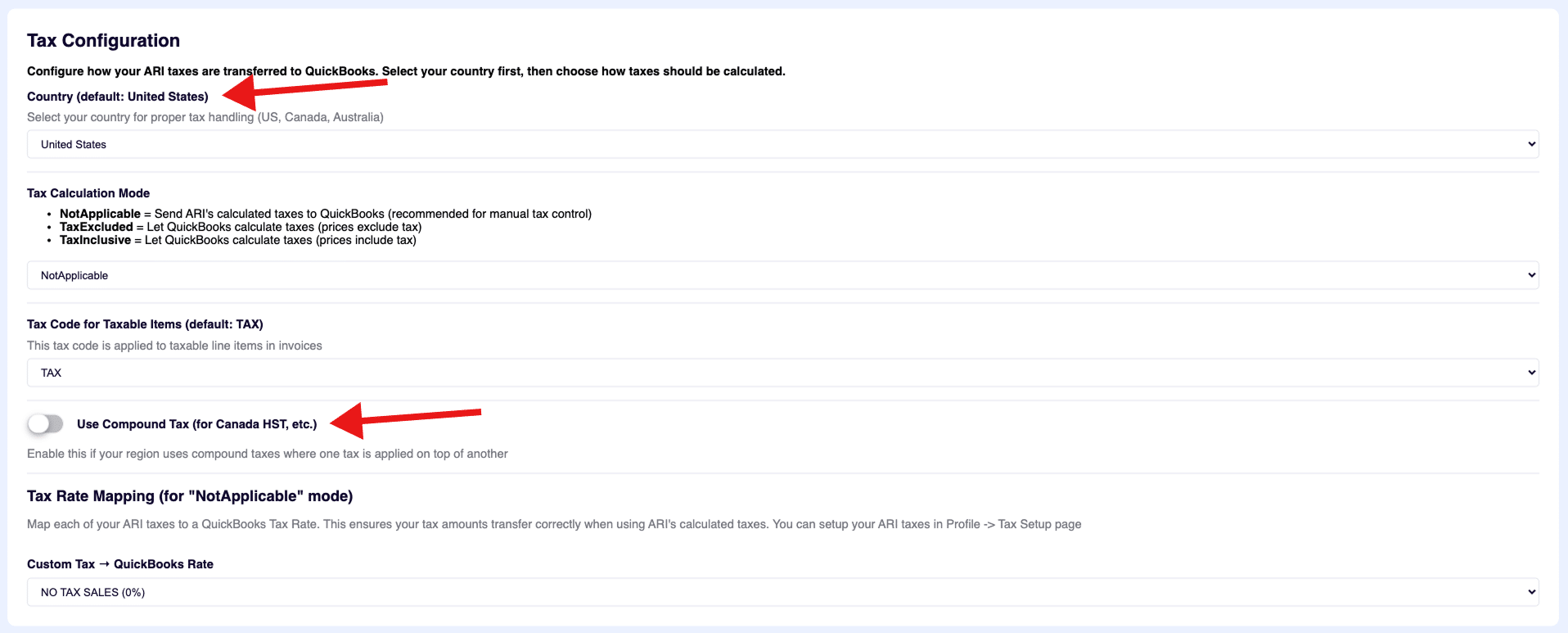
You can now tell ARI exactly how to treat your taxes based on your location:
- United States: seamless integration with Automated Sales Tax (AST).
- Canada: Full support for HST and compound tax calculations.
- Australia: Proper GST handling.
How it helps you:
In the Settings menu, you can now map specific ARI tax rates to particular QuickBooks tax codes. When you sync an invoice, QuickBooks will know exactly which rate was applied, ensuring your end-of-year tax reporting is 100% accurate without manual adjustments.
Intelligent Expense & Vendor Automation
The Problem: In the past, syncing an expense for a vendor that didn’t exist in QuickBooks resulted in errors or generic “Unknown Vendor” entries.
The Solution: ARI now acts as your automated bookkeeper.
- Auto-Create Vendors: If you log an expense for “Mike’s Auto Parts” in ARI, the system checks QuickBooks. If the vendor doesn’t exist, ARI automatically creates the vendor profile in QuickBooks (including phone, email, and address) and links the expense.
- Full Line-Item Detail: Expenses sync with every single line item detailed. You will see exactly what items were purchased, rather than just a lump sum.
- Employee Sync: Payroll expenses linked to employees in ARI will automatically map to or create the corresponding Vendor in QuickBooks. NOTE: ARI maps employees as Vendors in QBO, as not all users have payroll activated in their QBO accounts
The Result: Your Profit & Loss reports in QuickBooks will now accurately show exactly who you paid and what you paid for, with zero manual data entry.
- Seamless Estimate-to-Invoice Conversion
One of the biggest technical challenges in accounting software is handling the conversion of an Estimate to an Invoice. QuickBooks treats these as two totally different documents with different IDs.
What Changed: ARI now utilizes Dual Document Tracking.
When you convert an Estimate to an Invoice in ARI, we now maintain separate IDs for both versions in QuickBooks.
- The Estimate remains in QuickBooks as a record.
- The Invoice is created as a new, linked document.
This preserves your audit trail and prevents “sync loops” where updating one document accidentally overwrites the wrong file in your accounting software.
- Smarter Payments & Deposits
Getting paid is the best part of the job, but reconciling the bank account is the worst. We’ve fixed that.
- Dynamic Payment Mapping: ARI automatically finds or creates payment methods in QuickBooks. If you create a custom payment type in ARI (e.g., “PayPal”), it will appear correctly in QuickBooks.
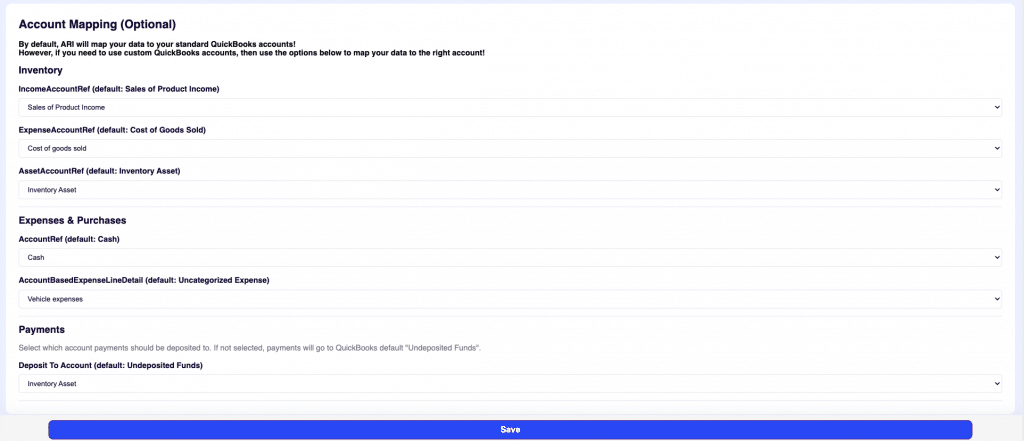
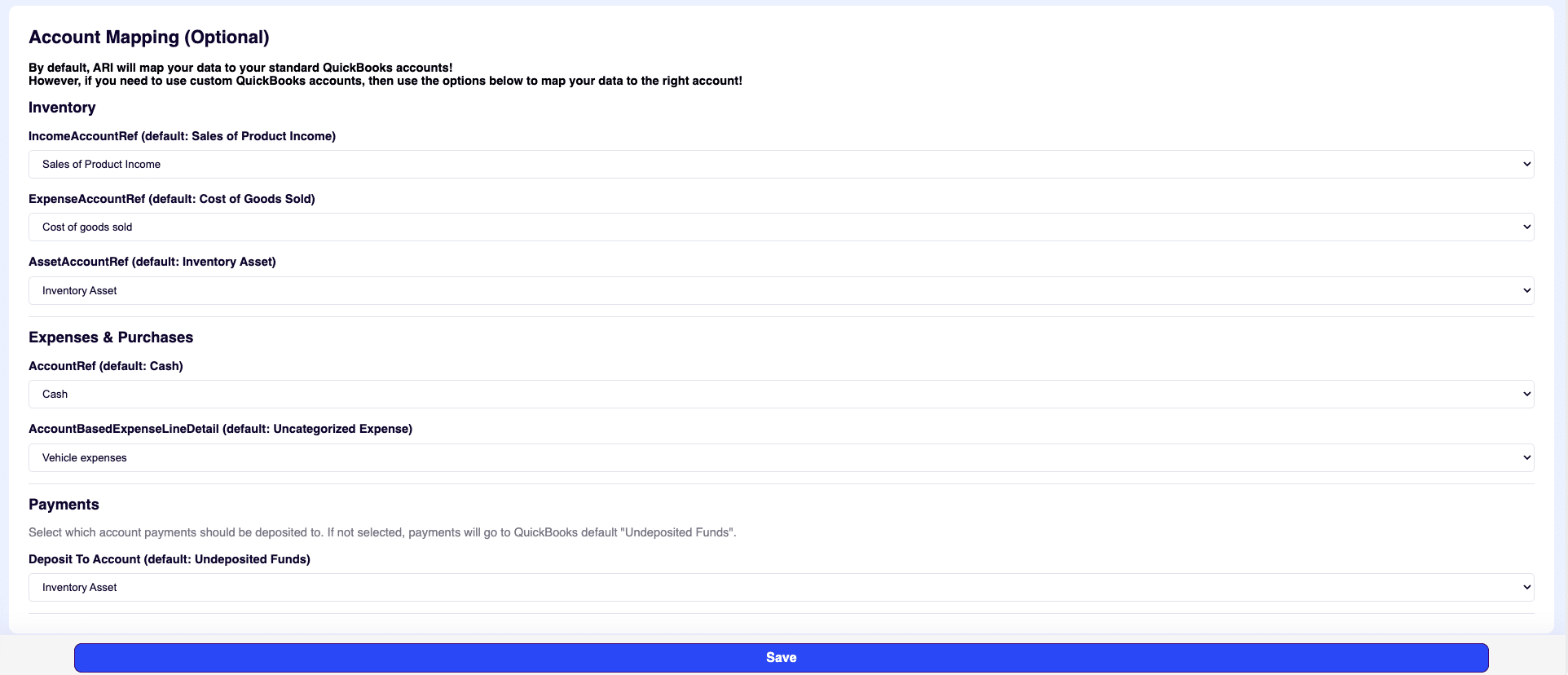
- Deposit Control: You can now configure exactly which account payments should go to. Want Expenses to go to “Undeposited Funds” and Payments to go straight to “Checking”? You can now map this in settings.
“Smart” Features You Won’t See (But Will Feel)
We’ve added a layer of intelligence under the hood to make the app feel faster and more reliable.
- Intelligent Caching: ARI remembers your vendors and items. The first sync might take a second, but subsequent syncs are instant because the app “knows” the path.
- Default Item Creation: If you add a custom part to an invoice that isn’t in your inventory, ARI won’t throw an error. It will automatically map it to a default “Parts” or “Labor” item in QuickBooks so the sync succeeds every time.
- Deleted Client Recovery: If you accidentally delete a customer in QuickBooks but try to sync an invoice for them from ARI, the system will detect the deletion and recreate the customer profile for you automatically.
Real-World Comparison
Here is how the update changes your daily workflow:
| Feature | Before Update | After Update (v15.8) |
| Vendor Expenses | Synced to “Unknown Vendor” or failed | Auto-creates Vendor with full contact info |
| Invoice Detail | “Parts” and “Labor” were grouped vaguely | Exact Line Items match your ARI invoice |
| Tax Reporting | Lump sum tax amount | Mapped Tax Rates for exact reporting |
| New Parts | Caused sync errors if not in QB | Auto-maps to default inventory items |
| Speed | Slow, repeated lookups | Instant sync via Smart Caching |
How to Get Started
These features are available right now in the new ARI version.
- Update your ARI App to the latest version.
- Navigate to Settings → QuickBooks.
- Check “Tax Configuration”: Select your country and map your tax rates.
- Review “Account Mapping”: Choose where your deposits should go.
⚠️ Important Note on Compatibility
Don’t worry about your existing data. This update is fully backward compatible. Your historical syncs remain valid, and if you choose not to use the new advanced mapping features, the system will continue to work as it always has.
Ready to automate your accounting?
We are confident these enhancements will save you hours of reconciliation time every month. Log in to ARI today and configure your new QuickBooks settings!
Have questions? Check the tooltip helpers inside the settings page or reach out to our support team.
Happy syncing!
The ARI Team