ARI Update: Pass processing fees to clients

ARI Update - Pass processing fees illustration

Pass Payment Processing Fees to the Client

As part of our latest ARI software update, we’ve introduced a highly requested option that gives shops more control over online payment costs: the ability to pass payment processing fees to the client. As more customers choose to pay invoices online, processing fees can quietly eat into margins. This new setting helps protect your revenue while keeping the checkout experience transparent and easy to understand. The feature is OFF by default, so nothing changes unless you decide to enable it.

How the feature works

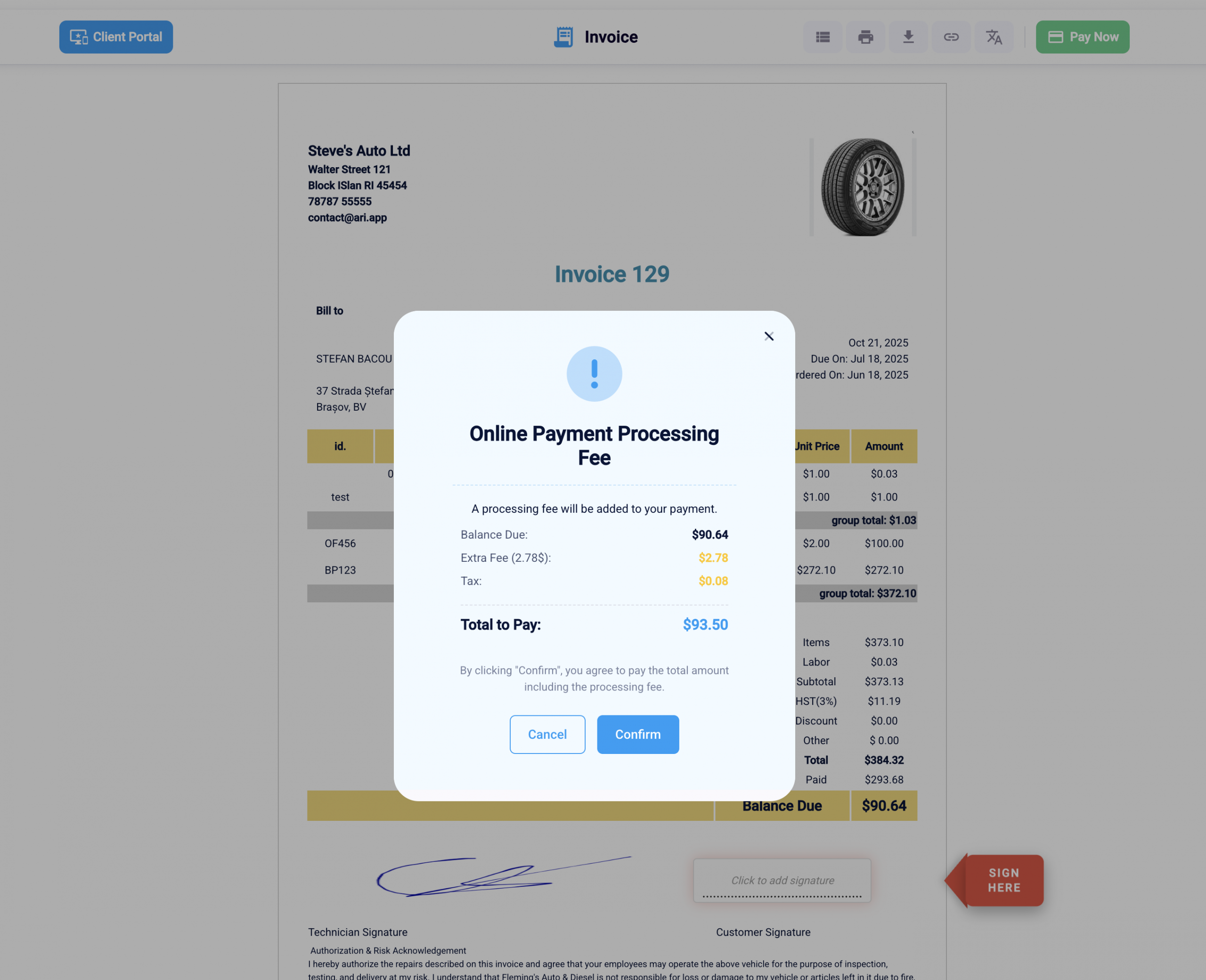
When the “Pass Fee to Client” option is turned on, ARI (Auto Repair Software) adds a clear disclosure step during online invoice payment. Customers see this disclosure before completing the payment, so they understand that a processing fee will be applied. This approach follows common best practices for payment transparency—showing relevant details at the right moment without overwhelming the user.

The fee is only presented when a client attempts to pay an invoice online. There are no changes to in-person payments or invoices that are not paid through the online payment flow.
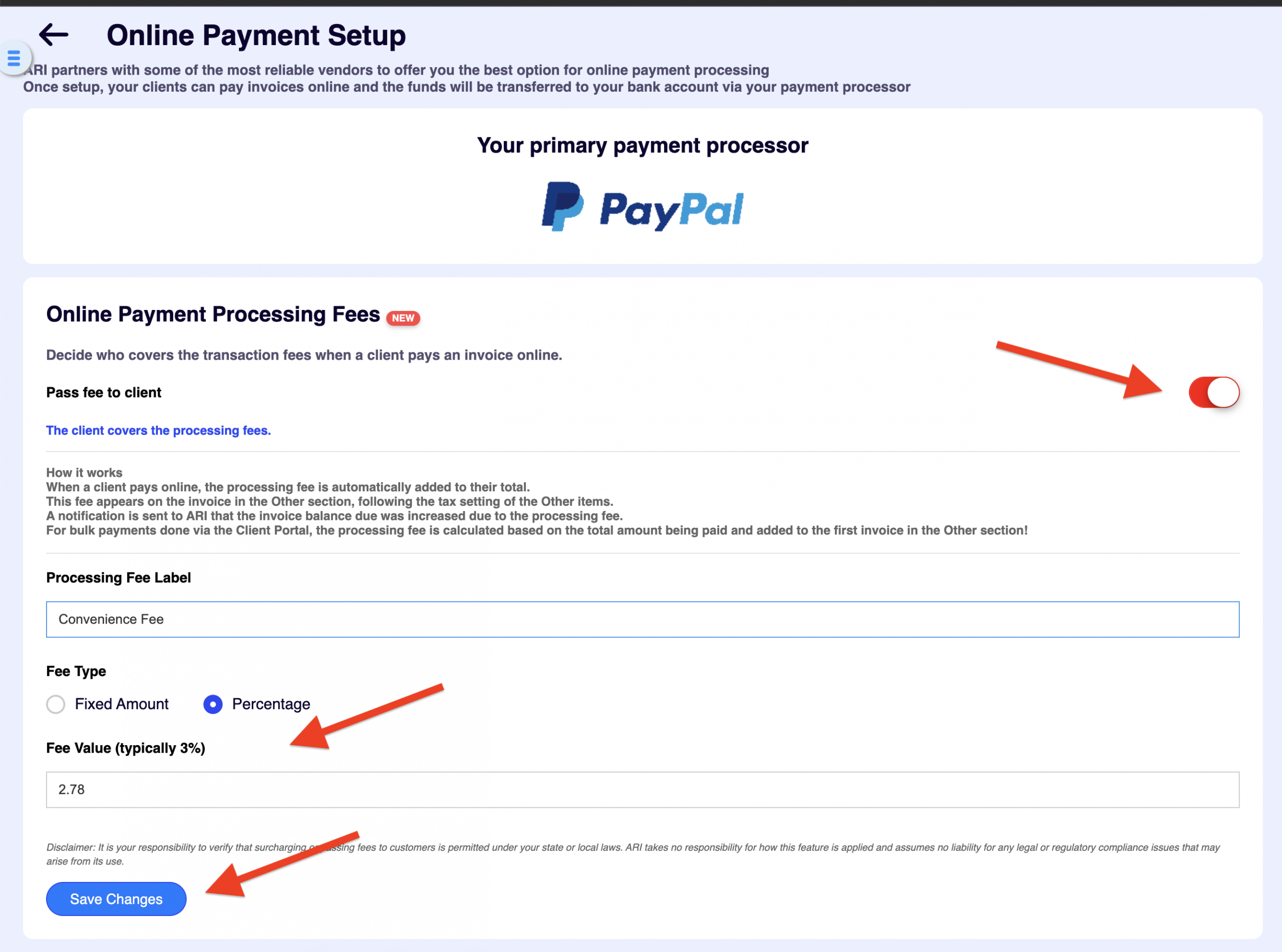
Pass fees to clients screenshot in ARI

How to enable the feature

Because this setting directly affects your customers’ checkout experience, it’s intentionally disabled by default. To turn it on:

  1. Go to Settings → Online Payments Setup

  2. Make sure a payment processor is connected to ARI

  3. Toggle “Pass Fee to Client” to ON

Once enabled, your clients will see a disclosure pop-up when paying invoices online, clearly explaining the added processing fee before payment is finalized. This keeps expectations clear and helps prevent confusion or disputes.
Track your savings

We made a table and an interactive calculator with an estimation of the savings you get after turning this setting on.

Estimated processing-fee savings (annual)

Assumptions used: $1,060,000 annual shop revenue, and a typical online payment processing fee range of 2%–3%.
Savings = Revenue × % of invoices paid online × fee rate.

Online-paid share of invoices Online-paid revenue Savings @ 2% Savings @ 3%
5% $53,000 $1,060 $1,590
10% $106,000 $2,120 $3,180
20% $212,000 $4,240 $6,360
35%+ $371,000+ $7,420+ $11,130+

Processing fee savings calculator

Enter your numbers, then click Calculate savings.


Ready. Click “Calculate savings”.

Online-paid revenue (annual)

Savings at 2%

Savings at 3%

Savings at 2.5%

Savings at your custom rate

Monthly savings (custom rate)

Note: This models percentage fees only (many processors also add a small fixed fee per transaction).

Conclusion

This update gives your auto repair business more flexibility in how you handle online payment costs—without compromising transparency. If online payments are a regular part of your workflow, passing processing fees to the client can help keep margins consistent as transaction volume grows. Since this feature is part of the latest ARI (Auto Repair Software) update, it’s worth reviewing your payment settings to decide whether enabling it makes sense for your shop. As always, the choice stays fully in your hands.

Happy Holidays, and best of luck in the new year.
Team ARI

My Vehicle: A Personal Dashboard for Solo Vehicle Owners

One Vehicle, One Clear Home Base: Meet the New My Vehicle Dashboard Most vehicle owners do not think of themselves as managing a fleet. They are thinking about one car, one next service, one estimate that needs a decision, or one question they want their repair shop to help answer.

Service Story: A Clearer View of Every Repair Visit

Turn Every Repair Visit Into a Story Customers Can Follow For a repair shop, a vehicle visit is a clear sequence: the vehicle arrives, the team inspects it, recommendations are made, decisions are recorded, work moves forward, and the final documents are prepared. For the vehicle owner, that same visit

AI Predictive Care: Turn Service History Into Bookings

From Service History to the Next Appointment: Meet AI Predictive Care Your customers do not stop caring about their vehicles when they leave your shop. They simply stop having the same information you have. Between visits, a vehicle owner may remember that something should be checked “soon,” wonder whether the

White-label and personalized client portal
White Label Auto Repair Software: Make the Portal Yours

Your Client Portal Just Got More Personal — and a Whole Lot Easier to Walk Into We shipped two updates to the ARI Client Portal that share one goal: making the portal feel less like our software and more like your shop. One makes signing in effortless for every customer.

Client Management

Add clients, vehicles & all the details that are relevant to them

Vehicle Management

Create detailed inspections with checklists, damage reports

Inventory Management

Manage your parts, tires, business assets, and all other important items.

Job Cards

Track labor progress, start & stop work clocks, approve & deny services.

Estimates

Create professional quotes for your auto repair clients

Invoices

Generate professional invoices for your auto shop’s clients

Inspections

Generate damage reports & attach pictures to your auto inspections

Appointments

Let your clients book your services online from the comfort of their home

Service Reminders

Earn return customers by reminding them when service is due

Accounting

Create purchase orders, track your expenses, and monitor your profits

OBD Scanner

Read Engine Error Codes with ARI monitor car’s parameters live

Reports & Stats

Reports for your business performance & export the data

Payments

Never miss a payment keep an eye on your invoice billing process

Marketing

Reach your core customers & market business across different channels

Vendors

Manage vendors, partners & orders for a streamlined repair experience

Time Tracking

Monitor and label the activity of multiple employees

Payment Processing

Receive payments on your Online Invoices with the world’s most renowned payment networks

Parts Ordering with
PartsTech

Order parts easily with PartsTech and ARI! Smooth and reliable parts procurement process.

M1 Labor Guides and
Estimates

Every mechanic benefits from quality Repair Guides and Car Repair Estimates.

Vehicle History with
CarFax

Get Service History Instantly. Decode VINs and Plates with Accurate Data from a Leading Supplier.

Car Diagnose with
CarMD

Get Diagnostic & Maintenance Info. Access Diagnosis, Solutions, and Problem Predictions.

Accounting with
QuickBooks

Sync ARI invoices to QuickBooks Online. Manage customers and inventory.

AI Labor
Guides

Get detailed labor guides, labor times, and estimates from the world's first AI labor guides system.

POS Terminal from 360Payments

Process In-Person Payments On The Spot. Geared towards auto repair businesses.

Customer Financing With Wisetack

ARI has partnered with Wisetack to offer your clients extra payment options for auto repair services.

Parts Ordering with
Nexpart

Order auto parts through Nexpart without leaving ARI — a faster, more reliable way to source what your shop needs.

Get Started

A complete guide to setting up and running your auto repair business

Client Portal

ARI’s client portal lets clients easily stay informed when they visit you

Multiple Users

How to add multiple users to your ARI Profile

Update ARI

You must ensure you keep your app updated all the time

Profile Setup

ARI offers features and settings tailored for auto repair services

Blog

Welcome to ARI's blog for updates, articles, and guides

ARI Awards

Here are our most notable achievements over the years.

Online Documents

Get the most out of your client management with our online documents

ARI Demo

Test the features and see if it’s the right fit for you

ARI Videos

Welcome To ARI's Official Video Library

ARI Affiliate Program

Earn rewards and ARI credits by referring our app to friends