

Client Portal for Repair Shop Customers

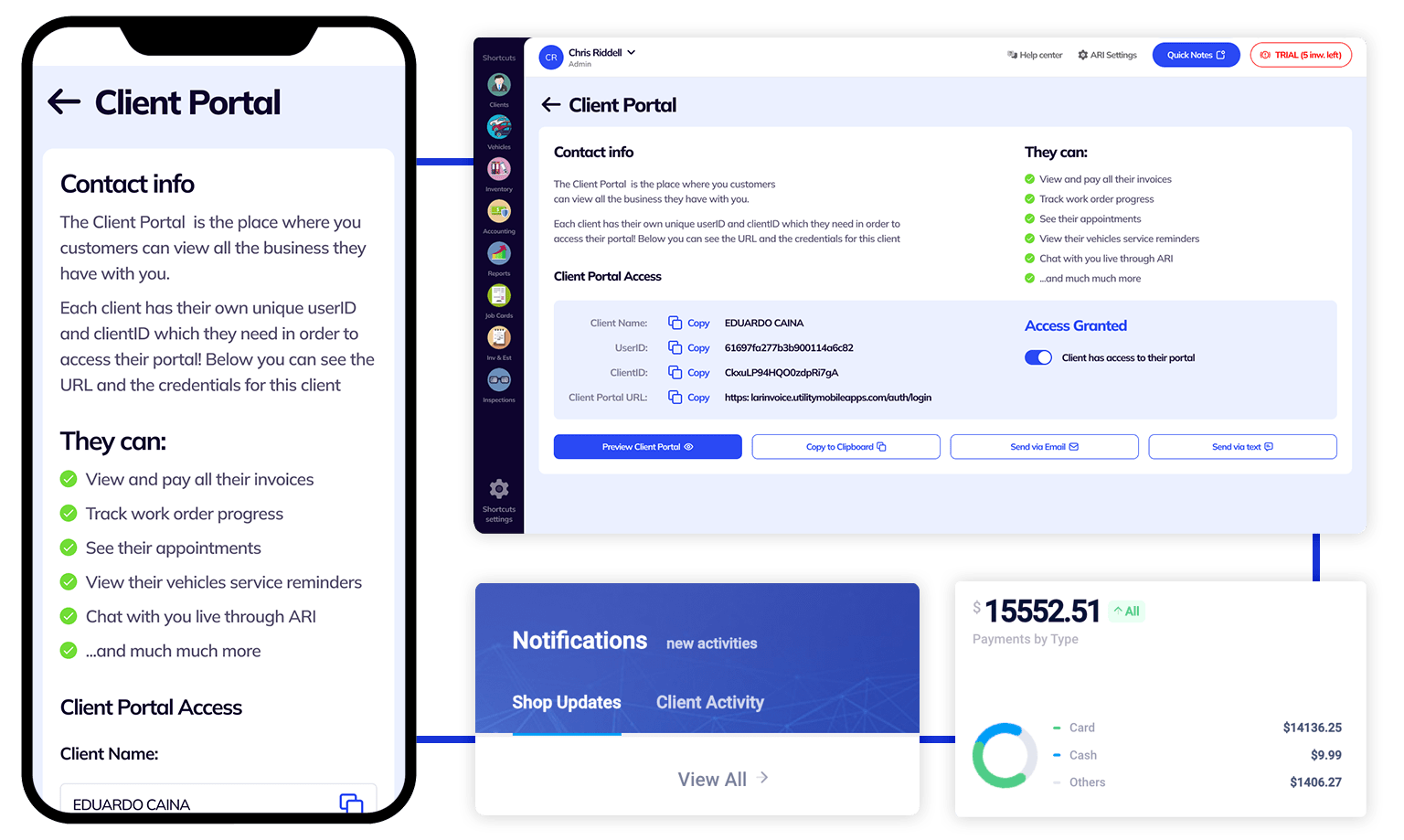
ARI’s client portal is where you keep track of everything related to your auto care provider. You see your appointments, payments, and vehicle maintenance details and even book appointments or chat with the shop/ mechanic.

*The client portal will work only if your auto repair specialist uses ARI(Auto Repair Software).

Client Portal

Client Portal Overview

How the Client Portal works

Client Portal Basics

The Client Portal presents an overview of business information handled by your auto care provider. It’s broken down into sections with quick access to payments, invoices, and other essential items. There’s a dashboard with a broader summary, reports, and a detailed section for each item.

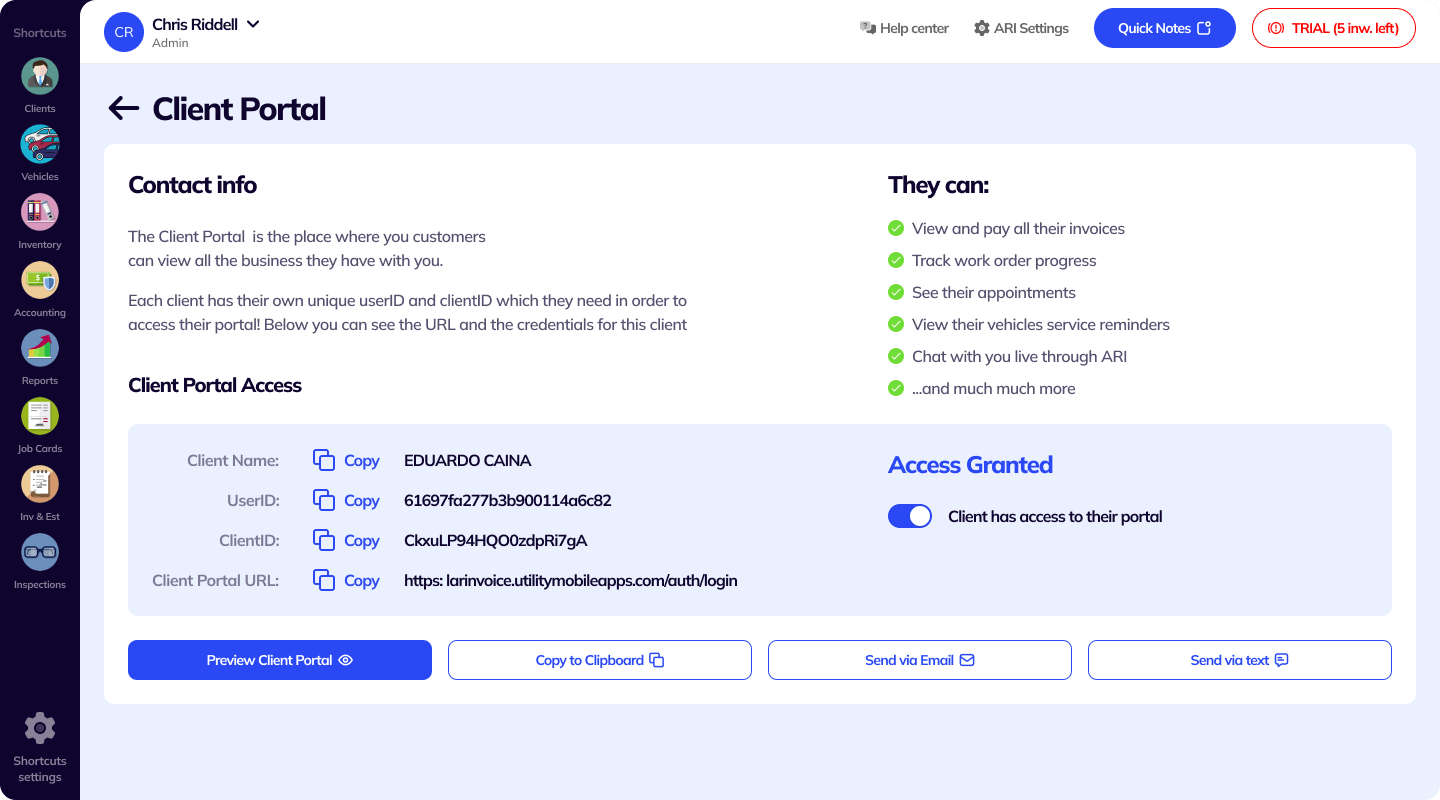
You can use the portal with login keys provided by your auto-care service. When they’ve sorted out your data – they will give you the entry keys via email, SMS, or a simple link.

You copy/ paste the Client and User IDs to open your portal. User IDs are unique to every client in an auto repair shop.

*If the shop/ mechanic has given you the wrong key – ask them to preview the portal and send you the accurate login info!

Your auto-care provider manages the data, but you can request changes at any time!

Using the Client Portal

Our client portal has a big dashboard, a sidebar menu, and a couple of action buttons.

The buttons do the following:

  • Contact us – opens a live chat with your mechanic/ repair shop.
  • Business data – pulls up a window with your financial data (payments and invoices), utilities tracking(vehicle inspections, maintenance, appointments), and a button to book an appointment with the shop.
  • Profile Icon (top-right) – has links to your profile and the auto care company profile.
  • Notifications – has info about your work orders and their status.
  • Dashboard – takes you back to the main page dashboard.
  • Reports – soon-to-be-released feature with different personalized reports.

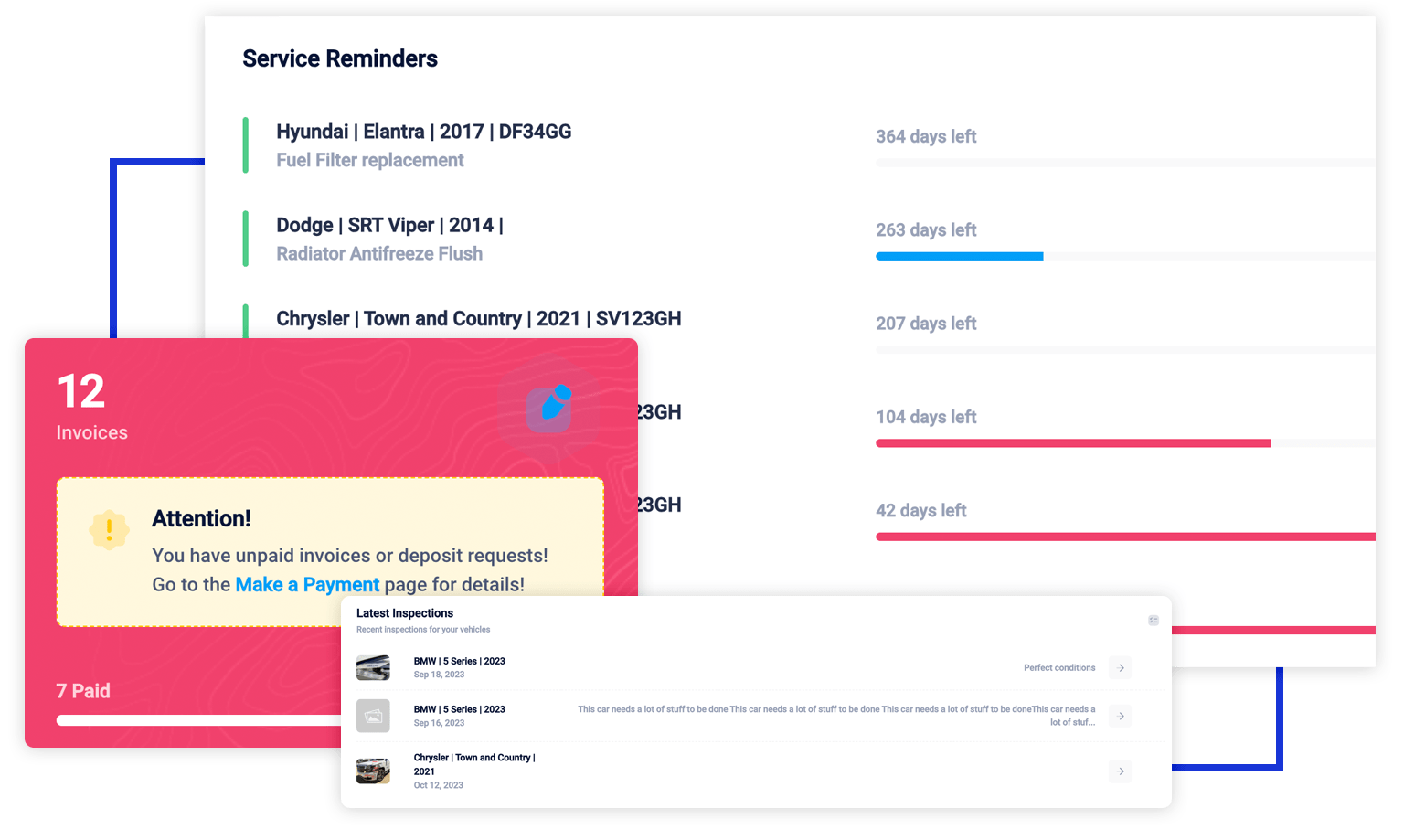
The other primary section is the dashboard. It summarizes the main things you will look for. It contains the following items:

  • The amount of all your invoices.
  • The sum of all payments and a breakdown by payment type.
  • All of your vehicles.
  • Links to your complete profile.
  • Your future online appointments and upcoming car maintenance.
  • The sum of recent invoices and their amount by month.
  • All vehicle inspections and work orders with their status.

*The sidebar menu has the same items formatted differently.

Get in touch with your auto repair specialist whenever you need assistance. They will receive a push notification when you start the chat and can reply instantly. They will easily understand what’s happening as your info is visible next to your profile. To start a new chat – click the message icon or go to
				
					Help Center → Get Support → Contact Us


Open the complete view when you want a deeper look into a payment, vehicle, or something else. Every detailed section is different and has various filtering options and action buttons.

Vehicles
Allow you to monitor your entire vehicle fleet. You can view the make, model, VIN, license plate number, engine, and more data about a car. Moreover, you can book an appointment for a vehicle or check the complete info list.

Appointments/ Booking
Here, you will find your future appointments with their status, date, and any notes about them. You can book an appointment with the action button.


Work Orders
Represent the service done on your vehicles. You can see the progress and details and pay for a repair job straight from the client portal!

Invoices
You’ll find your invoices with dates and payment status. The pay now action button will show up on all invoices that have an amount due.

Payments
Track the payments with your auto care provider, and check the invoice number, amount, and payment method.

Vehicle Inspections
Check the condition of your vehicle with a complete inspection checklist and a damage report. Click the ‘view more’ icon to follow the details

Upcoming Maintenance
Your shop will remind you about any incoming maintenance on your vehicles. You can see the next mandatory repairs, the days left, and other service details.

Using the Client Portal

Everything your shop has on file for you

Your side of the software your repair shop already runs on

The invoices, the photos, the appointments and the history for your vehicle — in one place you can open from your phone.

  • Pay the invoice from your phone

    Card, Apple Pay, Google Pay, PayPal or Venmo, straight from the invoice your shop sent. You see the exact amount before you confirm it.

    Online payments

  • Book without phoning

    Pick a service, a date and a time. The page is open at eleven at night and at six on a Sunday, when the shop is not.

    Online booking

  • See what they found

    Inspection findings arrive with photos of the actual part, so you are looking at the same thing your mechanic is.

    Inspections

  • Say yes, or say not yet

    Estimates wait for your answer. Anything you postpone stays on the list instead of disappearing, so it is easy to pick up next time.

    Estimates & postponed work

  • Follow the repair

    Opened, started, finished, paid. The page moves as the work does, so you do not have to ring up and ask.

    Service Story

  • Keep the paperwork

    Every invoice, estimate and inspection stays where you can find it, long after you have driven away.

    Your vehicle’s records

Getting in takes about a minute

No app to download, and no account to create

Your shop sends you a link, and two details get you in.

  1. Open the link your shop sent

    It arrives by text or by email. If you cannot find it, go to portal.ari.app and start from there instead.

  2. Find your shop

    Start typing your shop’s name and pick it from the list. If it does not come up, paste the Shop ID from their message instead.

  3. Enter your Client ID

    That is the ID your shop sent you — it is in the same text or email as the link. Then Continue, and you are in.

Paying does not even need that

An invoice link opens straight to the payment page. Most of the people who paid or booked through the portal in July never created a login at all.

Lost your ID? Use Forgot your credentials? on the sign-in page, or ask your shop to send the link again. If you set up your own username and password, there is a separate sign-in link for those just underneath.

Open the sign-in page

It opens in whatever browser you already have, on a phone or a computer.

You stop having to ask “is it ready yet?”

Service Story puts the whole visit on one page, under your shop’s name

Instead of an estimate in one message, photos in another and a phone call for the status, it sits in one place that updates as the work happens.
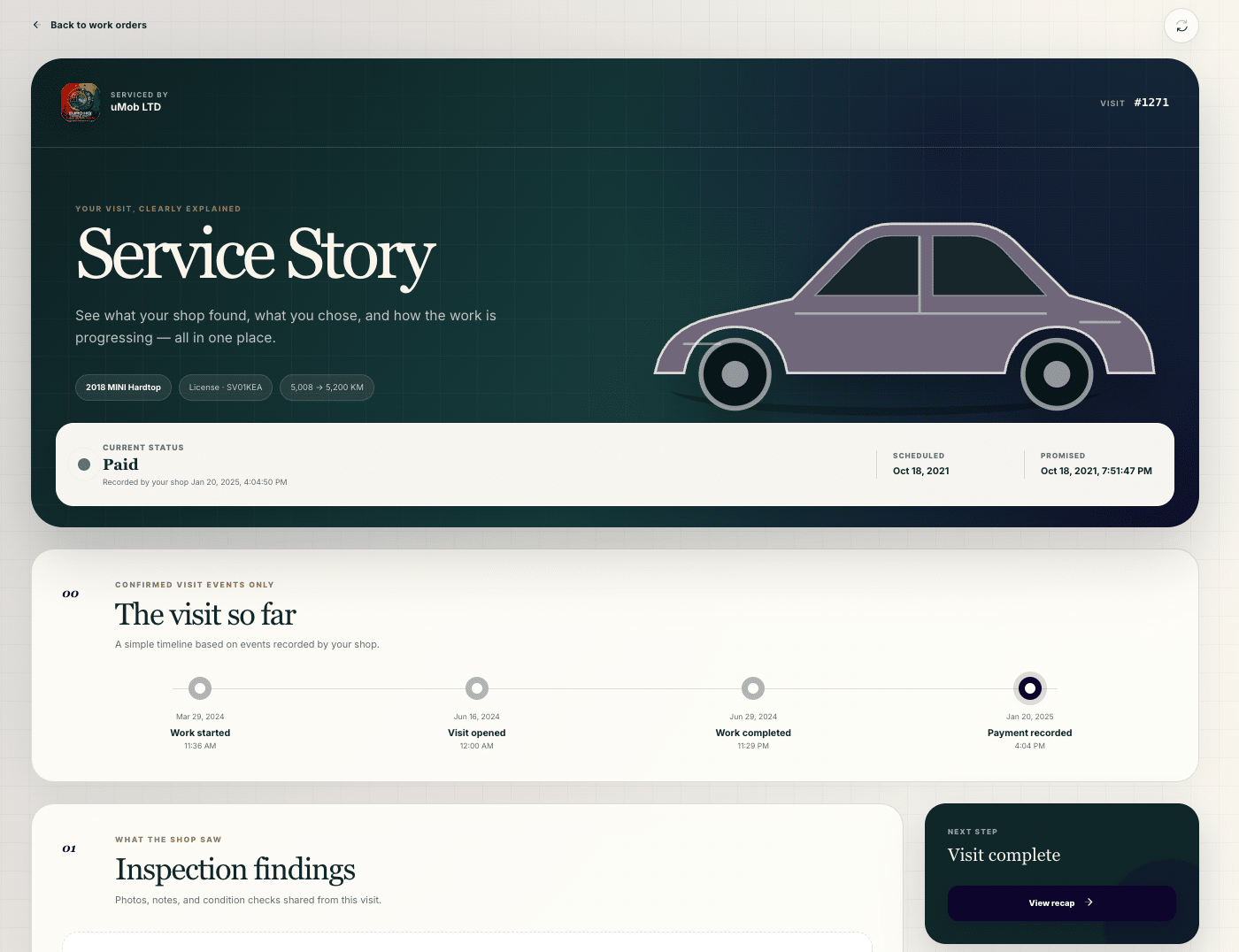
A Service Story page in the client portal, branded for the shop, showing the vehicle, a status of Paid, a timeline of the visit so far and the start of the inspection findings
One page you can follow from drop-off to pick-up.
  1. Where your vehicle stands

    The status right now, and the dates that matter, on one timeline: opened, work started, finished, paid.

  2. What they found

    Inspection findings with the photos attached, so you can see the worn part rather than take somebody’s word for it.

  3. What needs your decision

    Recommendations sit on their own, ready for you to approve or postpone. Nothing important is buried inside a document.

  4. What is being done, and what it costs

    Parts and services with the progress recorded against them, your shop’s notes, any files they attached, and the running total.

  5. What happens next

    The page changes as the visit does: review a recommendation, follow the work, open the invoice, or book the next appointment.

Nobody has to update you by hand

Your shop does not write any of this separately. It builds itself out of the job they are already working on, so it stays current on its own.

Open it from your dashboard, from your list of work orders, or from the top of an invoice. Service Story appears for eligible visits — older or simpler records keep the invoice, estimate and inspection pages you already know.

The two things most people come here to do

Booking and paying, without a phone call

Nine out of every ten people who rated the portal in July were doing one of these two things. Both are built to finish in the time you have standing next to your car.

Booking

  • Open at any hour. Pick a service, a date and a time that suits you.

  • Not only cars — boats, RVs, ATVs and snowmobiles book the same way.

  • In a hurry, let the booking assistant do it by chat or by phone. It answers in your shop’s name, not ours.

  • An estimate you have already approved turns into an appointment in one tap.

Paying

  • Card, Apple Pay, Google Pay, PayPal and Venmo.

  • Pay straight from the invoice, on the phone in your hand, without ringing anyone.

  • If your shop passes on its processing fee, the amount on screen is exactly what your card is charged. Nothing extra appears afterwards.

  • Asked for a deposit? Pay that now and settle the rest when the work is done.
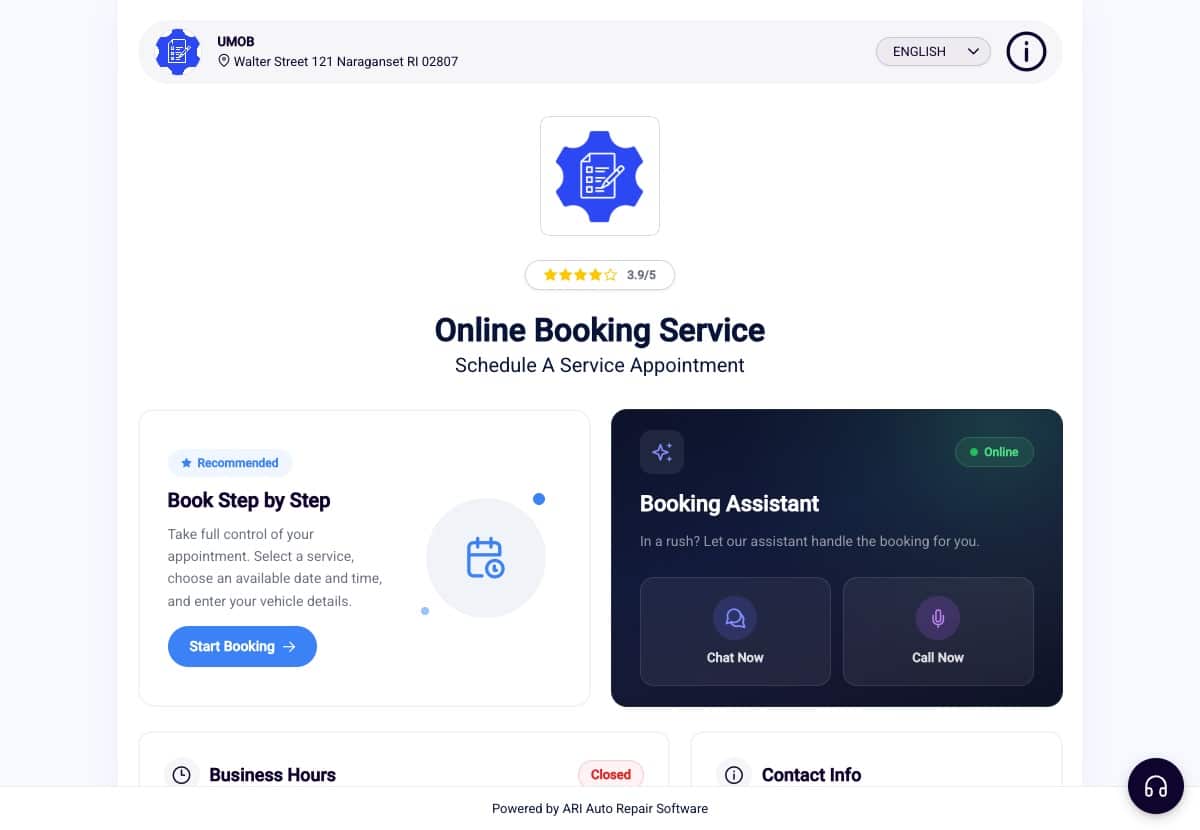
An online booking page in the client portal showing the shop's name, opening hours and rating, with a list of services to choose from
Your shop’s booking page, with their name, their hours and their rating on it.

Your vehicle keeps its own page

Not only for the week your car is in the shop

Between visits it holds the record, the reminders, and a view of what is likely to come up next.

  • One vehicle, one screen

    With a single vehicle on your account the dashboard is built around it: year, make, model, plate, the mileage your shop recorded, and one clear thing to do next.

  • A care passport

    Service history, documents and the work your shop has recommended, kept together instead of scattered across old texts and glovebox receipts.

  • A look at what is next

    Ask for a forecast and the portal suggests three or four services worth discussing, with a reason for each and how confident it is about them.

  • A price before you ask

    The cost estimator gives you a ballpark for a job before you speak to anybody, so you are not walking in blind.

Forecasts are generated by AI and labelled as such wherever they appear. They draw on your vehicle’s details, the mileage and services your shop recorded, and general maintenance information — they are not a diagnosis, and they are not your manufacturer’s official schedule. Your shop, or your owner’s manual, has the final word.

Most people would rather do it this way

July 2026 results

Every time somebody finishes paying, booking or checking on a vehicle in the portal, they get asked one question: was that alright? In July 2026, 2,079 people answered — and 171 of them wrote something in the box as well.

97.4% rated it positive
  • 2,024thumbs up, 55 down
  • 359shops in the numbers
  • 84.4%did it from a phone
  • The pay portal is so nice I can do it on a quick break.

    Paying an invoice

  • Super easy to use the app on my phone.

    Paying an invoice

  • No glitches, quick screen changes.

    Paying an invoice

  • Fast and easy appointment booking

    Booking an appointment

  • Professional and easy to read documents

    Vehicle dashboard

  • clear and easy to understand.

    Service Story

Read the full report

Ten pages: every part of the portal people rated, the comments they wrote, and what is being changed because of them.

From 2,079 ratings left inside the ARI client portal between 5 and 31 July 2026, across 359 shops. Nobody was paid or prompted to leave one — everybody was asked once, at the moment they used it. Quotes are word for word, spelling as left, and anonymous.

The complaints get read too

What people asked for, and what is being done about it

Not all 171 of those written comments were praise. These are the five things people asked for most in July.

  1. Fewer questions when you book In progress

    People told us the booking form asked for more than it needed, including things nobody carries around — a VIN, an engine size. Those fields are being cut back and made optional.

  2. Regulars stop repeating themselves In progress

    “As a regular customer it would be nice not to have to enter everything every time.” Returning customers are being recognised, with vehicle and contact details already filled in.

  3. More ways to pay In progress

    People named the cards and wallets they wanted and could not use. What the portal accepts is being widened, so the payment method is never the reason an invoice sits there.

  4. Smoother on a phone In progress

    More than eight in ten people do this on a phone, so the small things matter: keyboard order, autofill, and being able to type a signature instead of drawing one with a fingertip.

  5. The total, up front In progress

    People want to see the number before they commit — at booking, and again at payment. It is being surfaced earlier in both places.

Based on the 171 written comments left in the portal between 5 and 31 July 2026. These are current plans, and the timing can move.

Questions customers ask

Before you tap a link a repair shop sent you

The things people usually want settled first.

Do I need to download an app or create an account?

No to both. The portal opens in whatever browser is already on your phone. Your shop sends you a link, you enter the ID they gave you, and that is the whole thing. Paying an invoice does not even need that — the link opens straight to the payment page.

I have lost the ID my shop sent me.

Use Forgot your credentials? on the sign-in page, or simply ask your shop to send the link again — they can resend it by text or email in a few seconds. If you created your own username and password, sign in with those using the separate link underneath the form.

Why is there a processing fee on my invoice?

Some shops pass on the fee their card processor charges them, and some absorb it. That is your shop’s decision rather than something ARI adds. Where it does apply, the amount shown on screen is exactly what your card is charged — nothing separate appears later. If the fee is the problem, your shop is the one who can change it.

Is my information safe?

The sign-in service limits repeated failed attempts, so credentials cannot be guessed by brute force. The booking assistant runs invisible checks that block bots and stop third parties abusing it.

Why does it have my shop’s name and logo on it?

Because some shops pay for that. On ARI Pro Plus the portal carries the shop’s own branding across the sign-in page, the booking page and every document link they send you. It is the same portal either way — your shop has just put its name on the front.

Can I see invoices and inspections from past visits?

Yes. Your dashboard keeps your invoices and totals, your payments broken down by type, your vehicles, upcoming appointments and service reminders, and your inspections and work orders with the status of each.

Do I have to re-enter my details every time I book?

Often yes, for now — and it is the single thing customers complain about most. Recognising returning customers so the form arrives already filled in is in progress.

Can I message the shop from here?

Yes. Open the chat from the message icon, or through Help Center → Get Support → Contact Us. It reaches your shop as a notification, so you are not waiting for somebody to check an inbox.

What if my shop does not use ARI?

Then there will be nothing in the portal for you. It only carries what a repair shop puts there, so it works only if the shop looking after your vehicle runs its jobs in ARI.

If your shop does not use ARI yet. There is nothing here for you to sign up for and nothing to buy — the portal exists because a repair shop chose to run its work in ARI, and it only ever shows what that shop puts into it. If you have used one somewhere else and found yourself missing it at your usual garage, it is worth mentioning to them. A fair number of shops hear about it from a customer first.

Client Management

Add clients, vehicles & all the details that are relevant to them

Vehicle Management

Create detailed inspections with checklists, damage reports

Inventory Management

Manage your parts, tires, business assets, and all other important items.

Job Cards

Track labor progress, start & stop work clocks, approve & deny services.

Recycle Bin

Restore deleted invoices, clients & job cards within 7 days

Estimates

Create professional quotes for your auto repair clients

Invoices

Generate professional invoices for your auto shop’s clients

Inspections

Generate damage reports & attach pictures to your auto inspections

Appointments

Let your clients book your services online from the comfort of their home

Service Reminders

Earn return customers by reminding them when service is due

Accounting

Create purchase orders, track your expenses, and monitor your profits

OBD Scanner

Read Engine Error Codes with ARI monitor car’s parameters live

Reports & Stats

Reports for your business performance & export the data

Payments

Never miss a payment keep an eye on your invoice billing process

Marketing

Reach your core customers & market business across different channels

Vendors

Manage vendors, partners & orders for a streamlined repair experience

Time Tracking

Monitor and label the activity of multiple employees

Payment Processing

Receive payments on your Online Invoices with the world’s most renowned payment networks

Parts Ordering with
PartsTech

Order parts easily with PartsTech and ARI! Smooth and reliable parts procurement process.

M1 Labor Guides and
Estimates

Every mechanic benefits from quality Repair Guides and Car Repair Estimates.

Vehicle History with
CarFax

Get Service History Instantly. Decode VINs and Plates with Accurate Data from a Leading Supplier.

Car Diagnose with
CarMD

Get Diagnostic & Maintenance Info. Access Diagnosis, Solutions, and Problem Predictions.

Accounting with
QuickBooks

Sync ARI invoices to QuickBooks Online. Manage customers and inventory.

AI Labor
Guides

Get detailed labor guides, labor times, and estimates from the world's first AI labor guides system.

POS Terminal from 360Payments

Process In-Person Payments On The Spot. Geared towards auto repair businesses.

Customer Financing With Wisetack

ARI has partnered with Wisetack to offer your clients extra payment options for auto repair services.

Parts Ordering with
Nexpart

Order auto parts through Nexpart without leaving ARI — a faster, more reliable way to source what your shop needs.

Get Started

A complete guide to setting up and running your auto repair business

Client Portal

ARI’s client portal lets clients easily stay informed when they visit you

Multiple Users

How to add multiple users to your ARI Profile

Update ARI

You must ensure you keep your app updated all the time

Profile Setup

ARI offers features and settings tailored for auto repair services

Blog

Welcome to ARI's blog for updates, articles, and guides

ARI Awards

Here are our most notable achievements over the years.

Digital Invoices

Get the most out of your client management with our online documents

ARI Demo

Test the features and see if it’s the right fit for you

ARI Videos

Welcome To ARI's Official Video Library

Referral Program

Get 3000 ARI Credits by referring someone to ARI