Introducing Expense Tracking in the Client Portal

Expense tracking illustration

Your Client Portal Just Got Smarter: Introducing Expense Tracking for Vehicle Owners

Keeping customers engaged between visits is one of the biggest hurdles in the auto repair industry. That’s why we’re constantly innovating to make the ARI Client Portal more valuable—not just for your shop, but for the vehicle owners who rely on it.

Today, we’re rolling out Expense Tracking, a new feature that gives your customers a clear, visual breakdown of their vehicle spending over time.

What Your Customers Will See

When vehicle owners log into their portal and navigate to Reports, they’ll discover a new Expenses page. This dashboard pulls together their complete service history into an intuitive, easy-to-read interface.

At a glance, they can view:

  • Financial Summaries: Total spent, total paid, and outstanding balances across all their vehicles.
  • Visual Trends: A monthly bar chart displaying spending patterns over time.
  • Fleet Breakdowns: Per-vehicle segmentation, allowing them to compare costs across their fleet.
  • Detailed Records: A searchable, sortable table listing every invoice with dates, amounts, and payment statuses.

Power User Tools: Customers can filter by vehicle, select preset date ranges (such as “Last 6 Months” or “This Year”), or select custom time frames. Plus, they can export data as a CSV spreadsheet or a printable PDF—perfect for personal budgeting, tax records, or fleet management.
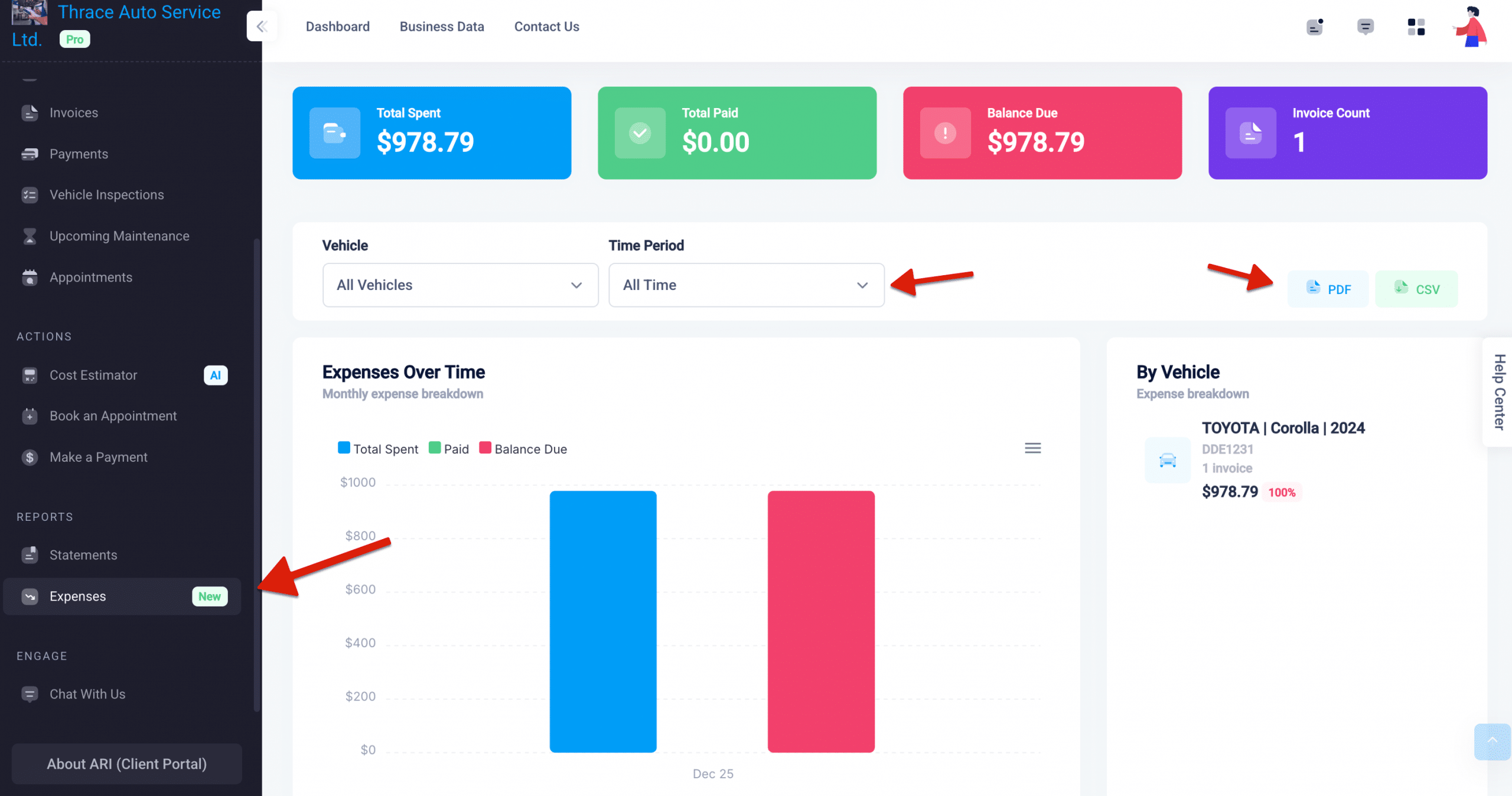
The expense dashbord in ARI's client portal

Why This Matters for Your Shop

You might ask: Why give customers this much visibility into their spending? Transparency isn’t just a nice-to-have; it’s a growth strategy. Here is how Expense Tracking benefits your bottom line:

  • It Builds Trust: Transparency is the foundation of long-term relationships. When owners see exactly what they’ve paid and what’s outstanding, it eliminates surprises. That confidence keeps them returning to your shop rather than looking elsewhere.
  • It Reduces Support Calls: When customers can self-serve their payment history and invoice details, they don’t need to call your front desk. This frees your team to focus on what matters—getting cars fixed.
  • It Encourages Timely Payments: The Expenses dashboard clearly highlights outstanding balances in red. When customers see what they owe at a glance, they are significantly more likely to settle up without you needing to send a reminder.
  • It Makes Your Portal “Sticky”: Every impactful feature gives vehicle owners another reason to stay connected with your digital ecosystem. The more they use the portal, the more likely they are to book their next appointment, approve an estimate, or refer a friend.
  • It Positions You as a Pro: Not every repair shop offers this level of data access. Providing a polished expense dashboard signals that you run a modern, customer-first operation.

No Setup Required

Expense Tracking is now active for all ARI users at no additional cost. The feature works automatically using your existing invoice data—there’s nothing to configure or turn on. Your customers will see the new Expenses option under Reports the next time they log in.

We built ARI to help independent shops deliver a client experience that rivals the big dealerships. Expense Tracking is one more step in that direction.

Have questions or feedback? Reach out to us anytime at ari.app.

Recycling Bin Feature Added

Introducing the Recycle Bin: Never Lose a Client or Invoice Again We’ve all been there. You’re cleaning up your client list, tap the wrong row, and poof—a customer’s entire history is gone. Or, a technician on the shop floor deletes a Job Card meant for another vehicle, and suddenly, there

Helcim is now an ARI Partner

Helcim Is Now Built Into ARI You asked for a cheaper way to get paid online, and we delivered. As of today, Helcim is ARI’s newest payment processor, sitting alongside Stripe, Square, 360Payments, and PayPal. If you’re tired of flat-rate processors charging the same 2.9% + 30¢ on every card

localized labor estimates in ARI
Localized Labor Estimates

Your AI Estimates Now Speak Your Market If you’ve ever looked at an AI-generated parts estimate and thought, “That’s not what it costs around here,” you’re not alone. Shop owners from Phoenix to Melbourne have told us the same thing: the numbers looked like they were pulled from a different

Improved Repair Assistant in ARI
ARI’s Improved Repair Assistant

A Smarter, Faster Repair Assistant You’re elbow-deep in a vehicle you’ve only worked on once before. You need a torque spec, a firing order, or a tip on reaching that one hidden bolt. You need it now—not in four tabs, three searches, and a headache. The Repair Assistant has always

Body repair labor guides section in ARI (Auto Repair Software)
Introducing Body Repair Labor Guides

Body Repair Labor Guides for Collision & Paint Shops If you run a body shop, collision center, or paint booth, you’ve probably noticed that most shop management software is built around mechanical repair (oil changes, brakes, timing belts). When you need to quote a fender R&R with a three-stage pearl

New embeded appointments page from ARI
Website-embedded online booking page

Your Booking Page Now Fits Right Into Your Website If you already share your ARI booking link with clients, you know how convenient online booking is—customers pick a time, fill in their info, and the appointment shows up on your calendar automatically. However, sending people to a separate page means

Client Management

Add clients, vehicles & all the details that are relevant to them

Vehicle Management

Create detailed inspections with checklists, damage reports

Inventory Management

Manage your parts, tires, business assets, and all other important items.

Job Cards

Track labor progress, start & stop work clocks, approve & deny services.

Estimates

Create professional quotes for your auto repair clients

Invoices

Generate professional invoices for your auto shop’s clients

Inspections

Generate damage reports & attach pictures to your auto inspections

Appointments

Let your clients book your services online from the comfort of their home

Service Reminders

Earn return customers by reminding them when service is due

Accounting

Create purchase orders, track your expenses, and monitor your profits

OBD Scanner

Read Engine Error Codes with ARI monitor car’s parameters live

Reports & Stats

Reports for your business performance & export the data

Payments

Never miss a payment keep an eye on your invoice billing process

Marketing

Reach your core customers & market business across different channels

Vendors

Manage vendors, partners & orders for a streamlined repair experience

Time Tracking

Monitor and label the activity of multiple employees

Payment Processing

Receive payments on your Online Invoices with the world’s most renowned payment networks

Parts Ordering with
PartsTech

Order parts easily with PartsTech and ARI! Smooth and reliable parts procurement process.

M1 Labor Guides and
Estimates

Every mechanic benefits from quality Repair Guides and Car Repair Estimates.

Vehicle History with
CarFax

Get Service History Instantly. Decode VINs and Plates with Accurate Data from a Leading Supplier.

Car Diagnose with
CarMD

Get Diagnostic & Maintenance Info. Access Diagnosis, Solutions, and Problem Predictions.

Accounting with
QuickBooks

Sync ARI invoices to QuickBooks Online. Manage customers and inventory.

AI Labor
Guides

Get detailed labor guides, labor times, and estimates from the world's first AI labor guides system.

POS Terminal from 360Payments

Process In-Person Payments On The Spot. Geared towards auto repair businesses.

Customer Financing With Wisetack

ARI has partnered with Wisetack to offer your clients extra payment options for auto repair services.

Get Started

A complete guide to setting up and running your auto repair business

Client Portal

ARI’s client portal lets clients easily stay informed when they visit you

Multiple Users

How to add multiple users to your ARI Profile

Update ARI

You must ensure you keep your app updated all the time

Profile Setup

ARI offers features and settings tailored for auto repair services

Blog

Welcome to ARI's blog for updates, articles, and guides

ARI Awards

Here are our most notable achievements over the years.

Online Documents

Get the most out of your client management with our online documents

ARI Demo

Test the features and see if it’s the right fit for you

ARI Videos

Welcome To ARI's Official Video Library

ARI Affiliate Program

Earn rewards and ARI credits by referring our app to friends