Introducing the Recycle Bin: Never Lose a Client or Invoice Again
We’ve all been there. You’re cleaning up your client list, tap the wrong row, and poof—a customer’s entire history is gone. Or, a technician on the shop floor deletes a Job Card meant for another vehicle, and suddenly, there is no easy way back.
You asked, and we delivered. Starting today, ARI features a new Recycle Bin. When you delete a client, vehicle, invoice, estimate, Job Card, or custom template, it no longer disappears forever. It is moved to your Recycle Bin, where you can restore it with a single tap or permanently remove it.
How It Works
Your daily workflow remains the same. You continue to delete using your usual swipe, tap, or delete button. Behind the scenes, ARI (Auto Repair Software) now stores a safe copy of your deleted items for 7 days.
Accessing Your Recycle Bin
- Open Settings from the main menu.
- Tap the Recycle Bin card.
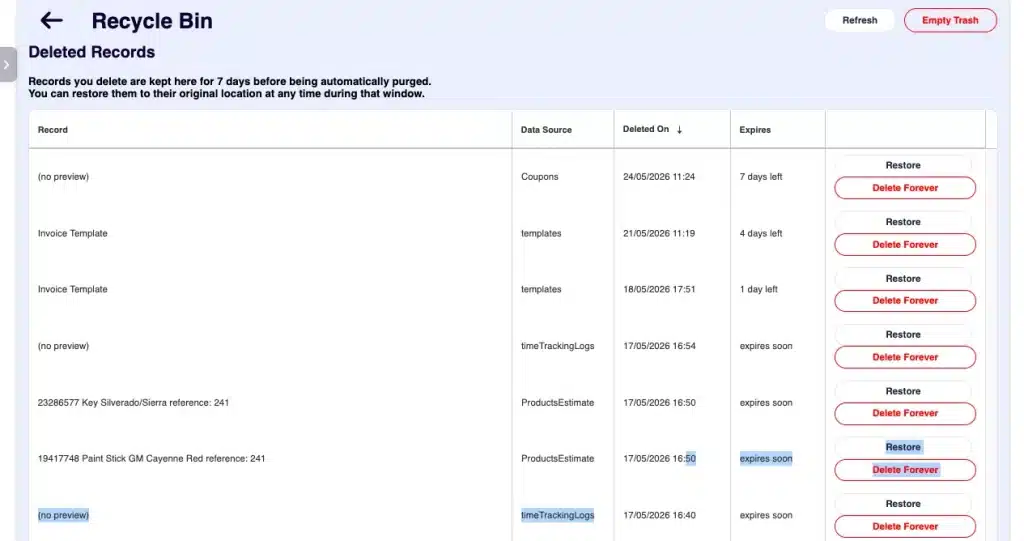
Inside, you will see a list of recently deleted items, including the record type, identifier (e.g., Invoice #564, “John Doe”), and the date of deletion. Each row features two simple options:
- Restore: Instantly returns the record to its original location with all original data intact. If an ID conflict arises (rare, but possible), ARI will prompt you before overwriting existing data.
- Delete Forever: Permanently removes the item with no chance of recovery.
Need a clean slate? Use the Empty Recycle Bin button to clear everything at once.
What’s Covered
We have included nearly every critical record type to ensure you are fully protected:
- Clients & Vehicles
- Invoices & Estimates
- Job Cards & Line Items
- Appointments & Expenses
- Custom Email Templates
Note: Only system-level records, such as chat messages and session logs, bypass the bin. These items are excluded to ensure your storage remains lean and secure.
The 7-Day Safety Net
To keep your shop’s data organized and your storage optimized, every item in the Recycle Bin has a 7-day countdown. After one week, items are automatically purged. This window provides the perfect balance: plenty of time to catch an accidental deletion, but not enough time for the bin to become cluttered with unnecessary data.
Delete with Confidence
Accidents happen in a busy shop. Whether a technician taps the wrong row during a rush or an owner accidentally removes an active record, you no longer need to contact support or rebuild data from scratch.
Next time you are tidying up your client list or archiving old Job Cards, go ahead and hit delete—you now have a 7-day safety net working for you.