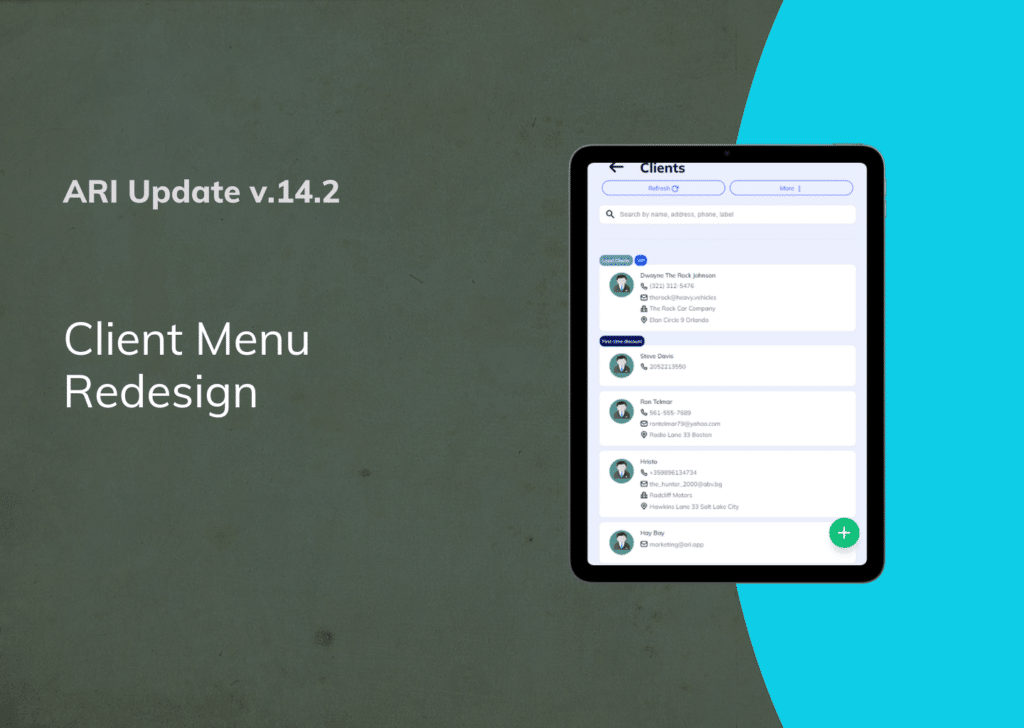
ARI Update – Client Menu Redesign

client menu redesign illustration

We are happy to announce the complete redesign of our client menu. Our latest auto repair software update gives you a new layout with better input options and usability improvements. This aims to improve your workflow and give you a fast route to your key business details.

Make sure you are using the latest ARI version with the help of this guide.

Let’s explore the changes in detail:

Client Page Changes

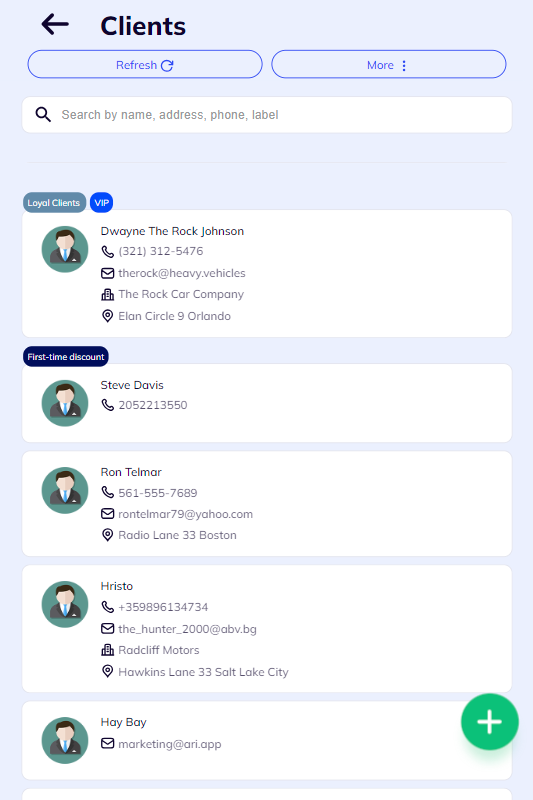
The new client page has a modern layout that lets you navigate easily
and find your clients in seconds. Depending on your chosen view, you will see your client info in columns or cards on the main client page. The grid view is the default setting for a desktop PC or laptop, and the list view is the default mode for mobile devices.

We introduced new icons and rearranged some fields so you understand the information more intuitively.
 

Adding a new client

Adding a new client now is much more intuitive. When you click on the button in the client view, you can start adding the client details. Most of the fields are identical to the previous version, but the fields are restructured to make the data input easier. We remade some of the action buttons such as ID Scan, Contact Import, and phoning a client to improve usability.

There are new toggle settings you can activate on individual clients. For example, you can make a client tax-exempt, apply a discount, or override the labor rate or parts markup for them. Use any of the toggle buttons to turn on and off any of the settings you like.
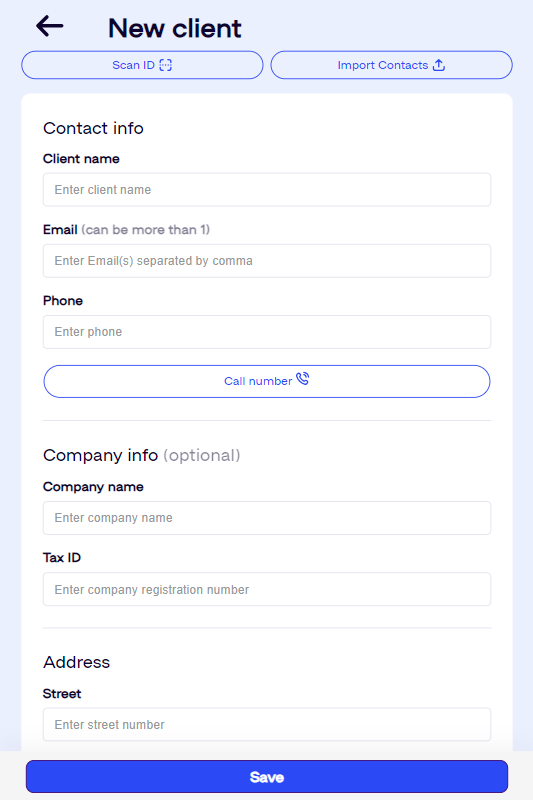
Creating new clients in the updated ari client view

Client Details Page

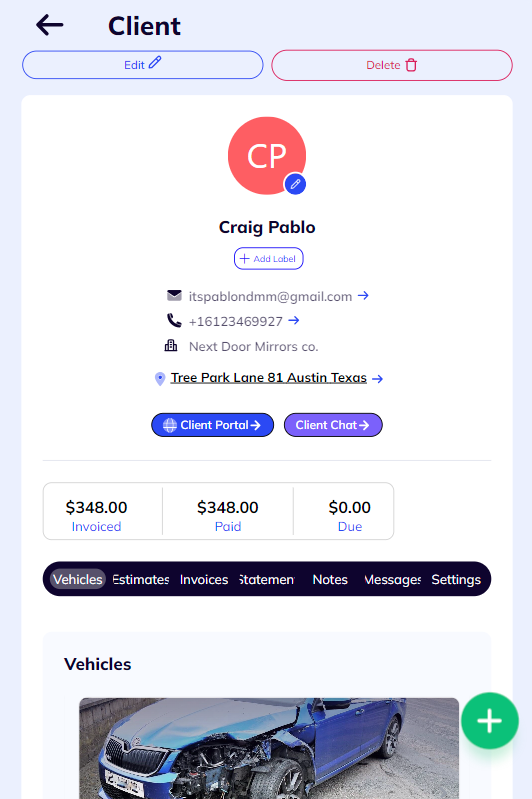
The new layout combines all key client info in a much easier-to-understand format. You can see all the details, labels, and action buttons in one place. By clicking on the arrow button next to the details, you can dial the phone, open your email client, or open the client location on Google Maps.

We’ve added two new action buttons to each client details page. One is the Client Portal tab, where you can preview the portal or send it to your clients. The other is the Client Chat which gives you quick access to the chat in case a client has initiated it via the portal.

Each client page now has a summary of the total Invoiced amount and a breakdown of the Paid and Due sum.

A brand-new feature is the info tab which grants quick access to every menu in the app related to a certain client. You can see a client’s Vehicles, Invoices, Estimates, Statements, Notes, Messages, and even toggle any of the custom settings for them.
Open the new client portal view

Client Portal Minipage

The client portal page also received a significant design change. We’ve explained how it works, listed its perks, and added the unique credentials and sharing options in the layout. Remember, clients can generate their IDs and Passwords after you grant them the initial access keys.
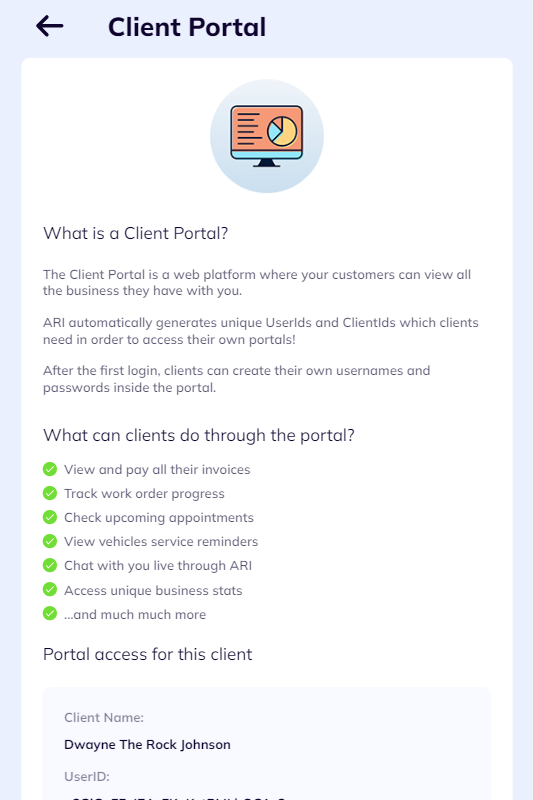
Individual client portal page preview

Thanks for sticking along. Please try the new design and tell us how you feel about it. We’ll be glad to hear your feedback.


Perfect Online Booking Page checklist
Perfect Online Booking Page

The “Perfect Booking Page” Checklist  A pretty page gets visits, but a perfect page gets keys in hands. Use this checklist to make sure your new ARI booking page is a conversion machine. 1. The “First 3 Seconds” Audit [ ] High-Resolution Logo: Does your logo look crisp or pixelated?

More Payment Options for Square users in the client portal
New Payment Options For Square Users

New Payment Options Now Available for Your Clients If You Use Square We’re excited to announce that your Client Portal now supports three new payment methods through your existing Square integration: Google Pay, Apple Pay, and Cash App Pay. These options appear automatically alongside the standard card payment form when

ARI Online Booking Comparison
ARI’s Online Booking Compared

The “Booking Bottleneck”: Why Your Shop Is Leaking Leads (And How to Fix It) You’re spending money on Google LSA, Facebook ads, and a professional website. You’re doing the work to get the “click.” But what happens when that customer actually lands on your booking page? If you’re using the

ARI Online Booking Landing Page new
ARI’s Improved Online Booking Landing Page

Your Shop Just Got a Digital Facelift (And it’s Already Live) You know the saying: “You never get a second chance to make a first impression.” In the repair business, that first impression usually happens on your booking page. If it looks like a cluttered spreadsheet from 2005, customers are

More Accurate AI Labor Guides and Estimates
AI Labor Guides with Real-Time Data

Stop Paying the “Data Tax”: AI Labor Guides Now Verified with Real-Time Data You know the drill. You’ve got a car on the lift, a customer waiting for a quote, and a software bill that looks like a mortgage payment. Most shop management systems hit you with a “Data Tax”—a

ARI AI Voice Booking Assistant Illustration
Introducing ARI’s AI Voice Assistant

Stop Answering the Phone. Let Your AI Do It. You know the sound. You’re elbow-deep in a brake job, covered in grease, and the shop phone starts ringing. You have two choices: Wipe your hands, kill your momentum, and answer a 5-minute question about oil change availability. Let it go

Client Management

Add clients, vehicles & all the details that are relevant to them

Vehicle Management

Create detailed inspections with checklists, damage reports

Inventory Management

Manage your parts, tires, business assets, and all other important items.

Job Cards

Track labor progress, start & stop work clocks, approve & deny services.

Estimates

Create professional quotes for your auto repair clients

Invoices

Generate professional invoices for your auto shop’s clients

Inspections

Generate damage reports & attach pictures to your auto inspections

Appointments

Let your clients book your services online from the comfort of their home

Service Reminders

Earn return customers by reminding them when service is due

Accounting

Create purchase orders, track your expenses, and monitor your profits

OBD Scanner

Read Engine Error Codes with ARI monitor car’s parameters live

Reports & Stats

Reports for your business performance & export the data

Payments

Never miss a payment keep an eye on your invoice billing process

Marketing

Reach your core customers & market business across different channels

Vendors

Manage vendors, partners & orders for a streamlined repair experience

Time Tracking

Monitor and label the activity of multiple employees

Payment Processing

Receive payments on your Online Invoices with the world’s most renowned payment networks

Parts Ordering with
PartsTech

Order parts easily with PartsTech and ARI! Smooth and reliable parts procurement process.

M1 Labor Guides and
Estimates

Every mechanic benefits from quality Repair Guides and Car Repair Estimates.

Vehicle History with
CarFax

Get Service History Instantly. Decode VINs and Plates with Accurate Data from a Leading Supplier.

Car Diagnose with
CarMD

Get Diagnostic & Maintenance Info. Access Diagnosis, Solutions, and Problem Predictions.

Accounting with
QuickBooks

Sync ARI invoices to QuickBooks Online. Manage customers and inventory.

AI Labor
Guides

Get detailed labor guides, labor times, and estimates from the world's first AI labor guides system.

POS Terminal from 360Payments

Process In-Person Payments On The Spot. Geared towards auto repair businesses.

Customer Financing With Wisetack

ARI has partnered with Wisetack to offer your clients extra payment options for auto repair services.

Get Started

A complete guide to setting up and running your auto repair business

Client Portal

ARI’s client portal lets clients easily stay informed when they visit you

Multiple Users

How to add multiple users to your ARI Profile

Update ARI

You must ensure you keep your app updated all the time

Profile Setup

ARI offers features and settings tailored for auto repair services

Blog

Welcome to ARI's blog for updates, articles, and guides

ARI Awards

Here are our most notable achievements over the years.

Online Documents

Get the most out of your client management with our online documents

ARI Demo

Test the features and see if it’s the right fit for you

ARI Videos

Welcome To ARI's Official Video Library

ARI Affiliate Program

Earn rewards and ARI credits by referring our app to friends