
ARI Update: Pass processing fees to clients

ARI Update - Pass processing fees illustration

Pass Payment Processing Fees to the Client

As part of our latest ARI software update, we’ve introduced a highly requested option that gives shops more control over online payment costs: the ability to pass payment processing fees to the client. As more customers choose to pay invoices online, processing fees can quietly eat into margins. This new setting helps protect your revenue while keeping the checkout experience transparent and easy to understand. The feature is OFF by default, so nothing changes unless you decide to enable it.

How the feature works

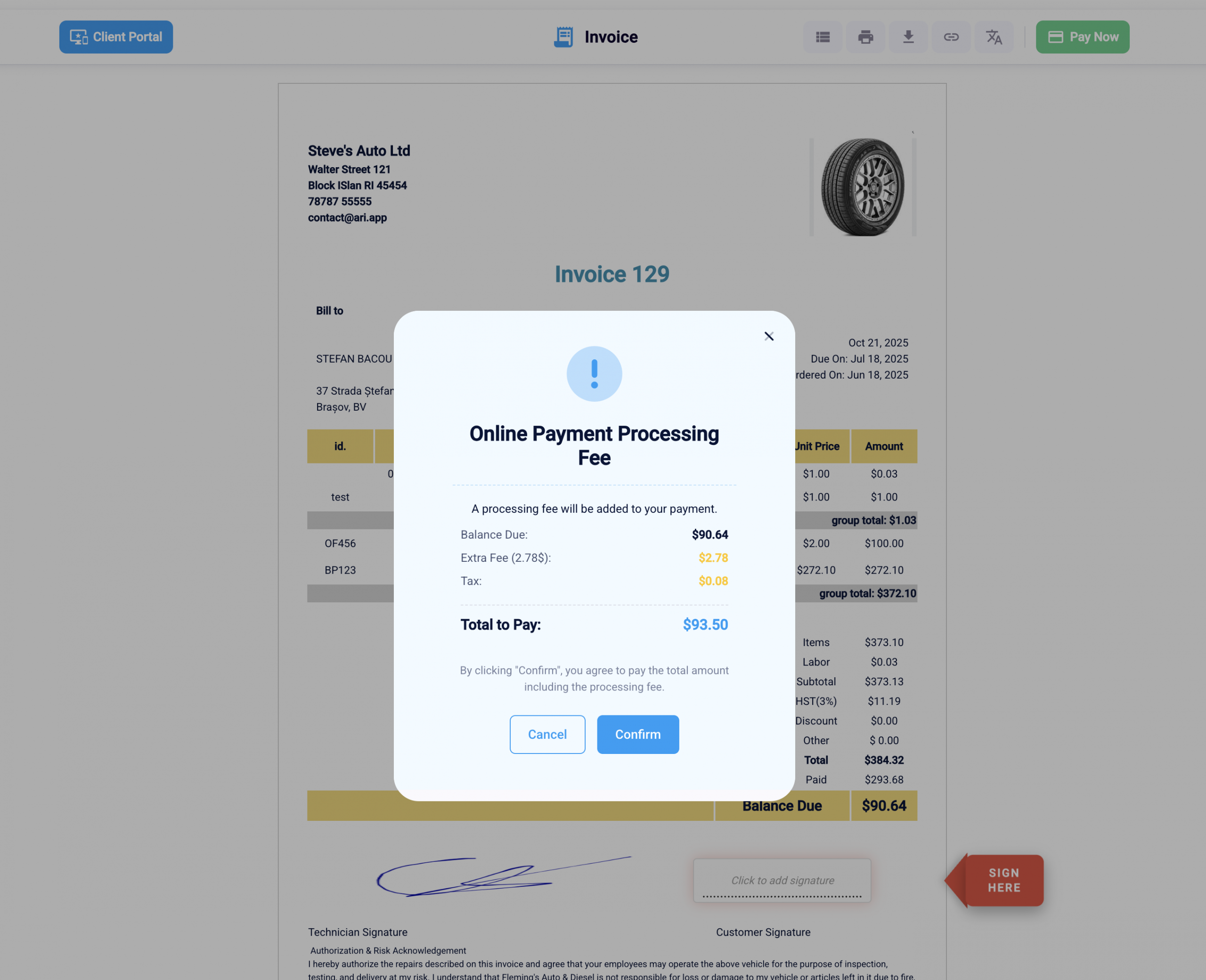
When the “Pass Fee to Client” option is turned on, ARI (Auto Repair Software) adds a clear disclosure step during online invoice payment. Customers see this disclosure before completing the payment, so they understand that a processing fee will be applied. This approach follows common best practices for payment transparency—showing relevant details at the right moment without overwhelming the user.

The fee is only presented when a client attempts to pay an invoice online. There are no changes to in-person payments or invoices that are not paid through the online payment flow.
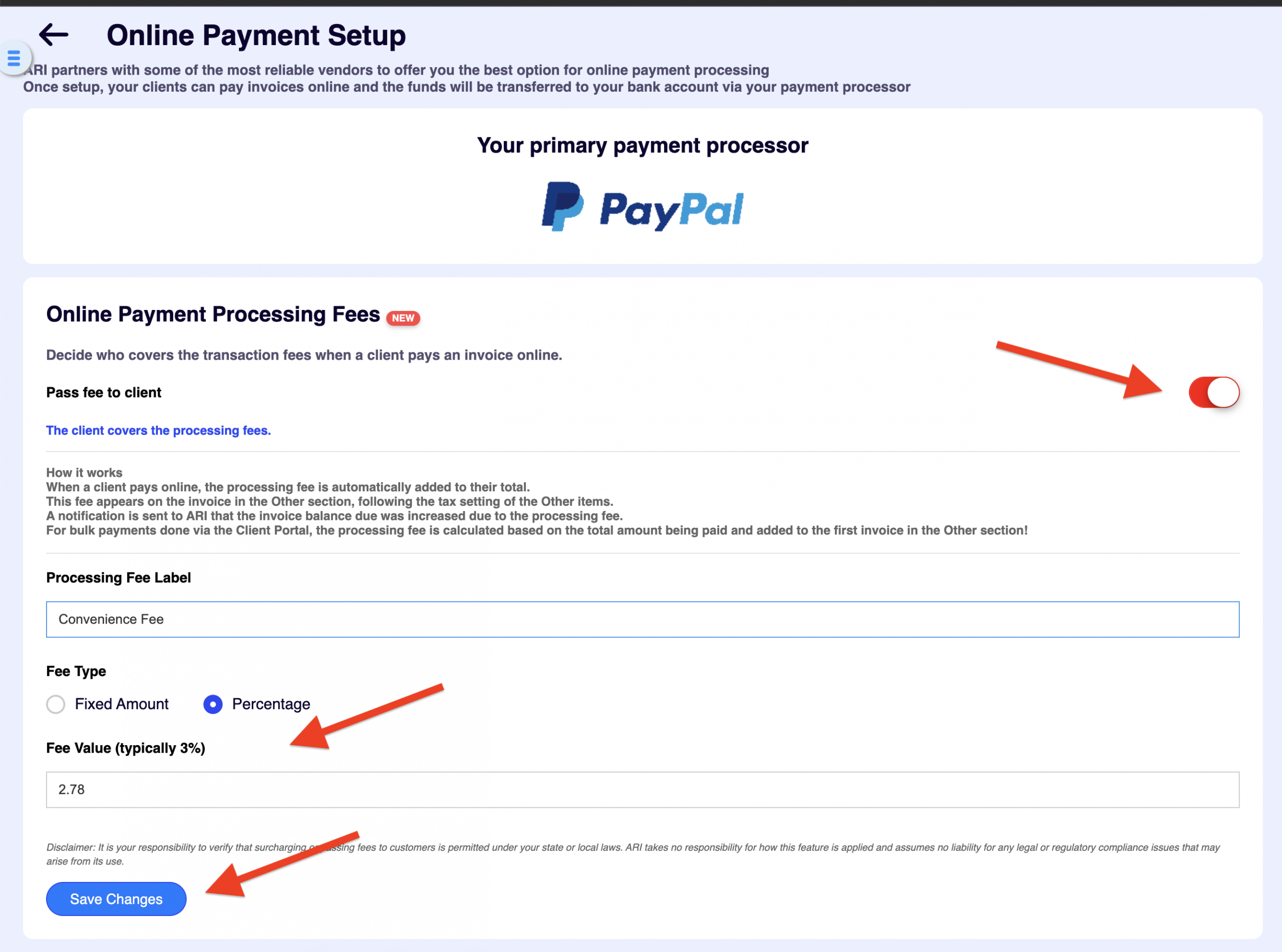
Pass fees to clients screenshot in ARI

How to enable the feature

Because this setting directly affects your customers’ checkout experience, it’s intentionally disabled by default. To turn it on:

  1. Go to Settings → Online Payments Setup

  2. Make sure a payment processor is connected to ARI

  3. Toggle “Pass Fee to Client” to ON

Once enabled, your clients will see a disclosure pop-up when paying invoices online, clearly explaining the added processing fee before payment is finalized. This keeps expectations clear and helps prevent confusion or disputes.
Track your savings

We made a table and an interactive calculator with an estimation of the savings you get after turning this setting on.

Estimated processing-fee savings (annual)

Assumptions used: $1,060,000 annual shop revenue, and a typical online payment processing fee range of 2%–3%.
Savings = Revenue × % of invoices paid online × fee rate.

Online-paid share of invoicesOnline-paid revenueSavings @ 2%Savings @ 3%
5%$53,000$1,060$1,590
10%$106,000$2,120$3,180
20%$212,000$4,240$6,360
35%+$371,000+$7,420+$11,130+

Processing fee savings calculator

Enter your numbers, then click Calculate savings.


Ready. Click “Calculate savings”.

Online-paid revenue (annual)

Savings at 2%

Savings at 3%

Savings at 2.5%

Savings at your custom rate

Monthly savings (custom rate)

Note: This models percentage fees only (many processors also add a small fixed fee per transaction).

Conclusion

This update gives your auto repair business more flexibility in how you handle online payment costs—without compromising transparency. If online payments are a regular part of your workflow, passing processing fees to the client can help keep margins consistent as transaction volume grows. Since this feature is part of the latest ARI (Auto Repair Software) update, it’s worth reviewing your payment settings to decide whether enabling it makes sense for your shop. As always, the choice stays fully in your hands.

Happy Holidays, and best of luck in the new year.
Team ARI

Get Paid with Square Terminal & POS App (BETA)

If you already use Square for online payments through ARI, you know the convenience of having invoices paid automatically. But what about the customer standing right in front of you? Previously, taking a card payment meant using a separate system and manually updating ARI later. That’s double the work and

Repair cost estimation from in ARI's client portal
Introducing Our AI Cost Estimator

Introducing the AI Cost Estimator: Turn “Sticker Shock” into Booked Appointments One of the hardest parts of being a service advisor is breaking the news to a customer who has no idea what a repair actually costs. We are excited to announce the AI Cost Estimator—a powerful new tool available

Our New Purchase Order Workflow

Master Your Inventory with ARI’s Purchase Orders Running low on parts in the middle of a busy week can bring your shop to a standstill. If you can save the time drain of endless calls, manual tracking, and chaotic orders, you will see your productivity ramp up. With the new

Expense tracking illustration
Introducing Expense Tracking in the Client Portal

Your Client Portal Just Got Smarter: Introducing Expense Tracking for Vehicle Owners Keeping customers engaged between visits is one of the biggest hurdles in the auto repair industry. That’s why we’re constantly innovating to make the ARI Client Portal more valuable—not just for your shop, but for the vehicle owners

account mapping in ARI's QuickBooks integration
Easier Accounting with our All-New QuickBooks Integration

A Game-Changing Update for Auto Repair Shop Accounting We are thrilled to announce a comprehensive overhaul of the ARI QuickBooks integration. For shop owners, accounting is often the most tedious part of the day. And we changed that for your convenience. We’ve updated the integration to an intelligent, synchronous financial

ARI shops interactive leads map
Introducing Leads and ARI Shops

Get Discovered by Local Customers: Introducing “Leads” & ARI Shops Your shop is about to become visible to thousands of customers looking for trusted local mechanics—and it won’t cost you a dime. Marketing an auto repair shop usually comes with a painful trade-off: You either spend big on ads, or

Client Management

Add clients, vehicles & all the details that are relevant to them

Vehicle Management

Create detailed inspections with checklists, damage reports

Inventory Management

Manage your parts, tires, business assets, and all other important items.

Job Cards

Track labor progress, start & stop work clocks, approve & deny services.

Estimates

Create professional quotes for your auto repair clients

Invoices

Generate professional invoices for your auto shop’s clients

Inspections

Generate damage reports & attach pictures to your auto inspections

Appointments

Let your clients book your services online from the comfort of their home

Service Reminders

Earn return customers by reminding them when service is due

Accounting

Create purchase orders, track your expenses, and monitor your profits

OBD Scanner

Read Engine Error Codes with ARI monitor car’s parameters live

Reports & Stats

Reports for your business performance & export the data

Payments

Never miss a payment keep an eye on your invoice billing process

Marketing

Reach your core customers & market business across different channels

Vendors

Manage vendors, partners & orders for a streamlined repair experience

Time Tracking

Monitor and label the activity of multiple employees

Payment Processing

Receive payments on your Online Invoices with the world’s most renowned payment networks

Parts Ordering with
PartsTech

Order parts easily with PartsTech and ARI! Smooth and reliable parts procurement process.

M1 Labor Guides and
Estimates

Every mechanic benefits from quality Repair Guides and Car Repair Estimates.

Vehicle History with
CarFax

Get Service History Instantly. Decode VINs and Plates with Accurate Data from a Leading Supplier.

Car Diagnose with
CarMD

Get Diagnostic & Maintenance Info. Access Diagnosis, Solutions, and Problem Predictions.

Accounting with
QuickBooks

Sync ARI invoices to QuickBooks Online. Manage customers and inventory.

AI Labor
Guides

Get detailed labor guides, labor times, and estimates from the world's first AI labor guides system.

POS Terminal from 360Payments

Process In-Person Payments On The Spot. Geared towards auto repair businesses.

Customer Financing With Wisetack

ARI has partnered with Wisetack to offer your clients extra payment options for auto repair services.

Get Started

A complete guide to setting up and running your auto repair business

Client Portal

ARI’s client portal lets clients easily stay informed when they visit you

Multiple Users

How to add multiple users to your ARI Profile

Update ARI

You must ensure you keep your app updated all the time

Profile Setup

ARI offers features and settings tailored for auto repair services

Blog

Welcome to ARI's blog for updates, articles, and guides

ARI Awards

Here are our most notable achievements over the years.

Online Documents

Get the most out of your client management with our online documents

ARI Demo

Test the features and see if it’s the right fit for you

ARI Videos

Welcome To ARI's Official Video Library

ARI Affiliate Program

Earn rewards and ARI credits by referring our app to friends