Adding account credit in ARI

Account Credit: Keep Money on File for Your Customers

Every shop runs into this. A customer overpays an invoice. You owe someone a refund, but they’d rather just “leave it on my account for next time.” You want to make good on a job that ran late by knocking something off on their next visit. Until now, ARI (Auto Repair Software) had no clean way to handle any of it — every payment had to be attached to an invoice, and there was nowhere to simply hold money for a customer.

Account Credit fixes that. It lets you keep a running balance of money on a client’s account that draws down against their future invoices — and it keeps a complete, permanent record of every dollar in and out

What Account Credit Actually Is

Account Credit is a balance of money a client has on file with your shop — think of it like a gift-card balance. Two things it is not, and it helps to be clear on both:

  • It is not a discount. A discount lowers the price of a job. Account Credit is a real value the customer already has — it pays a normal-priced invoice down, exactly like cash or a card.
  • It is not cash in their hand. It’s a balance they can only spend with you, on future work.

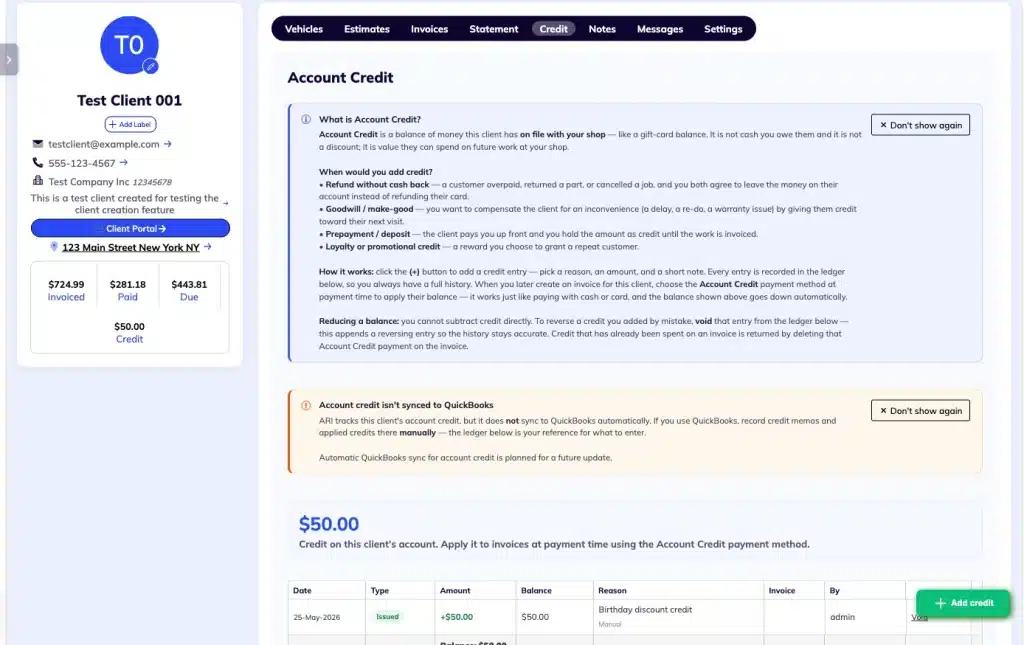
Behind the balance, ARI keeps a full ledger — every credit added, applied, or reversed is a permanent line item with a date, an amount, a reason, and who did it. You can always answer the question “Where did this balance come from?”

When You’d Use It

  • Refund without cash back — a customer overpaid, returned a part, or cancelled a job, and you both agree to leave the money on their account instead of refunding their card.
  • Goodwill / make-good — a job ran late, needed a re-do, or had a warranty hiccup, and you want to compensate the customer toward their next visit.
  • Overpayment capture — a customer simply pays more than the invoice total, and you keep the extra as credit.
  • Loyalty or a promotion — a reward you choose to grant a repeat customer.

How to Use It

Finding it

Open any client and look for the new Credit tab, alongside Vehicles, Estimates, Invoices, and Statements.

Adding credit

On the Credit tab, tap the + Add credit button. Pick a reason (refund, goodwill, a manual entry, or a correction), enter the amount and a short note explaining it, and tap Add Credit. The entry drops into the ledger immediately, and the balance updates.

Spending credit

When you take a payment on an invoice, choose Account Credit as the payment method. ARI automatically caps the amount at the lower of the invoice’s balance due and the customer’s available credit, so you can’t overspend. Save the payment — the invoice is paid down just like it was paid by cash or card, and the client’s balance drops automatically.

Proactive Alerts: ARI also offers it to you proactively: start a payment for a client who already has a balance, and ARI will ask whether you’d like to apply their credit — no need to remember it yourself.

Capturing an overpayment

If a customer pays more than an invoice’s total, ARI notices and offers to convert the overage into account credit.

  • Accept: ARI does something important quietly: it makes sure the invoice settles to exactly its total, records the extra as credit, and still records the full amount of cash you actually collected — your payment totals and bank deposit always match.
  • Decline: The invoice simply stays overpaid, the way it always has.

Fixing a mistake

Added a credit you shouldn’t have? Void that entry from the ledger — ARI appends a reversing entry rather than erasing anything, so your history stays accurate and auditable. Need to return credit a customer already spent on an invoice? Just delete that Account Credit payment on the invoice, and the credit goes back onto their account.

Where the Balance Shows Up

The current balance appears in three places:

  1. On the client card, next to Invoiced, Paid, and Due
  2. In the header of the Credit tab
  3. At the bottom of the ledger grid

A Few Things to Know

  • QuickBooks: Account Credit is tracked inside ARI but is not synced to QuickBooks automatically. If you keep your books in QuickBooks, record the matching credit memos and applied credits there manually — your Credit-tab ledger is the exact reference for what to enter. When QuickBooks is connected, ARI shows a reminder banner on the Credit tab, so this never slips.
  • Reducing a balance: You can’t subtract credit directly. To lower a balance, void an entry from the ledger.
  • Editing: An Account Credit payment can’t be edited after the fact — delete it and create a new one if something needs to change.
  • Bulk payments: Account Credit isn’t available in multi-invoice (bulk) payment mode — apply it one invoice at a time.
  • Deleting a client: A client who still has a credit balance can’t be deleted until that balance is cleared (so you never lose track of money owed to a customer).
  • Permissions: Adding or voiding credit follows your existing “create payments” permission; anyone on the team can view the Credit tab.

What’s Next

Today, Account Credit is applied by your team inside ARI. Letting customers apply their own credit when they pay an invoice online through the Client Portal is on our roadmap — stay tuned.

Find it: Client pageCredit tab.

Recycling Bin Feature Added

Introducing the Recycle Bin: Never Lose a Client or Invoice Again We’ve all been there. You’re cleaning up your client list, tap the wrong row, and poof—a customer’s entire history is gone. Or, a technician on the shop floor deletes a Job Card meant for another vehicle, and suddenly, there

Helcim is now an ARI Partner

Helcim Is Now Built Into ARI You asked for a cheaper way to get paid online, and we delivered. As of today, Helcim is ARI’s newest payment processor, sitting alongside Stripe, Square, 360Payments, and PayPal. If you’re tired of flat-rate processors charging the same 2.9% + 30¢ on every card

localized labor estimates in ARI
Localized Labor Estimates

Your AI Estimates Now Speak Your Market If you’ve ever looked at an AI-generated parts estimate and thought, “That’s not what it costs around here,” you’re not alone. Shop owners from Phoenix to Melbourne have told us the same thing: the numbers looked like they were pulled from a different

Improved Repair Assistant in ARI
ARI’s Improved Repair Assistant

A Smarter, Faster Repair Assistant You’re elbow-deep in a vehicle you’ve only worked on once before. You need a torque spec, a firing order, or a tip on reaching that one hidden bolt. You need it now—not in four tabs, three searches, and a headache. The Repair Assistant has always

Body repair labor guides section in ARI (Auto Repair Software)
Introducing Body Repair Labor Guides

Body Repair Labor Guides for Collision & Paint Shops If you run a body shop, collision center, or paint booth, you’ve probably noticed that most shop management software is built around mechanical repair (oil changes, brakes, timing belts). When you need to quote a fender R&R with a three-stage pearl

New embeded appointments page from ARI
Website-embedded online booking page

Your Booking Page Now Fits Right Into Your Website If you already share your ARI booking link with clients, you know how convenient online booking is—customers pick a time, fill in their info, and the appointment shows up on your calendar automatically. However, sending people to a separate page means

Client Management

Add clients, vehicles & all the details that are relevant to them

Vehicle Management

Create detailed inspections with checklists, damage reports

Inventory Management

Manage your parts, tires, business assets, and all other important items.

Job Cards

Track labor progress, start & stop work clocks, approve & deny services.

Estimates

Create professional quotes for your auto repair clients

Invoices

Generate professional invoices for your auto shop’s clients

Inspections

Generate damage reports & attach pictures to your auto inspections

Appointments

Let your clients book your services online from the comfort of their home

Service Reminders

Earn return customers by reminding them when service is due

Accounting

Create purchase orders, track your expenses, and monitor your profits

OBD Scanner

Read Engine Error Codes with ARI monitor car’s parameters live

Reports & Stats

Reports for your business performance & export the data

Payments

Never miss a payment keep an eye on your invoice billing process

Marketing

Reach your core customers & market business across different channels

Vendors

Manage vendors, partners & orders for a streamlined repair experience

Time Tracking

Monitor and label the activity of multiple employees

Payment Processing

Receive payments on your Online Invoices with the world’s most renowned payment networks

Parts Ordering with
PartsTech

Order parts easily with PartsTech and ARI! Smooth and reliable parts procurement process.

M1 Labor Guides and
Estimates

Every mechanic benefits from quality Repair Guides and Car Repair Estimates.

Vehicle History with
CarFax

Get Service History Instantly. Decode VINs and Plates with Accurate Data from a Leading Supplier.

Car Diagnose with
CarMD

Get Diagnostic & Maintenance Info. Access Diagnosis, Solutions, and Problem Predictions.

Accounting with
QuickBooks

Sync ARI invoices to QuickBooks Online. Manage customers and inventory.

AI Labor
Guides

Get detailed labor guides, labor times, and estimates from the world's first AI labor guides system.

POS Terminal from 360Payments

Process In-Person Payments On The Spot. Geared towards auto repair businesses.

Customer Financing With Wisetack

ARI has partnered with Wisetack to offer your clients extra payment options for auto repair services.

Get Started

A complete guide to setting up and running your auto repair business

Client Portal

ARI’s client portal lets clients easily stay informed when they visit you

Multiple Users

How to add multiple users to your ARI Profile

Update ARI

You must ensure you keep your app updated all the time

Profile Setup

ARI offers features and settings tailored for auto repair services

Blog

Welcome to ARI's blog for updates, articles, and guides

ARI Awards

Here are our most notable achievements over the years.

Online Documents

Get the most out of your client management with our online documents

ARI Demo

Test the features and see if it’s the right fit for you

ARI Videos

Welcome To ARI's Official Video Library

ARI Affiliate Program

Earn rewards and ARI credits by referring our app to friends