Wiring Diagrams & Electrical Data Free in Your Auto Repair Software
TL;DR
- Schematic-grade wiring diagrams generated on demand for any specific vehicle, year, make, model, and engine.
- Step-by-step electrical diagnostic walkthrough — what to test, where, expected reading, and what each result means.
- Connector pinouts, fuse box data, ground points, and component locations in one tap.
- Included in ARI Pro. No Mitchell1 or ALLDATA subscription needed for everyday electrical work.
Electrical Work Is Where Shops Lose the Most Time
If you’ve ever quoted “two hours” on a no-start, a flaky power window, or an A/C clutch that won’t engage — and then watched the clock burn past four — you already know the story.
Electrical diagnosis is the single hardest category of work to estimate, the easiest to lose money on, and the place where the gap between a guess and a real diagnostic plan costs the most. For decades, that gap has been filled by Mitchell1 ProDemand, ALLDATA, and Identifix — service-information subscriptions that run $170–$230 per month per shop (as of May 2026) on top of whatever auto repair software you already pay for. For a one-bay shop or a mobile mechanic, that’s often the difference between buying the tool and skipping it.
We just closed that gap inside ARI. Shop owners on ARI Pro now have a brand-new AI Electrical & Wiring Assistant built directly into the labor guides workflow — included at no extra cost.
This has been one of our most requested features, and we built it to be accurate, useful, and shop-floor-ready from day one.
What the AI Electrical & Wiring Assistant Does
For any electrical service on your job card — headlamps, ABS sensor, fuel pump, A/C clutch, power windows, BCM, instrument cluster, you name it — the Electrical Assistant gives you three coordinated outputs on one screen:
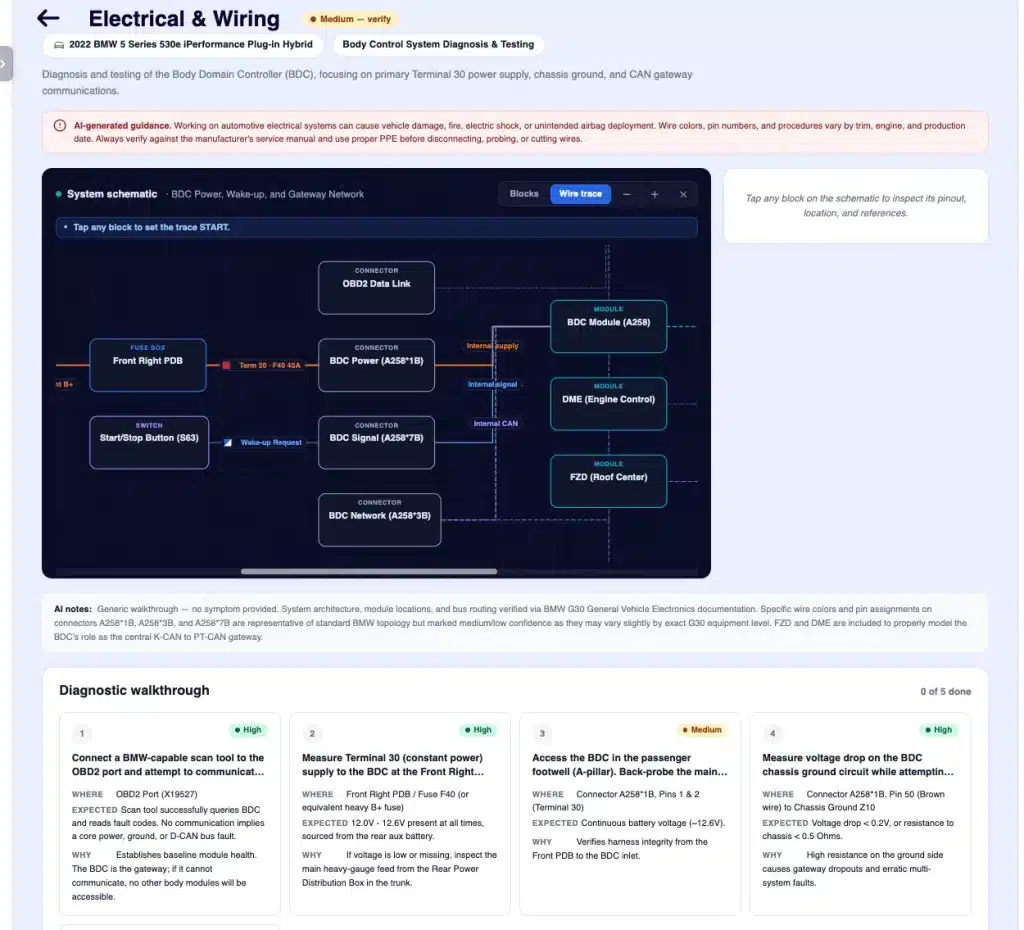
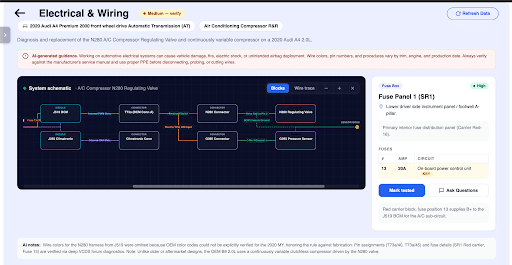
- An interactive system schematic showing exactly how the circuit is wired — battery to fuse box to relay to module to load to ground — with real wire colors, gauges, ignition states, and per-component confidence indicators.
- A step-by-step diagnostic walkthrough telling you what to test, where to probe, what reading to expect, and what each result means for your next move.
- Connector pinouts, fuse data, and component locations for every relevant component — so you don’t have to dig through PDFs trying to figure out which pin is the signal wire and which is ground.
Everything is generated specifically for the year, make, model, engine, and trim of the vehicle on the job card — not a generic diagram. And because it’s wired directly into ARI, you don’t switch apps, log in anywhere else, or copy any data across.
Suggested image: AI-generated wiring diagram for a 2019 Honda Civic headlamp low-beam circuit rendered inside the ARI Electrical Assistant.
Schematic-Grade Wiring Diagrams (12–20 Components Per Circuit)
The first version of this feature drew simplified “block diagrams” — battery to relay to bulb to ground, four or five boxes on a screen. Useful for a quick mental model, but nothing a working tech could actually diagnose against.
We rebuilt it from the ground up to match the kind of schematic mechanics actually used on the shop floor. A typical headlamp low-beam circuit now produces 12 to 20 individual components, rendered across thirteen distinct node types — splices, buses, diodes, and ten more — using proper symbology:
- Power sources (battery, alternator) with a nominal voltage.
- Fuse boxes with panel IDs and per-fuse amp ratings.
- Relays with separate coil and contact sides, plus what triggers the coil.
- Control modules (BCM, ECM, FCM, body controllers) with their bus memberships (CAN, LIN).
- Connectors as first-class components with full pin tables (number, color, function).
- Splices where harness branches fan out — the failure points most diagrams hide.
- Sensors with signal type, reference voltage, and expected range.
- Loads (bulbs, motors, solenoids) with nominal current draw.
- Grounds with shared-circuit data and physical location.
- Diodes and buses are rendered with proper symbols.
Every wire between components carries its color, gauge, ignition states (KOEO – key on engine off, KOER – key on engine running, ACC, OFF), and the fuse protecting it. Two-tone wires render as a diagonal color split, just like a Mitchell1 schematic.
When the AI isn’t fully confident about a component, ARI (Auto Repair Software) dims it with a dashed border so you know to verify it before relying on it — instead of pretending everything is gospel.
The schematic is fully interactive. Zoom in to read a connector label. Tap any component to open the right-rail detail view with its physical location, full pin table, and notes. Drag to pan around large circuits. On wide desktop screens, the layout flows left-to-right (power → distribution → control → load → ground); on phones and narrow tablets, it flips vertically so you can still use it standing at the bay.
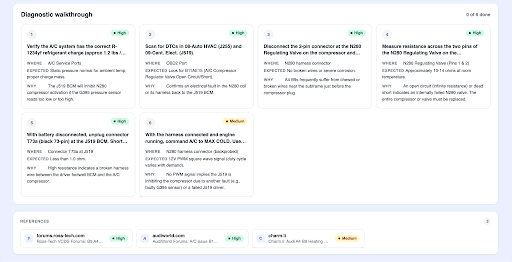
Step-by-Step Electrical Diagnostic Walkthrough
The schematic shows you the circuit. The diagnostic walkthrough tells you what to do about it. For each electrical service, the Electrical Assistant produces an ordered list of test steps. Every step includes:
- Action: what to do (e.g., “Backprobe BCM connector C501, pin 13”).
- Target: exactly where to do it (with reference back to the schematic).
- Expected reading: what you should see on the meter (e.g., “12.4–12.8 V with key in RUN”).
- Interpretation: what each possible result means and where to go next.
You can mark each step as done as you work through the circuit. The progress counter at the top of the panel keeps the whole team in sync — a tech on a long job can hand off to a colleague after lunch and pick up exactly where they left off.
Connector Pinouts, Component Locations & Fuse Data
Tap any component on the schematic, and the right rail opens with everything you need to physically find and test it:
- Physical location in the vehicle (e.g., “Behind the glove box, top-right of HVAC duct”).
- Full pinout table — every pin, the wire color, and the function.
- Fuse table for fuse boxes — fuse number, amp rating, and what each fuse protects.
- Notes — common failure modes, gotchas, and OEM-specific quirks.
You can also mark each component as tested and tag it Pass or Fail as you work. The schematic updates with a colored status badge so you can see at a glance which parts of the circuit you’ve already cleared and which still need attention.
Suggested image: Connector pinout panel for a BCM C501 connector showing PINs, wire colors, and pin functions inside the ARI Electrical Assistant.
Ask Questions About Any Component
Even with a 20-node schematic, every job has those moments where you want to ask a specific question. Every component on the schematic has an “Ask Questions” button. Tap it, and the ARI AI chat opens with the full context of that component already loaded — its pinout, its neighbors in the circuit, the wire colors going in and out — so the AI can answer specifically about what you’re looking at.
How to Use the AI Electrical Assistant in ARI
- Open any Job Card, Invoice, or Estimate with a vehicle attached.
- Go to Labor Guides > Parts & Labor.
- For any electrical service, tap Electrical & Wiring.
- ARI builds the schematic, walkthrough, and component data for that exact vehicle and service.
The first request takes a couple of minutes while the AI verifies sources. After that, the results are cached and reopened instantly.
ARI vs Mitchell1, ALLDATA & Identifix
| Provider | What You Get | Monthly Cost |
| ALLDATA Repair | OEM wiring diagrams, component locations, procedures | ~$179/month |
| Mitchell1 ProDemand | Wiring diagrams, connector views, diagnostic flowcharts | ~$169/month |
| Identifix Direct-Hit | Confirmed fixes, wiring diagrams, hotline | ~$170/month |
| ARI Pro | AI-generated schematic, pinouts, diagnostic walkthrough | Included |
Who This Helps
- Solo Technicians and Mobile Mechanics: Get high-end diagnostic data without the $200/month overhead.
- Small 1-to-3 Bay Shops: Potentially replace your service-info subscription and save $1,700+/year.
- High-Volume Operations: Eliminate app-switching; keep all data on one screen tied to the job card.
- Fleet and Specialty Shops: Rapidly search across OEM PDFs and TSBs for complex systems.
Built to Be Honest About What It Knows
Electrical diagnosis is unforgiving. We built the AI Electrical Assistant to be honest about its own uncertainty:
- Every component carries a confidence rating (high/medium/low).
- Low-confidence parts render dimmed and dashed.
- If data is unreliable, ARI will state “Insufficient data” rather than guessing.
- Every result includes a sources panel linking to the manuals and PDFs consulted.
What’s Next
We are already working on:
- Symptom-aware walkthroughs (e.g., targeting specific scan-tool freeze-frames).
- Photo-assisted component location via your smartphone camera.
- Deeper hybrid and EV coverage for high-voltage systems.
FAQ
Is the AI Electrical & Wiring Assistant included in ARI Pro?
Yes. It’s part of your ARI Pro plan at no extra cost.
How accurate are the AI-generated wiring diagrams?
They are grounded against OEM sources, but AI can be incomplete. Always verify critical PINs against official manuals.
Does this replace Mitchell1 or ALLDATA?
For most routine wiring diagnostics, yes. For full TSBs and OEM labor times, you may still prefer a dedicated service.
Which vehicles does it support?
Most domestic, Asian, and European vehicles from the last 25 years.
Getting Started
If you’re already on ARI Pro: Open any job card, head to Labor Guides > Parts & Labor, and tap Electrical & Wiring.
If you’re on the Free Plan: Upgrading to ARI Pro unlocks the Electrical Assistant, along with AI Labor Guides and AI Diagnosis immediately.
Team ARI
⚠️ AI-Generated Content Disclaimer. The AI Electrical & Wiring Assistant is provided for informational and diagnostic-aid purposes only. It is not a substitute for trained technician judgment or OEM service information. AI-generated information may be incomplete, outdated, or incorrect.
Always verify info against official service manuals. High-voltage and hybrid/EV systems carry the risk of serious injury or death — never service these without proper training and certification. ARI accepts no liability for vehicle damage or personal injury resulting from the use of AI-generated guidance.