
Writing up vehicle concerns is essential, but it can pull a technician away from the vehicle at exactly the wrong moment. ARI Smart Voice Dictation lets you capture what you see and hear while the inspection is still fresh, then turns your spoken notes into a structured write-up you can review before saving.
The feature works inside Issues Found or Reported, where ARI already keeps the Concern, Cause, and Correction details connected to a job card, estimate, or invoice.
What Smart Voice Dictation does
Instead of stopping to type every observation, tap the microphone and describe the issue in your own words. ARI organizes that input into professional service notes while keeping you in control of the final wording.
You can use Smart Voice Dictation in three ways:
- Dictate one field at a time. Use the microphone beside Concern, Cause, or Correction when you only need to add or update one part of the 3Cs.
- Dictate an entire issue. Describe the customer concern, what caused it, and the recommended correction in one pass. ARI separates the information into the appropriate fields.
- Use Walkaround Dictation. Talk through multiple findings during an inspection, and ARI creates separate issue entries that you can review individually.
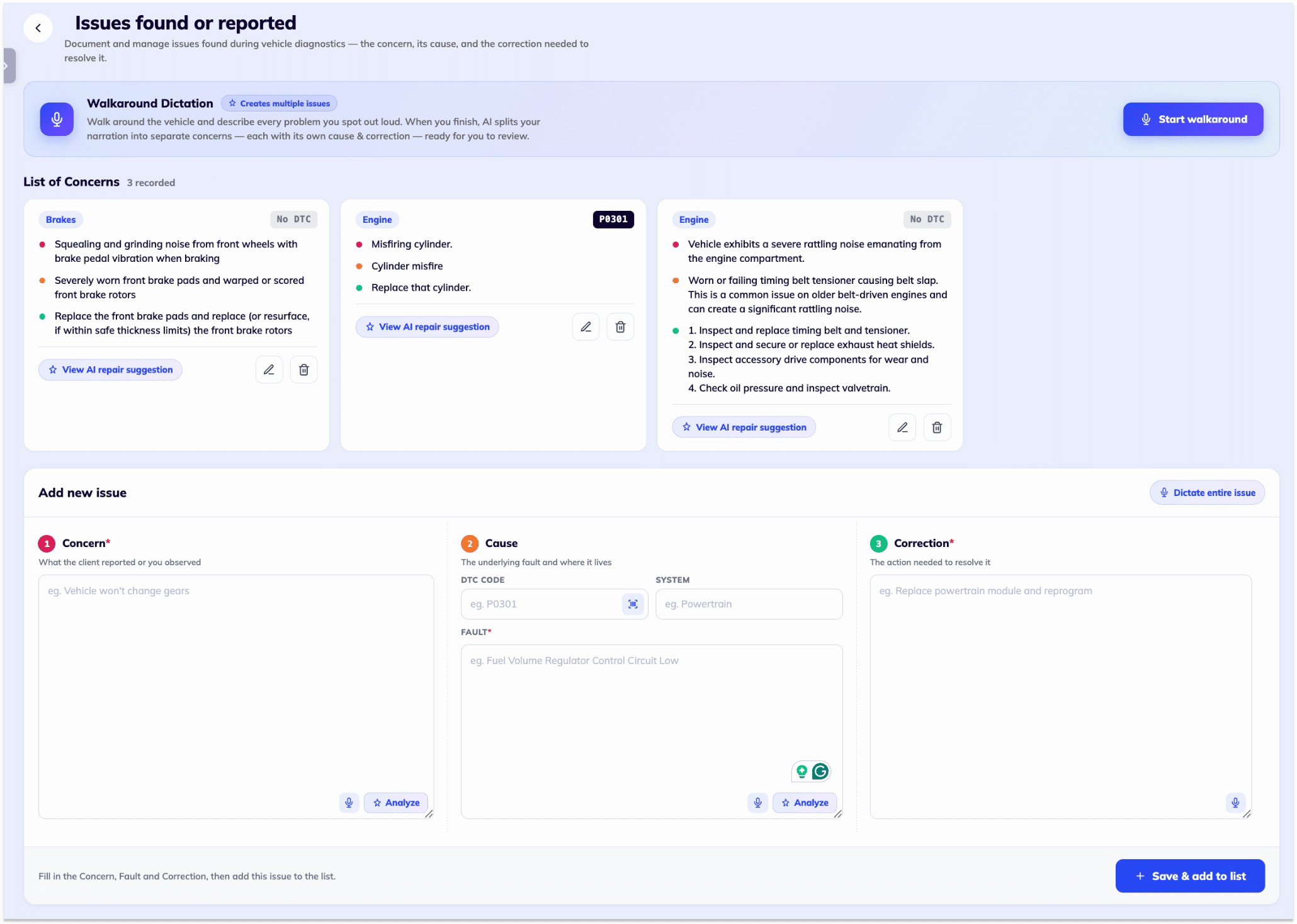
Capture repair details without breaking your inspection flow
Technicians often notice several details at once: a noise, a worn component, a warning light, or a diagnostic trouble code. Voice dictation makes it easier to record those details while you are still beside the vehicle, rather than relying on memory later.
ARI is designed to turn natural speech into clear written notes. That includes common corrections while speaking and phrases such as diagnostic trouble codes. The release also supports speaking in one language and producing the written entry in another, which can help multilingual teams keep customer-facing documentation consistent.
The result is still a draft for the technician or service advisor to check. Review the generated text, edit anything that needs clarification, and save only when the record accurately reflects the vehicle and the work performed.
Build a complete Concern, Cause, and Correction record
A strong 3C write-up gives the shop and the customer a useful record of the repair:
- Concern: the symptom or problem reported by the customer or found during inspection.
- Cause: the verified reason for the concern after diagnosis.
- Correction: the repair performed or recommended to resolve it.
ARI keeps these details with the rest of the repair workflow. You can learn more about how estimates, invoices, inspections, and service records come together on the ARI Job Cards feature page.
Review, edit, or undo before saving
Voice input should speed up documentation without taking away judgment. Smart Voice Dictation lets you inspect the generated text before it becomes part of the final record. If the latest generated text is not right, use undo and try again, or edit the wording directly.
This review step matters for names, measurements, technical terms, DTCs, and any safety-related finding. The technician remains responsible for verifying the diagnosis and making sure the written record is accurate.
Where to find Smart Voice Dictation
Open a job card, estimate, or invoice in ARI and go to Issues Found or Reported. From there, use the microphone beside an individual field, choose the option to dictate an entire issue, or start a walkaround when you want to capture several findings.
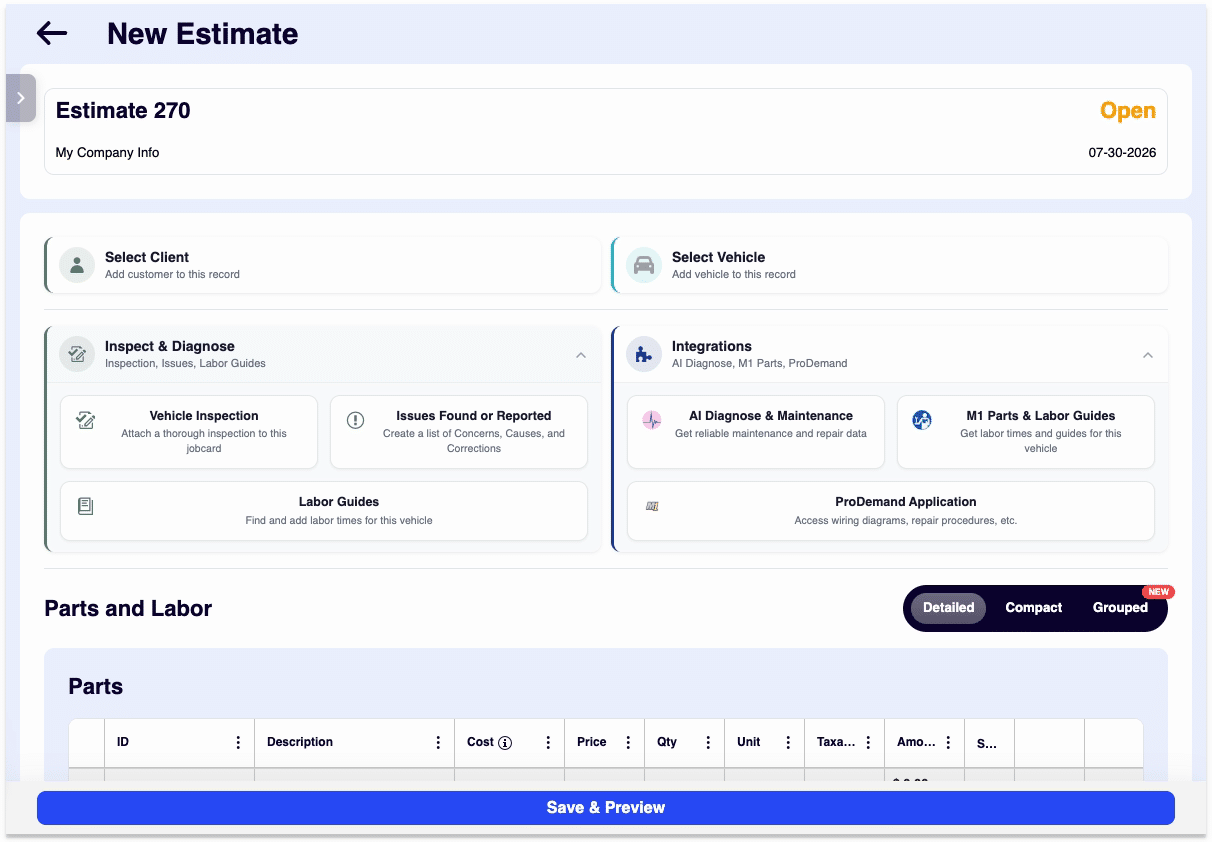
If you work away from a fixed front desk, see how ARI supports estimates, invoices, inspections, and customer records in our guide to mobile mechanic software.
Try Smart Voice Dictation in ARI
Open ARI, choose a job card, estimate, or invoice, and try dictation from Issues Found or Reported. Start with a single Concern field, then use the complete-issue or walkaround options when you are ready to capture more.
Open ARI and try Smart Voice Dictation
New to ARI? Follow the getting-started guide or browse the ARI tutorial library.