

Recycle Bin
One wrong swipe used to mean retyping a whole invoice. Not anymore. ARI now keeps your deleted clients, vehicles, invoices, estimates and job cards in a Recycle Bin for seven days — so a slip of the thumb costs you a few seconds instead of your morning.
Free to try · No credit card needed · Works on iOS, Android, Windows & web
Why we built it
You are under a lift with a phone in one hand and a greasy glove on the other. You swipe to scroll, the list moves, and the wrong job card disappears.
Every shop owner knows the feeling that comes next. The parts, the labour lines, the notes, the photos, the client's signature — all of it typed in again from memory, usually while the customer is waiting at the counter.
The Recycle Bin removes that risk completely. Deleting works exactly the way it always has: swipe, tap, or hit the delete button. The difference is what happens next. Instead of vanishing, the record moves quietly into a bin where it waits for seven days. If you meant to delete it, you never have to think about it again. If you didn't, it is two taps away from being back exactly where it was.
There is no new step to learn and no box to tick. You keep working the way you always have — ARI just stops treating a mistap as a permanent decision.
How it works
The Recycle Bin runs in the background from the moment you open ARI. Here is the whole process, start to finish.
Swipe, tap, or use the delete button — nothing about your workflow changes. Behind the scenes, ARI quietly parks the record instead of destroying it.
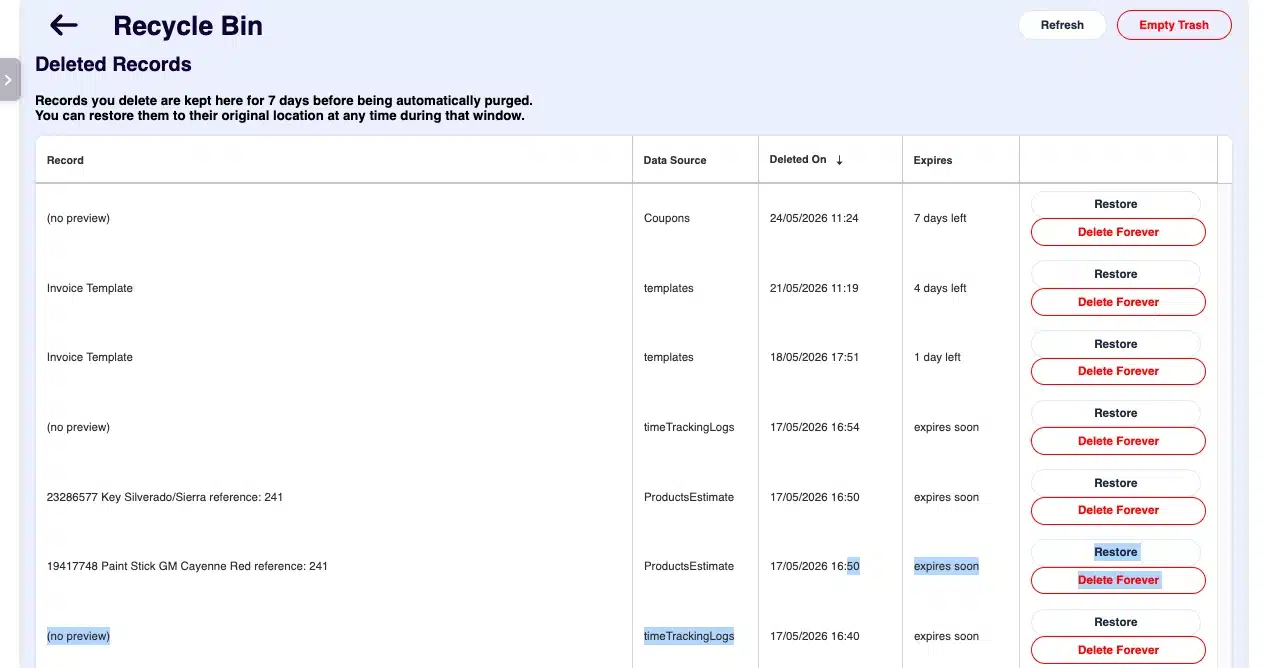
Every deleted item is listed with its record type, its identifier — "Invoice #564" or the customer's name — and the date it was removed, so you can spot the right one instantly.
Restore puts the record back in its original place with all of its data. Delete Forever removes it for good. Or use Empty Recycle Bin to clear the whole list at once.
Coverage
The bin sits underneath the records you touch most — the ones that take the longest to rebuild if they disappear.
A customer record carries years of history. Delete one by accident and you lose the whole relationship — contact details, notes, and every car attached to it. Restore brings back the client profile and its vehicle details together.
The documents that actually get you paid. A deleted auto repair invoice or estimate comes back with its parts, labour, taxes, discounts and signature exactly as they were.
Half-finished work is the easiest thing to delete by mistake. Whole job cards are covered — and so are the individual parts and labour lines inside them.
Clear the wrong booking and you have a customer arriving to a bay that isn't reserved. Restore puts the appointment back on the calendar with its original time slot.
A missing expense quietly distorts your numbers at month end. The bin protects your accounting records, so your reports and profit figures stay honest.
Templates you spent an afternoon perfecting are recoverable too — the same ones behind your service reminders and customer follow-ups.
System-level records such as chat messages and session logs skip the Recycle Bin on purpose. They are high-volume and low-value to restore, and keeping them out means your bin stays readable and your account stays fast.
Bulk clean-ups
Tidying up a messy database is exactly when accidents happen — and exactly when they cost the most.
ARI's multiple delete option lets you select a whole list of job cards, clients, vehicles, invoices, inspections or tyres and remove them in one action. It is a genuinely useful tool when you are clearing out test data or years of duplicates. It is also the fastest way to wipe something you actually needed.
With the Recycle Bin behind it, a bulk clean-up stops being a one-way door. Work through the list, delete confidently, then open the bin and pull back anything that shouldn't have gone. The same applies to smaller housekeeping jobs, like the expenses you add, edit and delete through the week.
For shops with a team
The moment you add a second person to the account, deletions stop being something only you control.
When you add technicians, service advisors and office staff to your ARI profile, every one of them is working in the same live data you are. A new hire learning the app on their first week will tap the wrong thing. That is not a training failure — it is just what happens in a busy shop.
The Recycle Bin turns those moments into a shrug instead of a scramble. The record is not gone. It is sitting in the bin with its type, its name and its deletion date, waiting to be put back — and your customers never notice anything happened.
Restoring a record puts it back where it belongs, so the history your customers see in the ARI client portal stays complete and accurate.
On the road
If your workshop is a van, your office is a phone screen held at arm's length in the sun. That is a hard place to be careful.
Small targets and greasy fingers are a bad combination. The bin means a mistap on a driveway costs you five seconds, not a rebuilt invoice.
Working out of range of a good connection is normal. Knowing a deletion is recoverable for a week takes the anxiety out of tapping anything at all.
You do not have to catch the mistake on the spot. Finish the repair, get paid, then sort the record out that evening — the seven-day window is waiting.
For a mobile mechanic, a clean invoice and a complete service history are what separate you from someone working out of a toolbox. Protecting those records protects the trust that brings customers back — and the digital paperwork you send is often the only thing a customer keeps.
The details
Restore returns a record to its original location with all of its data intact. An invoice goes back to your invoice list with its parts, labour, taxes, discounts, notes, attached photos and signature. A client returns with their contact details and history. There is no re-linking to do and nothing to re-enter.
Sometimes you want something gone properly — a duplicate client, a test invoice, a record you created twice by accident. Delete Forever removes a single item permanently. This one cannot be undone, so it is deliberately a separate, explicit action rather than something you can trigger with a stray swipe.
One button clears the entire bin at once. Useful after a big clean-up when you have already restored everything you needed and just want a clean slate. Like Delete Forever, it is permanent.
Items purge automatically seven days after deletion. Seven days is a deliberate balance: long enough that a mistake made on Monday is still fixable when you reconcile the books on Friday, short enough that your account is not carrying months of dead records and slowing down.
You do not need to manage this. If you never open the bin, it takes care of itself.
System-level records — chat messages and session logs among them — bypass the bin by design. They are generated in high volume and are rarely worth restoring, so keeping them out preserves storage and keeps the bin easy to scan.
Open Settings from the main menu and select the Recycle Bin card. If you do not see it yet, make sure you are on the latest version — you can update ARI here.
FAQ
Seven days. After that, items are purged automatically and cannot be recovered. If you realise something is missing within a week, you can restore it yourself in a couple of taps.
Yes. Restore returns the record to its original location with all of its data intact — parts, labour lines, taxes, discounts, notes, photos and the client's signature. It is the same record, not a blank copy.
Clients, vehicles, invoices, estimates, job cards, individual line items, appointments, expenses and custom email templates. System-level records such as chat messages and session logs are not included.
No. Delete Forever and Empty Recycle Bin are permanent by design — they are how you actually get rid of something. Use them once you are certain, and rely on the seven-day window for everything else.
No. It is on by default and works in the background. There is no setting to configure and nothing extra to pay for — just make sure you are running the latest version of ARI.
No, and it is worth being clear about the difference. The Recycle Bin is an undo for deletions you made in the app, held for seven days. It is there to catch mistaps and over-enthusiastic clean-ups — not to replace your wider record-keeping.
The same protection applies. Deletions made by any user on your profile go through the Recycle Bin, so a new technician's mistake is recoverable rather than permanent.
Keep exploring