ARI Update – Professional Client E-mail Templates

email templates illustration

Introducing Professional Client E-mail Templates to ARI


As part of our most recent update, we are providing ARI(Auto Repair Software) users with the capacity to represent their businesses in the best light possible. The app now supports a collection of templates used to send e-mails for Invoices, Estimates, Vehicle Inspections, or Service Reminders directly to your clients. In previous versions – those used to be plain text e-mails with limited customization options.

These client e-mails also contain a link to your customized Online Booking Page, making it easy for them to connect with you and schedule their next appointment for your shop.

The info in those e-mails is pre-filled and comes from your ARI Vehicles, Inventory, and Client libraries. Before you send an e-mail to a client – you can preview how it will look in their inbox and address any issues if necessary.

Now – look at how they will appear to your clients in the app.


Invoice/ Estimates Template
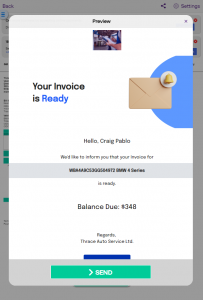
invoice template preview

You can use them to notify clients that their invoice is ready and needs to be paid. They will see the pay now option after they open the web invoice. Additionally, they can follow the online appointment link and book the next service in your shop.

Template items:

  • a VIN
  • vehicle make and model
  • client name
  • balance due
  • basic company info such as logo and company name
  • web invoice link
  • online booking link

Vehicle Inspection Templates 
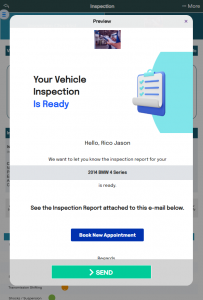
 

vehicle inspections e-mail preview


Let clients know what’s the overall condition of their vehicles. Send them a complete vehicle inspection and let them book an appointment quickly if something needs to be fixed urgently.


Template items:

  • vehicle year
  • vehicle make and model
  • client name
  • basic company info such as logo and company name
  • online booking link


Service Reminder Template
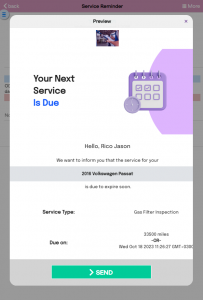
 

service reminder e-mail preview


This e-mail contains all the essential information that informs people when and what type of service needs to be done on their vehicle. Then it’s followed up with an online booking link, so your clients don’t forget to schedule their next appointment and miss the deadline.


Template items:

  • vehicle year
  • vehicle make and model
  • client name
  • basic company info such as logo and company name
  • online booking link
  • service type
  • date/ miles service due

Our idea moving forward is to give you further customization options that will make your messages stand out in a big way. We are open to feedback regarding the templates and want to make them as usable.


ARI Online Booking Landing Page new
ARI’s Improved Online Booking Landing Page

Your Shop Just Got a Digital Facelift (And it’s Already Live) You know the saying: “You never get a second chance to make a first impression.” In the repair business, that first impression usually happens on your booking page. If it looks like a cluttered spreadsheet from 2005, customers are

More Accurate AI Labor Guides and Estimates
AI Labor Guides with Real-Time Data

Stop Paying the “Data Tax”: AI Labor Guides Now Verified with Real-Time Data You know the drill. You’ve got a car on the lift, a customer waiting for a quote, and a software bill that looks like a mortgage payment. Most shop management systems hit you with a “Data Tax”—a

ARI AI Voice Booking Assistant Illustration
Introducing ARI’s AI Voice Assistant

Stop Answering the Phone. Let Your AI Do It. You know the sound. You’re elbow-deep in a brake job, covered in grease, and the shop phone starts ringing. You have two choices: Wipe your hands, kill your momentum, and answer a 5-minute question about oil change availability. Let it go

ARI AI Booking Assistant
ARI’s New AI Booking Assistant

From Friction to Flow: Meet Your New AI Booking Assistant In the world of auto repair, the biggest hurdle to a full calendar isn’t your skill—it’s the booking form. Traditional forms feel like homework, and phone calls often go to voicemail. That’s why we’ve launched the AI Booking Assistant. It

The new Inventory Update Flow in ARI

How Inventory Updates Work in ARI ARI automatically keeps your parts and tires inventory in sync with your invoices. When you add parts to an invoice, save it, convert between estimates and invoices, void, or delete, your stock numbers update accordingly. No manual adjustments needed. Here is exactly how it

Auto adding tire fees in ARI (Auto Repair Software)
Tire Fees Update in ARI

Stop Leaving “Tire Money” on the Table If your shop does tire work, you know the drill. Every swap means manually clicking through to add levy and disposal fees. It’s tedious, it’s easy to forget, and—let’s be honest—when the shop is busy, those fees are the first things to slip

Client Management

Add clients, vehicles & all the details that are relevant to them

Vehicle Management

Create detailed inspections with checklists, damage reports

Inventory Management

Manage your parts, tires, business assets, and all other important items.

Job Cards

Track labor progress, start & stop work clocks, approve & deny services.

Estimates

Create professional quotes for your auto repair clients

Invoices

Generate professional invoices for your auto shop’s clients

Inspections

Generate damage reports & attach pictures to your auto inspections

Appointments

Let your clients book your services online from the comfort of their home

Service Reminders

Earn return customers by reminding them when service is due

Accounting

Create purchase orders, track your expenses, and monitor your profits

OBD Scanner

Read Engine Error Codes with ARI monitor car’s parameters live

Reports & Stats

Reports for your business performance & export the data

Payments

Never miss a payment keep an eye on your invoice billing process

Marketing

Reach your core customers & market business across different channels

Vendors

Manage vendors, partners & orders for a streamlined repair experience

Time Tracking

Monitor and label the activity of multiple employees

Payment Processing

Receive payments on your Online Invoices with the world’s most renowned payment networks

Parts Ordering with
PartsTech

Order parts easily with PartsTech and ARI! Smooth and reliable parts procurement process.

M1 Labor Guides and
Estimates

Every mechanic benefits from quality Repair Guides and Car Repair Estimates.

Vehicle History with
CarFax

Get Service History Instantly. Decode VINs and Plates with Accurate Data from a Leading Supplier.

Car Diagnose with
CarMD

Get Diagnostic & Maintenance Info. Access Diagnosis, Solutions, and Problem Predictions.

Accounting with
QuickBooks

Sync ARI invoices to QuickBooks Online. Manage customers and inventory.

AI Labor
Guides

Get detailed labor guides, labor times, and estimates from the world's first AI labor guides system.

POS Terminal from 360Payments

Process In-Person Payments On The Spot. Geared towards auto repair businesses.

Customer Financing With Wisetack

ARI has partnered with Wisetack to offer your clients extra payment options for auto repair services.

Get Started

A complete guide to setting up and running your auto repair business

Client Portal

ARI’s client portal lets clients easily stay informed when they visit you

Multiple Users

How to add multiple users to your ARI Profile

Update ARI

You must ensure you keep your app updated all the time

Profile Setup

ARI offers features and settings tailored for auto repair services

Blog

Welcome to ARI's blog for updates, articles, and guides

ARI Awards

Here are our most notable achievements over the years.

Online Documents

Get the most out of your client management with our online documents

ARI Demo

Test the features and see if it’s the right fit for you

ARI Videos

Welcome To ARI's Official Video Library

ARI Affiliate Program

Earn rewards and ARI credits by referring our app to friends