A Smarter, Faster Repair Assistant
You’re elbow-deep in a vehicle you’ve only worked on once before. You need a torque spec, a firing order, or a tip on reaching that one hidden bolt. You need it now—not in four tabs, three searches, and a headache.
The Repair Assistant has always been your go-to for those moments. With this update, we’ve made it faster, cleaner, and smart enough to start helping before you’ve even typed a single word.
- Starter Questions: It Already Knows the Job
Before today, opening the Repair Assistant meant staring at a blank chat box and trying to phrase your question perfectly.
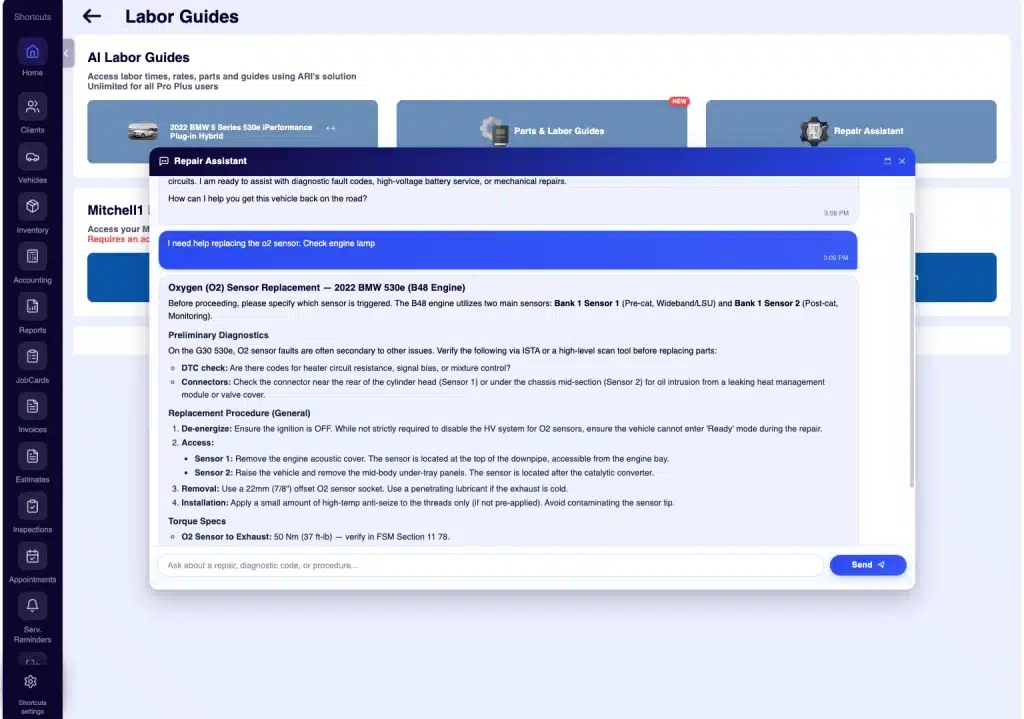
Not anymore. When you open the Assistant from a vehicle, a labor guide, or a diagnostic screen, it already knows the context: the year, make, model, the service you’re quoting, or the trouble code you’re chasing.
It greets you, confirms the vehicle, and suggests specific questions you might need answered. Just tap, and the response starts instantly. No typing, no rephrasing—you’re back to work in seconds.
- Answers You Can Actually Read
The AI’s responses used to come back as one dense block of text. We’ve changed that. Responses are now formatted like a professional-grade shop manual:
- Headings: Clearly separate Parts Required, Procedure, and Torque Specs.
- Bold Text: Instantly highlights part numbers, critical specs, and safety warnings.
- Numbered Steps: Procedures are laid out logically, step-by-step.
- Bullet Lists: Parts, tools, and measurements are ready to scan at a glance.
Finding the spec you need is now a quick look, not a paragraph-scan. That matters when you’re standing at the bench with greasy hands and two more jobs in the queue.
- A Chat That Feels Like a Pro Tool
We’ve given the chat interface a complete visual overhaul to make it feel like a seamless part of your workflow:
- Refined Interface: A clean, branded look that matches the rest of ARI (Auto Repair Software).
- Smooth Animations: New replies pop in smoothly.
- “Thinking” Indicator: See exactly when the AI is processing your request.
- Streamlined Controls: A crisp, intuitive interface for faster interaction.
These are small touches, but together, they make the chat feel like a tool you want to reach for, not something you have to tolerate.
Where to Find It
The Repair Assistant button is ready and waiting for you on:
- Labor Guides: While looking at any service.
- Diagnose: While investigating DTCs and symptoms.
- Services & Items: While building inventory or a repair plan.
It’s included in every ARI Pro plan at no extra cost.
What This Means for Your Shop
The Repair Assistant has always been there for the “tricky” jobs. Now, it helps you faster. By starting with relevant questions instead of a blank page—and delivering answers your eyes can actually skim—you save time on every repair.
If this saves you just ten minutes a day, that’s an hour a week added back to your productive time at the bench.
Try it on your next tough job and let us know what you think at contact@ari.app.