localized labor estimates in ARI

Your AI Estimates Now Speak Your Market

If you’ve ever looked at an AI-generated parts estimate and thought, “That’s not what it costs around here,” you’re not alone. Shop owners from Phoenix to Melbourne have told us the same thing: the numbers looked like they were pulled from a different city—or a different country.

So, we fixed it.

What’s New

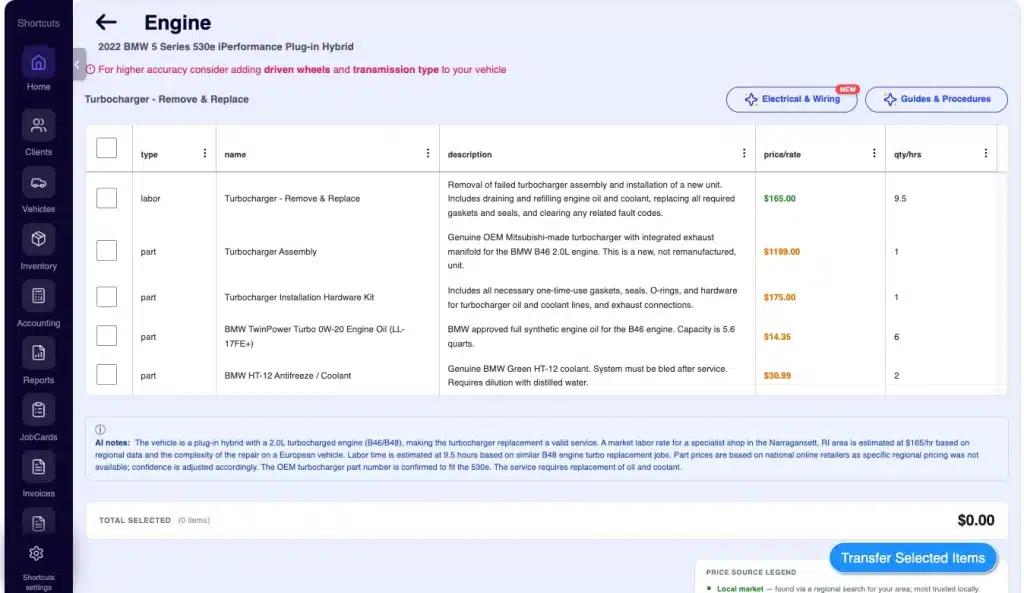
ARI’s AI Parts & Labor estimator now localizes every price to your shop’s market. It uses the city, state, and currency saved in your profile to pull parts pricing from retailers that actually serve your area, and it generates a regional labor rate based on what local shops charge.

No more Los Angeles pricing showing up on a quote for a shop in rural Montana, and no more US-dollar numbers on estimates for a shop in Argentina or the UK.

How It Works

You don’t need to change a thing. As long as your profile is up to date, the next time you tap Get Parts & Labor in Labor Guides or Diagnose, the estimator will:

  • Regional Sourcing: Search retailers that ship to or have stores in your region.
  • Currency Matching: Quote every price in your local currency.
  • Market Insight: Pull a regional market labor rate to compare against your own Primary rate.

Price Indicators

We’ve added color-coded labels, so you know exactly where each number came from:

  • 🟢 Green (Local Market): Found via regional search; the most accurate data for your area.
  • 🟠 Orange (National Avg): No regional data available; perform a “sanity check” before quoting.
  • 🔵 Blue (OEM List): Pulled directly from manufacturer list pricing.

Pro Tip: A new Total Selected card below the grid adds up your checked parts and labor live, allowing you to see your totals before you Transfer Items into the invoice. The AI also surfaces its own reasoning—such as “Shop Location used for regional pricing; waterborne paint system assumed; ADAS calibration required”—so you can see exactly what it checked.

Why It Matters for Your Shop

The regional labor rate is the feature that surprises most shop owners.

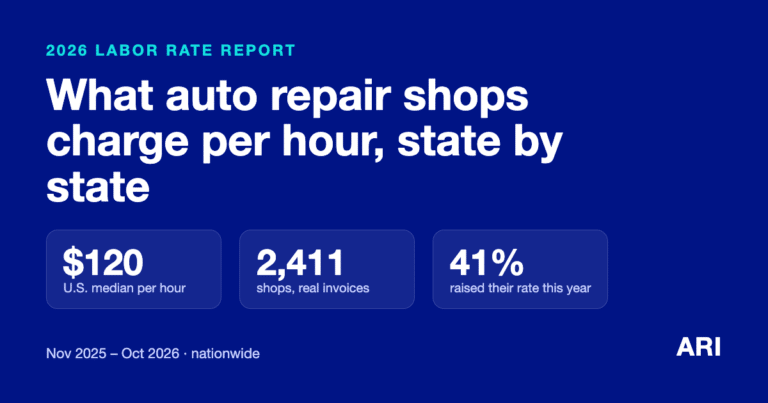
If your Primary rate is $65/hr and the local market is $120/hr, you’ll see that gap on every estimate—a clear signal that you might be leaving money on the table. Conversely, if your rate is already above market, it provides the data you need when a client pushes back on price.

For international shops, this update is the difference between a usable estimate and one you previously had to manually convert. Prices now match what you’d actually pay your parts rep, in the currency you use to invoice.

Find It in ARI (Auto Repair Software)

Ready to see it in action? Navigate to: Labor Guides > [Any Service] > Get Parts & Labor or Diagnose > Get Parts & Labor

Just a reminder: Ensure your city, state, and currency are set in your profile, and you’re good to go!
Recycling Bin Feature Added

Introducing the Recycle Bin: Never Lose a Client or Invoice Again We’ve all been there. You’re cleaning up your client list, tap the wrong row, and poof—a customer’s entire history is gone. Or, a technician on the shop floor deletes a Job Card meant for another vehicle, and suddenly, there

Helcim is now an ARI Partner

Helcim Is Now Built Into ARI You asked for a cheaper way to get paid online, and we delivered. As of today, Helcim is ARI’s newest payment processor, sitting alongside Stripe, Square, 360Payments, and PayPal. If you’re tired of flat-rate processors charging the same 2.9% + 30¢ on every card

Improved Repair Assistant in ARI
ARI’s Improved Repair Assistant

A Smarter, Faster Repair Assistant You’re elbow-deep in a vehicle you’ve only worked on once before. You need a torque spec, a firing order, or a tip on reaching that one hidden bolt. You need it now—not in four tabs, three searches, and a headache. The Repair Assistant has always

Body repair labor guides section in ARI (Auto Repair Software)
Introducing Body Repair Labor Guides

Body Repair Labor Guides for Collision & Paint Shops If you run a body shop, collision center, or paint booth, you’ve probably noticed that most shop management software is built around mechanical repair (oil changes, brakes, timing belts). When you need to quote a fender R&R with a three-stage pearl

New embeded appointments page from ARI
Website-embedded online booking page

Your Booking Page Now Fits Right Into Your Website If you already share your ARI booking link with clients, you know how convenient online booking is—customers pick a time, fill in their info, and the appointment shows up on your calendar automatically. However, sending people to a separate page means

P&L profit and loss screen in ARI
P&L Statement Feature

Stop Guessing Your Shop’s Profit. Let ARI Do the Math. It’s 8:00 PM on a Tuesday. You’ve turned ten wrenches today, handled three difficult customers, and ordered a mountain of parts. But if someone asked, “How much did you actually take home today?” — could you answer? Most shop owners

Client Management

Add clients, vehicles & all the details that are relevant to them

Vehicle Management

Create detailed inspections with checklists, damage reports

Inventory Management

Manage your parts, tires, business assets, and all other important items.

Job Cards

Track labor progress, start & stop work clocks, approve & deny services.

Estimates

Create professional quotes for your auto repair clients

Invoices

Generate professional invoices for your auto shop’s clients

Inspections

Generate damage reports & attach pictures to your auto inspections

Appointments

Let your clients book your services online from the comfort of their home

Service Reminders

Earn return customers by reminding them when service is due

Accounting

Create purchase orders, track your expenses, and monitor your profits

OBD Scanner

Read Engine Error Codes with ARI monitor car’s parameters live

Reports & Stats

Reports for your business performance & export the data

Payments

Never miss a payment keep an eye on your invoice billing process

Marketing

Reach your core customers & market business across different channels

Vendors

Manage vendors, partners & orders for a streamlined repair experience

Time Tracking

Monitor and label the activity of multiple employees

Payment Processing

Receive payments on your Online Invoices with the world’s most renowned payment networks

Parts Ordering with
PartsTech

Order parts easily with PartsTech and ARI! Smooth and reliable parts procurement process.

M1 Labor Guides and
Estimates

Every mechanic benefits from quality Repair Guides and Car Repair Estimates.

Vehicle History with
CarFax

Get Service History Instantly. Decode VINs and Plates with Accurate Data from a Leading Supplier.

Car Diagnose with
CarMD

Get Diagnostic & Maintenance Info. Access Diagnosis, Solutions, and Problem Predictions.

Accounting with
QuickBooks

Sync ARI invoices to QuickBooks Online. Manage customers and inventory.

AI Labor
Guides

Get detailed labor guides, labor times, and estimates from the world's first AI labor guides system.

POS Terminal from 360Payments

Process In-Person Payments On The Spot. Geared towards auto repair businesses.

Customer Financing With Wisetack

ARI has partnered with Wisetack to offer your clients extra payment options for auto repair services.

Get Started

A complete guide to setting up and running your auto repair business

Client Portal

ARI’s client portal lets clients easily stay informed when they visit you

Multiple Users

How to add multiple users to your ARI Profile

Update ARI

You must ensure you keep your app updated all the time

Profile Setup

ARI offers features and settings tailored for auto repair services

Blog

Welcome to ARI's blog for updates, articles, and guides

ARI Awards

Here are our most notable achievements over the years.

Online Documents

Get the most out of your client management with our online documents

ARI Demo

Test the features and see if it’s the right fit for you

ARI Videos

Welcome To ARI's Official Video Library

ARI Affiliate Program

Earn rewards and ARI credits by referring our app to friends