Stop Guessing Your Shop’s Profit. Let ARI Do the Math.
It’s 8:00 PM on a Tuesday. You’ve turned ten wrenches today, handled three difficult customers, and ordered a mountain of parts. But if someone asked, “How much did you actually take home today?” — could you answer?
Most shop owners can’t. They have “money in the bank,” but they don’t know their profit. They wait for tax season to find out they spent $4,000 more on “shop supplies” than they realized.
That ends today.
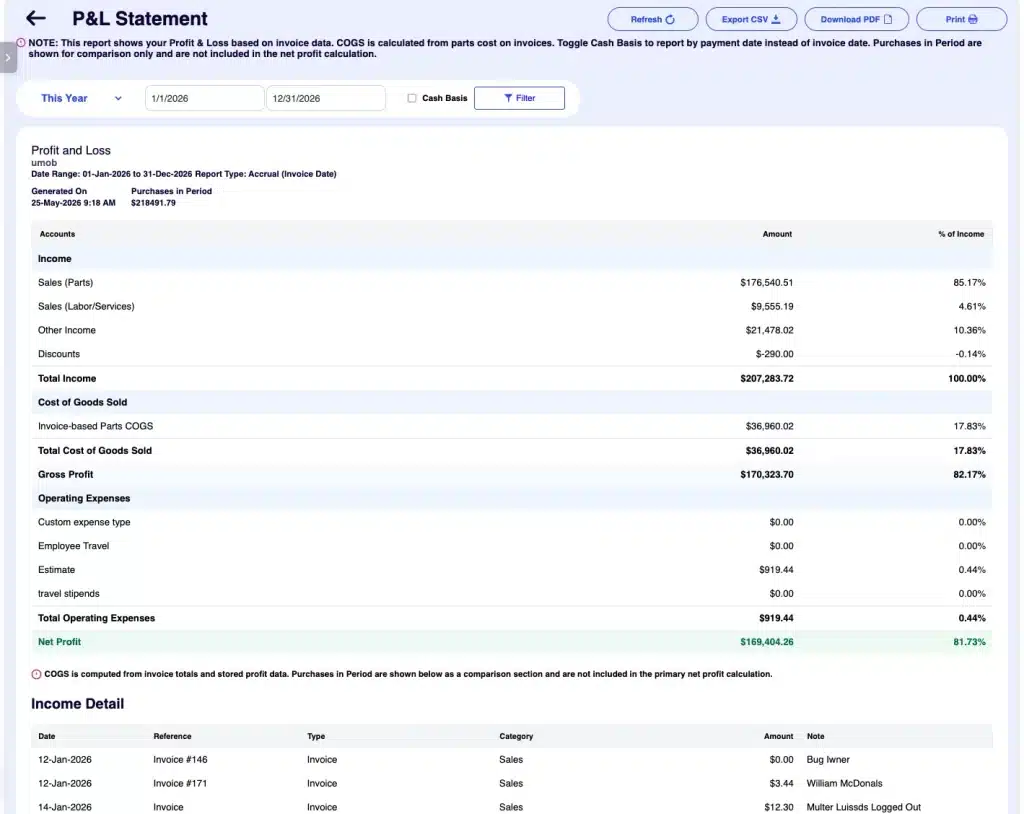
ARI’s new P&L Statement gives you a QuickBooks-style Profit & Loss breakdown built entirely from the data you’re already entering. No spreadsheets. No expensive accountants. No “exporting to Excel” just to see if you can afford that new lift.
22 Hours of Bookkeeping = 1 Click in ARI
If you’ve ever tried to build a P&L manually, you know the pain: 3 hours hunting invoices + 4 hours categorizing parts + 2 hours totaling rent/utilities + 1 hour fixing math errors… = A massive headache you’ll probably procrastinate on.
In ARI, it’s one button. Here is exactly what you get:
- Gross Profit: Your total income minus what those parts actually cost you.
- Operating Expenses: A cold, hard look at your Rent, Electricity, Salaries, and Tools.
- The Bottom Line: Your Net Profit. The number that actually matters.
Drill Down (Because “Misc” Is Where Money Dies)
A summary is great, but the devil is in the details. ARI (Auto Repair Software) lets you “open the hood” on your finances:
- Income Detail: Every single invoice, date, and client.
- COGS Detail: The specific cost breakdown per job.
- Expense Tracker: Every individual dime you paid to a vendor.
“I used to wait until March to find out how my shop did. Now I check my P&L every Friday morning while I drink my coffee. I caught a $600 overcharge on a parts statement last week because the numbers looked ‘off’ in ARI. It paid for the software for the next year.” — Mike, Independent Shop Owner
Cash vs. Accrual (The CPA’s Favorite Feature)
Most mechanics run on a cash basis (it counts when the money hits your hand). Big shops often use Accrual (it counts when the invoice is printed).
ARI does both. Just check a box to flip between them. Your accountant will want to hug you come tax time.
Export, Print, or Save as PDF
Need to show a business partner the numbers? Or handing off files to a CPA?
- Export CSV for the spreadsheet nerds.
- Download PDF for a clean, professional report.
- Print directly from your browser.
“But I’m Not an Accountant…”
Good. You shouldn’t have to be.
If you’re already using ARI to create invoices and track expenses, the P&L builds itself. There is no extra data entry. No new software to learn. It’s just your accounting data, finally working for you.
How to find it:
- Open Reports
- Tap the P&L Statement (Look for the “NEW” badge)
- Hit Filter
The Verdict: Know Your Numbers, Grow Your Shop
You wouldn’t try to fix a modern engine without a scanner. Don’t try to run a business without a P&L.
Stop wondering where the money went. See it. Track it. Keep more of it.
Go to your ARI Reports tab and see your profit now.