An auto body estimate can look complete and still miss hours of necessary work.
The problem is rarely one dramatic line. It is the mirror that must come off before the door can be refinished, the moldings that cannot be reused, the corrosion protection that must be restored, the calibration required after a component is disturbed, or the difference between body labor and refinish labor.
An auto body labor time guide provides a useful starting point. A complete estimate still depends on vehicle identification, damage analysis, OEM repair information, included-operation notes, materials, access work, and estimator judgment.
For the underlying difference between a standardized labor allowance and time recorded on the job, see our automotive labor time guide.
Quick answer: Auto body labor time is the estimated work allowance for a defined collision-repair operation. It is not the labor rate, a guaranteed completion time, or proof that every necessary step is included. A complete estimate separates operations such as repair, remove and install, replacement, structural work, mechanical work, and refinishing, then adds required materials and documented procedures that are not already included.
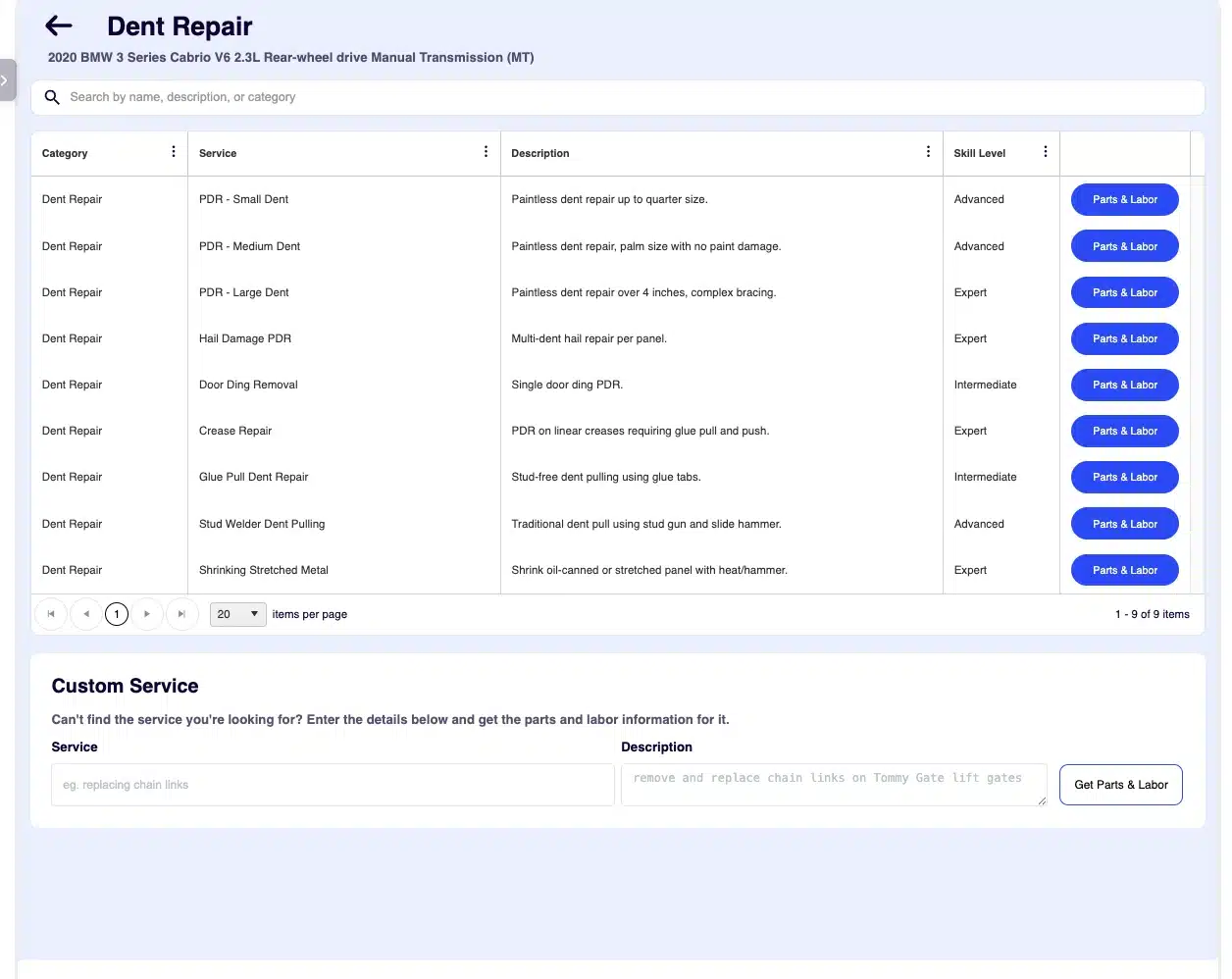
ARI's Body Repair workflow organizes vehicle-specific body-repair services before the estimator reviews parts, materials, and labor.
Labor time and labor rate are different
- Labor time is the number of hours assigned or judged for an operation.
- Labor rate is the amount charged per labor hour for a category of work.
- Labor charge is generally the applicable hours multiplied by the applicable rate.
A repair facility may use separate rates for body, refinish, frame or structural, mechanical, glass, electrical, and diagnostic work. Do not apply one rate to every line without checking the operation and your shop's rate structure.
The collision-estimating terms every small shop should know
Estimating systems and repair partners can use slightly different labels. Always confirm the database definition in the system you are using.
R&I: remove and install
R&I means removing a part and reinstalling the same part. Examples can include removing a lamp, handle, molding, bumper cover, or trim piece to gain access or produce a proper repair and refinish result.
The operation may require inspection, cleaning, protection, alignment, clips, fasteners, or calibration that is not automatically included. Read the procedure and labor-guide notes.
R&R or replace
In everyday shop language, R&R usually means remove and replace: the original component comes off and a different component is installed. Some estimating systems label the operation simply Replace.
Replacement labor and the price of the replacement part are separate parts of the estimate. Reuse items, transfer operations, seam preparation, corrosion protection, and setup may need their own review.
Repair time
Repair time covers restoring the existing component rather than replacing it. It is often judgment time entered by the estimator, based on the damage, material, access, tools, and documented repair method. Some systems may provide allowances for specific, defined operations, so confirm what the selected database line actually represents.
A judgment-time line is more useful when it is supported by damage photos, a repair plan, and notes describing the affected areas and intended method.
Refinish time
Refinish labor covers paint-related operations for the selected panel or component. It is not the same as body repair time, and it is not the same as the cost of paint and materials.
CCC's estimating help separates non-refinish labor hours from paint/refinish hours, reflecting how collision estimates commonly treat those categories independently.
Blend
Blending extends color into an adjacent panel so the repaired or replaced panel matches visually. The need and procedure depend on the color, damage, panel relationships, paint system, and repair plan. Do not assume blending is automatically included in another panel's refinish time.
Overlap
Overlap is labor that two operations share. If both procedures require the same access step, a database may reduce the combined time so the shop does not charge twice for identical work.
Overlap must be reviewed, not guessed. Two similar-looking operations do not always share the same complete procedure.
Included and not included operations
An included operation is already accounted for in the selected labor allowance. A not-included operation may need a separate line when it is necessary and performed.
This distinction is one of the most important parts of complete estimating. The Society of Collision Repair Specialists' Guide to Complete Repair Planning exists because many necessary repair steps can go unrecognized during estimate development. No checklist replaces the database notes and OEM procedure for the actual vehicle.
Sublet
Sublet work is performed by another business or specialist, such as glass, alignment, calibration, upholstery, towing, or a specialized mechanical service. Document the scope, price, markup policy, and supporting invoice according to your shop agreements and local rules.
Why body and refinish labor should stay separate
Body repair and refinishing use different skills, tools, materials, environments, and workflows.
A door repair might involve:
- Removing trim and adjacent components
- Metal repair
- Corrosion-protection steps
- Surface preparation
- Priming and blocking where required
- Color application and clearcoat
- Blending an adjacent panel
- Reassembly and adjustment
- Scanning, calibration, or final function checks when applicable
Rolling all of that into one unexplained labor line makes the estimate difficult to review and easy to underquote. Separate categories show the customer or payer what work is being performed and help the shop measure its own production accurately.
Paint materials also deserve their own treatment. Refinish labor pays for technician time; paint, primer, clear, sealer, toner, hardener, masking products, abrasives, adhesion promoter, seam sealer, and other consumables are material costs.
How to build a more complete body repair estimate
1. Identify the exact vehicle
Record the VIN, production date, trim, powertrain, paint code, options, and driver-assistance equipment. Construction can vary by model year and even within the same year.
2. Document the vehicle and damage
Capture overall condition, all sides of the vehicle, the damaged area, mileage, warning lamps, pre-existing damage, and relevant interior or underbody areas. A close-up without a context photo can be hard to interpret later.
A consistent digital vehicle inspection workflow can help organize intake photos, damage documentation, and customer-ready condition reports.
3. Review OEM procedures before committing to a method
Confirm repairability, sectioning locations, material type, joining method, corrosion protection, one-time-use parts, measuring requirements, and calibration procedures. An attractive repair is not necessarily a structurally correct repair.
4. Blueprint or disassemble when the scope is hidden
A drive-in visual estimate may not reveal damage behind a bumper cover, reinforcement, lamp, trim panel, or welded component. When appropriate and authorized, blueprinting or teardown can replace assumptions with a repair plan.
5. List each panel and operation
For every affected component, decide whether the work is:
- Inspect
- R&I
- Repair
- Replace
- Section
- Refinish
- Blend
- Align or measure
- Sublet
Do not use one vague line such as “repair front end” when the job involves multiple parts and labor categories.
6. Read notes, footnotes, and included operations
Before adding a line, confirm what the selected operation already contains. Then look for required steps that the time excludes. Database assumptions differ, and a familiar operation can change when the component or repair method changes.
7. Add access, transfer, and protection operations
Review the parts that must be removed, protected, transferred, initialized, aimed, or replaced to complete the selected repair. Consider clips, retainers, labels, seam sealer, cavity wax, weld-through primer, corrosion protection, sound deadening, and other required products based on the OEM procedure and shop process.
8. Build the refinish plan
Identify repaired, replaced, refinished, and blended panels. Review edges, undersides, jambs, cut-ins, replacement-part preparation, masking, cover-car requirements, de-nib and polish operations, and material calculations according to the estimating database and paint-manufacturer procedures.
9. Check scanning, calibration, glass, and high-voltage requirements
Collision work can affect cameras, radar, steering-angle inputs, occupant-safety systems, lamps, parking sensors, glass, and networked modules. Determine what pre-repair and post-repair operations are required for that vehicle and repair.
For hybrid and electric vehicles, follow OEM high-voltage procedures. NHTSA warns that EV high-voltage systems require qualified technicians with specialized training.
10. Review the estimate as a repair plan
Before authorization, walk through the job in the order the technician will perform it. Ask:
- Can every necessary part be identified and sourced?
- Does each operation have the correct labor category?
- Are access and reassembly accounted for?
- Are materials distinct from labor?
- Are calibrations, scans, alignments, or sublet work addressed?
- Are assumptions and open items visible?
- Does the documentation support the repair plan?
The goal is not a longer estimate. It is an estimate that reflects the work the vehicle actually requires.
Commonly missed estimate categories
The following are review prompts, not automatic charges. Add them only when required, performed, not already included, and permitted by the applicable agreement or rules.
- Detrim and access operations
- One-time-use clips, fasteners, labels, or adhesives
- Seam sealer and corrosion-protection restoration
- Raw-part preparation
- Masking beyond the database assumption
- Weld testing, setup, or destructive test coupons where required
- Pre-repair and post-repair scans
- ADAS calibration or aiming
- Steering, suspension, or alignment checks
- Refrigerant, coolant, or other fluid operations
- Battery support and initialization
- Glass operations
- Hazardous-waste or shop-material charges where lawful and appropriate
- Final function checks, road tests, leak checks, or quality-control steps
Avoid blanket “miscellaneous” lines when a specific operation and material can be documented.
Why supplements happen
A supplement is not automatically evidence of a bad estimate. Hidden damage, one-time-use components, part changes, or repair requirements identified after teardown can expand the repair plan.
Better blueprinting and research can reduce preventable supplements, but cannot eliminate every unknown. The professional response is to document the change, update parts and labor, obtain required authorization, and maintain a clear audit trail.
What to look for in an auto body labor guide or estimating tool
- Precise VIN and vehicle-option selection
- Body, refinish, structural, mechanical, glass, and diagnostic categories
- R&I, repair, replace, refinish, and blend operations
- Included-operation notes and footnotes
- Part diagrams and position clarity
- A way to add judgment time with notes
- Materials and sublet lines
- Separate labor rates by category
- Estimate revision, supplement history, export, and payer-compatibility requirements for the type of work your shop accepts
- Photos, inspection records, and customer authorization
- Links to or easy access to OEM procedures
- ADAS and EV safety prompts without pretending the software replaces verification
The most useful system helps an estimator remember and organize the work. It does not remove the need for repair knowledge.
How ARI supports body and collision estimating
In the current ARI web experience, ARI's Body Repair Labor Guides provide a dedicated Body Repair workflow within ARI's AI Labor Guides and Estimates. The workflow covers 15 areas, including structural and frame work, panel repair and replacement, dent repair, paint preparation and refinishing, glass, R&I access operations, and estimate/admin work. Availability can vary by app version, so confirm that the installed app is current.
ARI can generate suggested parts, materials, and labor with body and refinish hours separated. It can also surface ADAS and EV-safety considerations based on the selected work.
Treat generated results as a starting point. The repair facility remains responsible for verifying the vehicle, damage, labor operations, materials, OEM procedures, calibration requirements, safety steps, and any payer or legal requirements. ARI does not replace CCC, Mitchell, Audatex, OEM repair information, or a qualified collision estimator.
If your shop wants to organize body, refinish, material, and access-operation suggestions in the same system used for estimates and Job Cards, explore ARI's Body Repair Labor Guides and verify every generated line against the vehicle and repair plan.
Frequently asked questions
What is the difference between R&I and R&R in auto body repair?
R&I means remove and reinstall the same component. R&R commonly means remove and replace it with a different component, though some estimating systems label that operation simply “Replace.”
Is refinish labor included in body labor?
Usually they are separate categories. Body labor covers repair, removal, replacement, and related physical operations; refinish labor covers paint-process time. Review the estimating system's definitions for the selected line.
Are paint materials included in refinish labor time?
Generally, no. Refinish hours represent technician labor; paint and material consumption is normally calculated separately according to the estimating system, shop agreement, and payer rules.
What is judgment time?
Judgment time is labor assigned by the estimator when a standardized database time does not fully define the repair operation, often for repairing an existing panel. Support it with photos, notes, procedure, and a clear scope.
What does “not included” mean on a body estimate?
It means the operation is not already covered by the selected labor allowance. If that operation is required and performed, it may need a separate line. Always confirm the current database notes and any applicable rules.
Why do collision estimates need supplements?
Initial inspection cannot always reveal hidden damage, required one-time-use parts, or every procedure. A supplement documents an authorized change to the repair plan after new information becomes available.
Can auto body estimating software guarantee an accurate estimate?
No. Software can provide labor information and organize the repair plan, but accuracy depends on correct vehicle data, damage analysis, OEM procedures, materials, judgment, and verification by the repair facility.
The bottom line
A labor time guide is one layer of a collision estimate. The complete plan comes from combining that time with exact vehicle data, damage documentation, repair procedures, included-operation knowledge, access work, materials, refinish planning, safety requirements, and authorization.
When every line describes real work—and every real step has a place in the estimate—the shop can schedule more confidently, communicate more clearly, and reduce avoidable surprises after the repair begins.
Explore ARI's Body Repair Labor Guides to see how body, refinish, material, and access-operation suggestions can stay close to the estimate and repair workflow.