ARI v.10.4 Update – Service Reminders Additions

Improving our Service Reminders feature was one of the most significant changes of our latest v.10.4 ARI(Auto Repair Software) update. In this article, you will learn how the new Service Reminders flow impacts your work.

ARI now has the option to display your custom online bookings page to clients after they get a service reminder. This way – the process is much simpler. You can benefit a lot, especially if sending service reminders about an incoming service is your priority.


What’s new?

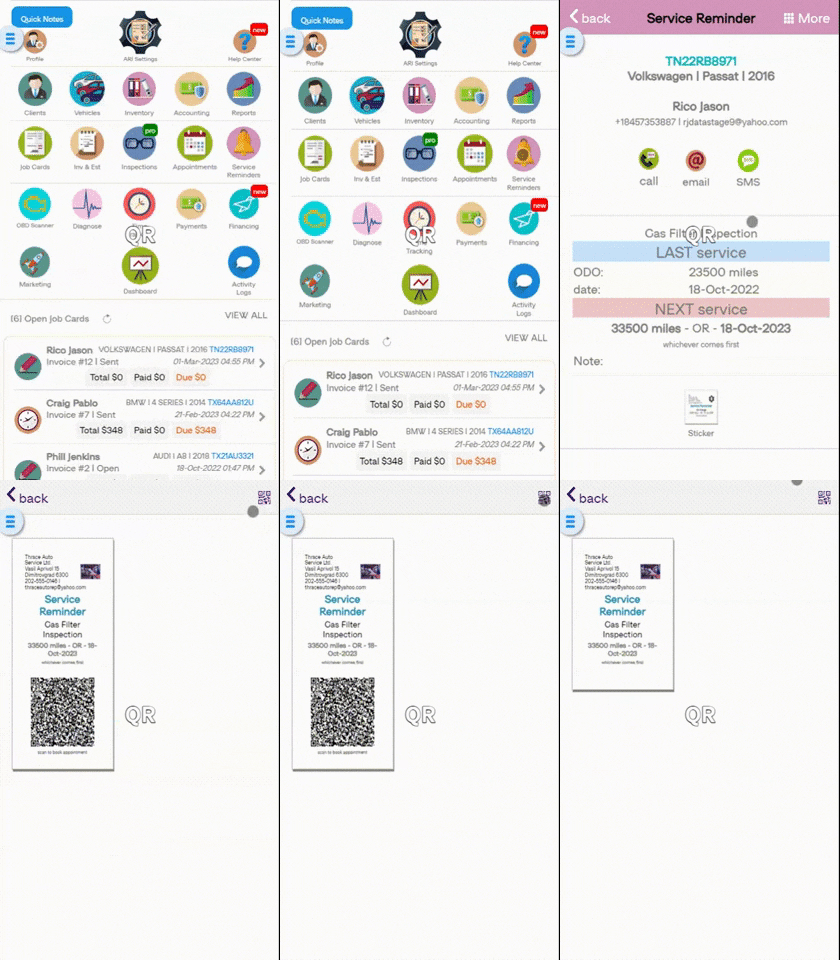
  • QR Code added to our service reminder stickers
  • QR Code interactions for your clients and you as a shop/ mechanic
  • An option to create Invoices from the Service Reminders view
  • Improved usability and page interactions


QR Code functionality

QR Codes make it easy for your clients to book an appointment for their next service and for your mechanics to view the details associated with that service reminder.

Start by creating a new Service Reminder for a client. Then add a QR code from the menu and send it/ print it so your client can see it. Your client can scan the QR code and book his next appointment at your shop. When a vehicle is in your shop – the mechanic can scan the QR code and open the Service Reminder. From there, he creates a new Invoice using the current reminder data!

You can toggle back and forth between displaying the QR code on your Service Reminder stickers with the QR button on the top right side of the page.
 

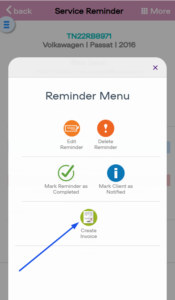
Creating a new Invoice from Service Reminders


You can do that by an existing Service Reminder. Then click the “More” button and select “Create Invoice.” This way, you grab the data from the reminder and transfer it over to the Invoice.


We hope this updated tutorial was helpful. Leave a comment or share on social media if you think that way!


 

account mapping in ARI's QuickBooks integration
Easier Accounting with our All-New QuickBooks Integration

A Game-Changing Update for Auto Repair Shop Accounting We are thrilled to announce a comprehensive overhaul of the ARI QuickBooks integration. For shop owners, accounting is often the most tedious part of the day. And we changed that for your convenience. We’ve updated the integration to an intelligent, synchronous financial

ARI shops interactive leads map
Introducing Leads and ARI Shops

Get Discovered by Local Customers: Introducing “Leads” & ARI Shops Your shop is about to become visible to thousands of customers looking for trusted local mechanics—and it won’t cost you a dime. Marketing an auto repair shop usually comes with a painful trade-off: You either spend big on ads, or

ARI Update - Pass processing fees illustration
ARI Update: Pass processing fees to clients

Pass Payment Processing Fees to the Client As part of our latest ARI software update, we’ve introduced a highly requested option that gives shops more control over online payment costs: the ability to pass payment processing fees to the client. As more customers choose to pay invoices online, processing fees

ARI Update - Client reviews Illustration
ARI Update: Introducing Client Reviews

Our latest update comes with one of the most requested features to date – the ability for clients to rate your shop using ARI (Auto Repair Software). That way, the quality of your services can reach more people, and you can attract new customers. You can activate the reviews feature

ARI update free diagnose features illustration - mechanic looking at a tablet in his garage
ARI Update: Diagnose Is Now Completely Free

Auto repair shops are dealing with rising costs everywhere — parts, labor, equipment, and rent. That’s exactly why our newest ARI update does the opposite. The Diagnose feature no longer uses ARI credits, and every Diagnose action is now 100% free. This puts real money back into your hands as

ARI Fall 2025 Upgrade: Smarter VINs, Better AI, and Cleaner Reports

We’re back with the rest of the changes from ARI(Auto Repair Software)‘s latest software update. This release focuses on giving you more accurate data (especially with VINs and AI), faster bookkeeping with QuickBooks, and lowering the friction points in your workflow. Here are the most impactful additions. Vehicle Page Updates

Client Management

Add clients, vehicles & all the details that are relevant to them

Vehicle Management

Create detailed inspections with checklists, damage reports

Inventory Management

Manage your parts, tires, business assets, and all other important items.

Job Cards

Track labor progress, start & stop work clocks, approve & deny services.

Estimates

Create professional quotes for your auto repair clients

Invoices

Generate professional invoices for your auto shop’s clients

Inspections

Generate damage reports & attach pictures to your auto inspections

Appointments

Let your clients book your services online from the comfort of their home

Service Reminders

Earn return customers by reminding them when service is due

Accounting

Create purchase orders, track your expenses, and monitor your profits

OBD Scanner

Read Engine Error Codes with ARI monitor car’s parameters live

Reports & Stats

Reports for your business performance & export the data

Payments

Never miss a payment keep an eye on your invoice billing process

Marketing

Reach your core customers & market business across different channels

Vendors

Manage vendors, partners & orders for a streamlined repair experience

Time Tracking

Monitor and label the activity of multiple employees

Payment Processing

Receive payments on your Online Invoices with the world’s most renowned payment networks

Parts Ordering with
PartsTech

Order parts easily with PartsTech and ARI! Smooth and reliable parts procurement process.

M1 Labor Guides and
Estimates

Every mechanic benefits from quality Repair Guides and Car Repair Estimates.

Vehicle History with
CarFax

Get Service History Instantly. Decode VINs and Plates with Accurate Data from a Leading Supplier.

Car Diagnose with
CarMD

Get Diagnostic & Maintenance Info. Access Diagnosis, Solutions, and Problem Predictions.

Accounting with
QuickBooks

Sync ARI invoices to QuickBooks Online. Manage customers and inventory.

AI Labor
Guides

Get detailed labor guides, labor times, and estimates from the world's first AI labor guides system.

POS Terminal from 360Payments

Process In-Person Payments On The Spot. Geared towards auto repair businesses.

Customer Financing With Wisetack

ARI has partnered with Wisetack to offer your clients extra payment options for auto repair services.

Get Started

A complete guide to setting up and running your auto repair business

Client Portal

ARI’s client portal lets clients easily stay informed when they visit you

Multiple Users

How to add multiple users to your ARI Profile

Update ARI

You must ensure you keep your app updated all the time

Profile Setup

ARI offers features and settings tailored for auto repair services

Blog

Welcome to ARI's blog for updates, articles, and guides

ARI Awards

Here are our most notable achievements over the years.

Online Documents

Get the most out of your client management with our online documents

ARI Demo

Test the features and see if it’s the right fit for you

ARI Videos

Welcome To ARI's Official Video Library

ARI Affiliate Program

Earn rewards and ARI credits by referring our app to friends