White Label Auto Repair Software: Make the Portal Yours

White-label and personalized client portal

Your Client Portal Just Got More Personal — and a Whole Lot Easier to Walk Into

We shipped two updates to the ARI Client Portal that share one goal: making the portal feel less like our software and more like your shop. One makes signing in effortless for every customer. The other — for Pro Plus shops — makes the entire experience unmistakably yours, from the login screen to the booking page to the voice on the phone.

Here’s what’s new.

Signing in used to be a small puzzle. Now it just works.

For a long time, the sign-in page asked your customers for a “User ID” and a “Client ID” — labels that made perfect sense to a database and no sense to the person holding a coffee in one hand and their phone in the other. Every confused customer was a potential “how do I log in?” call to your front desk.

That’s gone. The new sign-in page does three simple things:

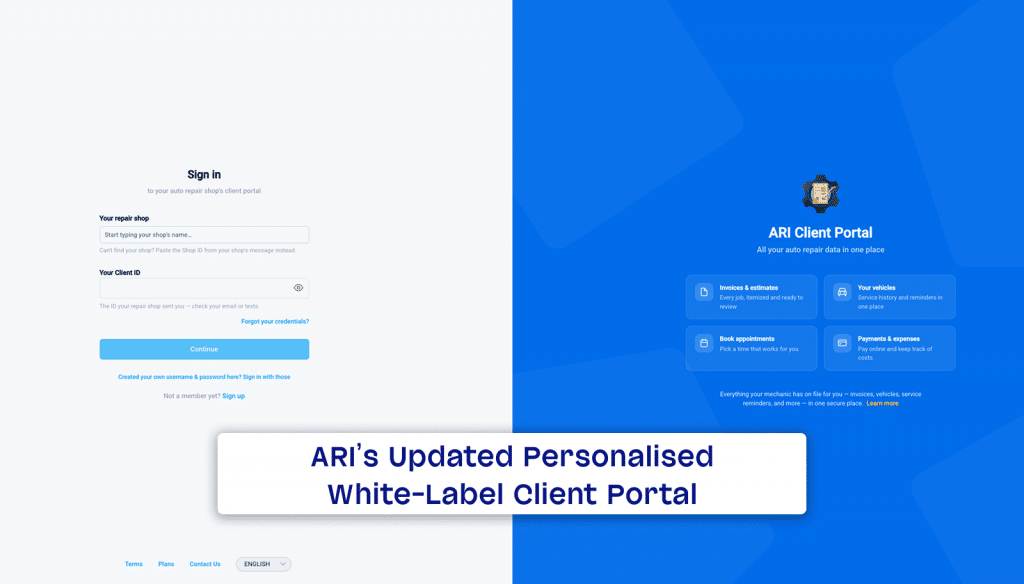
  • Customers just search for your shop by name. They start typing, your shop appears in the list — logo and all — they pick it, and enter the one ID you gave them. No cryptic codes to decipher.
  • You get your own sign-in link. Share portal.ari.app/auth/login?userId=YOUR_SHOP_ID anywhere — your email signature, your website, a printed invoice, a text — and it opens a page that already knows who you are, greeting your customer with your logo and shop name. This works on every plan, no upgrade required.
  • The links you already send still sign customers in automatically — now behind a clean, branded “Signing you in…” screen instead of a blank flash.

It also speaks all four portal languages, puts the form first on phones, and quietly hardened the sign-in behind the scenes to shrug off password-guessing bots. Less friction for your customers, fewer support calls for you, and more people actually using the portal to view invoices, pay, and rebook.

For Pro Plus shops: make it entirely yours

If the branded login is the first handshake, white-label branding is the whole relationship — and it’s included with Pro Plus, automatically, with nothing to set up.

Your customers stop seeing ARI and start seeing you, everywhere it counts:

  • Your logo and shop name on the login page, the booking page, and the browser tab and icon of every invoice, estimate, inspection, and appointment link you send.
  • The “Powered by ARI” line on your online booking page becomes your shop’s name.
  • Inside the portal, ARI’s links, badges, and promo touches step aside so your brand stands alone.
  • Even the AI assistant plays along — instead of introducing itself as “Ari,” it presents as your shop’s virtual assistant and never mentions us on the call.

The effect is simple but powerful: from the first click to the booked appointment, your customers feel like they’re dealing directly with your business — because they are. It’s the difference between “some software my mechanic uses” and “my shop’s app.”

Why it matters

A portal only helps you if your customers actually get into it and feel at home once they do. These two updates attack both ends of that: easier in, and unmistakably yours once they’re there. Fewer login headaches, a more professional first impression, and — for Pro Plus shops — a customer experience that carries your name the whole way through.

Get started in two minutes

  1. Grab your shop’s sign-in link and start sharing it — every customer who uses it lands on a page branded to your shop.
  2. On Pro Plus? You’re already white-labeled everywhere — nothing to configure. Send an invoice or open your booking page and see your brand front and center.
  3. Not on Pro Plus yet? This is what the upgrade buys you: a client experience that looks and sounds like your shop, not ours.

Your customers already trust your shop. Now the portal looks like it.
Recycling Bin Feature Added

Introducing the Recycle Bin: Never Lose a Client or Invoice Again We’ve all been there. You’re cleaning up your client list, tap the wrong row, and poof—a customer’s entire history is gone. Or, a technician on the shop floor deletes a Job Card meant for another vehicle, and suddenly, there

Client Management

Add clients, vehicles & all the details that are relevant to them

Vehicle Management

Create detailed inspections with checklists, damage reports

Inventory Management

Manage your parts, tires, business assets, and all other important items.

Job Cards

Track labor progress, start & stop work clocks, approve & deny services.

Estimates

Create professional quotes for your auto repair clients

Invoices

Generate professional invoices for your auto shop’s clients

Inspections

Generate damage reports & attach pictures to your auto inspections

Appointments

Let your clients book your services online from the comfort of their home

Service Reminders

Earn return customers by reminding them when service is due

Accounting

Create purchase orders, track your expenses, and monitor your profits

OBD Scanner

Read Engine Error Codes with ARI monitor car’s parameters live

Reports & Stats

Reports for your business performance & export the data

Payments

Never miss a payment keep an eye on your invoice billing process

Marketing

Reach your core customers & market business across different channels

Vendors

Manage vendors, partners & orders for a streamlined repair experience

Time Tracking

Monitor and label the activity of multiple employees

Payment Processing

Receive payments on your Online Invoices with the world’s most renowned payment networks

Parts Ordering with
PartsTech

Order parts easily with PartsTech and ARI! Smooth and reliable parts procurement process.

M1 Labor Guides and
Estimates

Every mechanic benefits from quality Repair Guides and Car Repair Estimates.

Vehicle History with
CarFax

Get Service History Instantly. Decode VINs and Plates with Accurate Data from a Leading Supplier.

Car Diagnose with
CarMD

Get Diagnostic & Maintenance Info. Access Diagnosis, Solutions, and Problem Predictions.

Accounting with
QuickBooks

Sync ARI invoices to QuickBooks Online. Manage customers and inventory.

AI Labor
Guides

Get detailed labor guides, labor times, and estimates from the world's first AI labor guides system.

POS Terminal from 360Payments

Process In-Person Payments On The Spot. Geared towards auto repair businesses.

Customer Financing With Wisetack

ARI has partnered with Wisetack to offer your clients extra payment options for auto repair services.

Parts Ordering with
Nexpart

Order auto parts through Nexpart without leaving ARI — a faster, more reliable way to source what your shop needs.

Get Started

A complete guide to setting up and running your auto repair business

Client Portal

ARI’s client portal lets clients easily stay informed when they visit you

Multiple Users

How to add multiple users to your ARI Profile

Update ARI

You must ensure you keep your app updated all the time

Profile Setup

ARI offers features and settings tailored for auto repair services

Blog

Welcome to ARI's blog for updates, articles, and guides

ARI Awards

Here are our most notable achievements over the years.

Online Documents

Get the most out of your client management with our online documents

ARI Demo

Test the features and see if it’s the right fit for you

ARI Videos

Welcome To ARI's Official Video Library

ARI Affiliate Program

Earn rewards and ARI credits by referring our app to friends