Your Client Portal Just Got More Personal — and a Whole Lot Easier to Walk Into
We shipped two updates to the ARI Client Portal that share one goal: making the portal feel less like our software and more like your shop. One makes signing in effortless for every customer. The other — for Pro Plus shops — makes the entire experience unmistakably yours, from the login screen to the booking page to the voice on the phone.
Here’s what’s new.
Signing in used to be a small puzzle. Now it just works.
For a long time, the sign-in page asked your customers for a “User ID” and a “Client ID” — labels that made perfect sense to a database and no sense to the person holding a coffee in one hand and their phone in the other. Every confused customer was a potential “how do I log in?” call to your front desk.
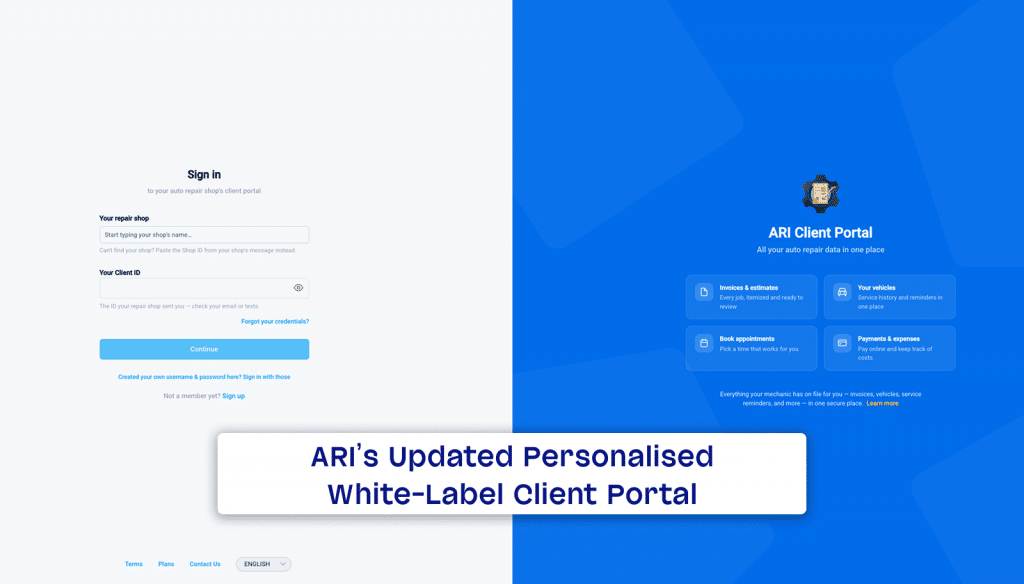
That’s gone. The new sign-in page does three simple things:
- Customers just search for your shop by name. They start typing, your shop appears in the list — logo and all — they pick it, and enter the one ID you gave them. No cryptic codes to decipher.
- You get your own sign-in link. Share portal.ari.app/auth/login?userId=YOUR_SHOP_ID anywhere — your email signature, your website, a printed invoice, a text — and it opens a page that already knows who you are, greeting your customer with your logo and shop name. This works on every plan, no upgrade required.
- The links you already send still sign customers in automatically — now behind a clean, branded “Signing you in…” screen instead of a blank flash.
It also speaks all four portal languages, puts the form first on phones, and quietly hardened the sign-in behind the scenes to shrug off password-guessing bots. Less friction for your customers, fewer support calls for you, and more people actually using the portal to view invoices, pay, and rebook.
For Pro Plus shops: make it entirely yours
If the branded login is the first handshake, white-label branding is the whole relationship — and it’s included with Pro Plus, automatically, with nothing to set up.
Your customers stop seeing ARI and start seeing you, everywhere it counts:
- Your logo and shop name on the login page, the booking page, and the browser tab and icon of every invoice, estimate, inspection, and appointment link you send.
- The “Powered by ARI” line on your online booking page becomes your shop’s name.
- Inside the portal, ARI’s links, badges, and promo touches step aside so your brand stands alone.
- Even the AI assistant plays along — instead of introducing itself as “Ari,” it presents as your shop’s virtual assistant and never mentions us on the call.
The effect is simple but powerful: from the first click to the booked appointment, your customers feel like they’re dealing directly with your business — because they are. It’s the difference between “some software my mechanic uses” and “my shop’s app.”
Why it matters
A portal only helps you if your customers actually get into it and feel at home once they do. These two updates attack both ends of that: easier in, and unmistakably yours once they’re there. Fewer login headaches, a more professional first impression, and — for Pro Plus shops — a customer experience that carries your name the whole way through.
Get started in two minutes
- Grab your shop’s sign-in link and start sharing it — every customer who uses it lands on a page branded to your shop.
- On Pro Plus? You’re already white-labeled everywhere — nothing to configure. Send an invoice or open your booking page and see your brand front and center.
- Not on Pro Plus yet? This is what the upgrade buys you: a client experience that looks and sounds like your shop, not ours.
Your customers already trust your shop. Now the portal looks like it.